Music On Hold

Status
Not open for further replies.

Thomas Telecomlijn

Gold Partner
Advanced Certified
Joined
Mar 26, 2021
Messages
2
Reaction score
0
Good afternoon people,

We've been encountering a few issues with one of our customers as of late. Our customer wants to hear a beep 3 times at first, after that the music should start. That part is easy, but our customer uses a playlist containing 5 different music files. The music files need to be on shuffle, so that every time someone calls the music shuffles between the tracks and doesnt play over and be boring.

It is not possible to implement this, or at least not something that I've been able to find. We want to first hear 3 beeps, then the music starts. But the music needs to still shuffle, but the beep needs to be heard 3 times before. It can't be an intro prompt, because the phone does need to ring when the beeps are heard.

Thank you in advance.
 
To do this, you could use individual audio files instead of a playlist.

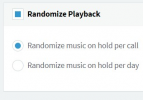
To clarify, have all your audio files edited in an audio editing tool and add the three beeps to every single file. Then, in 3CX, navigate to "Settings >> Music on Hold >> General MOH" and set a different audio file on every "Music File" slot. Then just scroll down and enable "Randomize Playback" and "Randomize music on hold per call":
1620992444221.png

Every time a call is put on hold, one of the set audio files will be randomly selected to play and will always start from the beginning, meaning that the three beeps will always be heard first.

Hope this helps.
 
Will this work? The user uses Queues that have the playlist used as MoH. This is so that all the 5 files will be played. If I put a different music file for each "Music File" option will it still randomize? I can't choose all the 5 files to be played in the queue.

I don't know if what I'm typing still makes sense at this point, sorry if it doesn't.
 
I may have misunderstood the situation as I had not realized Call Queues were involved.

To first clarify, you have a Call Queue setup, which as MOH uses a Playlist" which you created under "Settings >> MOH >> Playlists" with "Shuffle" enabled. What you need is, having three beeps play for the caller at the beginning of the call to this Call Queue.

If the above is the case, what I suggested won't work even if you have the three beeps play at the beginning of every file because the audio heard will not start at the beginning and also, the caller will hear the three beeps every time the next song plays. The only way to do it would be to use the intro prompt for the three beeps and then have the playlist in shuffle as the Queue's MOH. Just make sure NOT to select the "Play full intro prompt before calling agents" so that the agents actually ring during the three beeps as you mentioned.
 
If the 3 beeps only need to play once when the caller first comes into the queue, then sending the caller first to an IVR that plays the beeps, then forwards the call to the queue would work, and would not play over the top of the MOH.

I've been given different information over the years about whether MOH always starts at the beginning of the .wav file. In years past I was told the files just play in a loop and you hear where ever the MOH is in the recording when you are placed on hold. But more recently I was told that when someone is placed on hold/park, the MOH file always starts at the beginning. And how that applies to people waiting in queue further muddies the water. I assume you have tested and it is not doing what you need?

I have to wonder, however, what is the purpose of the 3 beeps? Are you using this as an indicator that the call is being recorded? Perhaps not, because I would think the caller would need an explanation of the purpose of the beeps.

If you are using the beeps to remind the caller that their call is being recorded (just a guess), then I would use the IVR to play a message explaining the call is being recorded, then have the beeps play every 15 seconds. To do this you would need a service that barges into the call, plays the beeps, and then drops out of the call. This is what we do with our 3CX Recording Beep tool. However, because this is a barge, the beeps do play over the top of the existing conversation.
 
Status
Not open for further replies.