Must Assign Phone after SBC IP Change

Status
Not open for further replies.

ITRUSA

Customer
Joined
Aug 2, 2019
Messages
17
Reaction score
3
Is there a setting that would allow a phone connected via SBC to automatically connect after the IP of the SBC or local phone changes? The extension already has the MAC address of the phone. With so many remote users, this is a constant issue. I must assign the phone to the extension that it is already assigned to.
 
Local IP?

The SBC must have a static IP address.
 
As above, the SBC should have a static IP address.

If the SBC ip address has changed, you maybe able to change it under the provision tab for extension, and finally restart the phone. The restart of the phone should try and reprovision the phone and download the new sbc IP address
 
I have deployed close to 20 SBCs on rPi for employees who are now working from home. They do not have static public IPs and getting them to assign local static IPs to the rPi is not easy since many do not know how to configure their home routers.
 
I imagine we're talking 1 extension per home? They probably would have gotten away with STUN
 
  • Like
Reactions: Saqqara
Understood. The SBC IP changes and successfully connects to my HQ system. The phone connects to my system via the SBC but appears as unassigned even though it has the same MAC address as a phone assigned to an extension already (via another SBC IP). It would be nice if it would just update the SBC IP for the extension automatically.

I will look at STUN.

Thank you.
 
Just to be clear, you meant that the private IP of the SBC changes or the Public IP?

Because the public IP changing is not a problem.

It is only a problem if the private lan IP changes so that the phone can no longer find it.
 
Yes, the private IP of the SBC changes. The phone finds the SBC and connects to my 3cx instance. But when the phone connects, it shows up as a new phone, not assigned to any extension, because the "Session Boarder Controller" (IP Address) has changed.
 
With STUN though, you will still have to connect to the user's modem and forward their ports, otherwise they phone wont work reliably.

I think your best bet is (since you already gave them Pis) to connect remotely to each one, and set static IPs on each Pi. You can use the last IP in their range to minimize any chances of conflict (say 192.168.1.254 if their modem has the internal range of 192.168.1.0/24)
 
Good idea on using the last IP. I will move in this direction. Thank you.
 
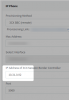
Yep, and as a final step, edit each extension to point it towards its own SBC IP (which may be different for each site) and simply ask the user to restart the phone to cause it to update its configuration

1594651665870.png
 
isn't it the first step of settings to give a static IP for Pi?
 
Status
Not open for further replies.

Forum statistics

Threads
111,954
Messages
589,921
Members
164,851
Latest member
DrunkeMeister