MYPhone does not allow me to select CRM

Status
Not open for further replies.

Sepp

Joined
Jul 7, 2008
Messages
21
Reaction score
0
HI,

I updated to V10, installed SP 1.1 but in the preferences it still does not show the CRM selection .....

I manualy installed the desktop components on the client, Outlook 2010 shows the 3CX menu, but it can't find the integration module ...

what have I done wrong ...


Thank you

Sepp
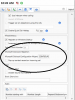
 
do you have the Paid Version fo 3CX?

If so goto MyPhone select the settings button

see below image
 

Attachments

  • myphone.png
    myphone.png
    33.6 KB · Views: 969
Outlook integration should work just fine.
We use it ourselves.
Unfortunately support for CRM 4.0 and 2011 is not available yet. Loved that feature though.

But I suppose this will be available soon.
 
Hi,

I have used the official trial key as on the website.....
should it work or not ??

And I use Outlook 2010..

Thank you for your help

Sepp
 
Sepp said:
Hi,

I have used the official trial key as on the website.....
should it work or not ??

And I use Outlook 2010..

Thank you for your help

Sepp

Sepp,

Mine works with the Trail Key, be sure you are using the up to date trial key located here:
http://www.3cx.com/blog/releases/3cx-phone-system-v10-service-pack-1/

Make sure TAPI is installed in Control Panel > Phone and Modems > Advanced
Also check if the MyPhone COMM object is installed at
Control Panel > Admin Tools > component services > computers > My Computer > MyPhoneComLib
and make sure Desktop Components are installed correctly
MyPhone local install > settings > preferences Desktop Components.

It should work unless there is an issue with Outlook 2010 I am not aware of.

Thanks,
Nate
 
Hi Nate,

the trial key is OK,
Tapi is installed,
MyPhoneComLib is istalled
I can't find MyPhone local install settings preferences Desktop components.... where should I look

Thank you very much

Sepp
 
Hi Sepp,

To find the status of Desktop Components open MyPhone and click the settings tab, the second to last tab next to conference tab. Then you will see three options, preferences is the third. Then at the top of the page you will see desktop components either listed in Green as up to date with the version date, or in red if it is out of date or if an update is installed.

Then if all is correct as you stated, you should in the same tab towards the bottom of the screen you should see the MS integration area, Outlook has to be open at this point or it will remain greyed out. Let me know how you get on.

Thanks,
Nate
 
Hi Nate,

I can't see anything about desktop components .... nothing at all ... can I send a screenshot to you?

Thanks Sepp
 
Status
Not open for further replies.