Solved MySQL insert into contacts table

Status
Not open for further replies.

greychain

Gold Partner
Advanced Certified
Joined
Jul 13, 2018
Messages
779
Reaction score
122
I'm trying to INSERT INTO `3cxcdr`.`contacts` (`number`) VALUES ([Number]); but the [Number] part isn't resolving the number.

Lookup works with select *from contacts where 'number' = [Number];

What syntax do I need?
 
Last edited:
is should have been is not.

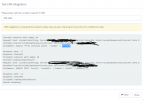
When running the test it show this INSERT INTO `3cxcdr`.`contacts` (`number`) VALUES ('[Number]');

I would expect it to show INSERT INTO `3cxcdr`.`contacts` (`number`) VALUES ('5551234');

This inserts either 0, or if I set the field type to VARCHAR, [Number] into the database not the number expected

1622932810481.png
 
Last edited:
As a test I changed the lookup statement to the contact creation statement and ran the CRM test
1623063053580.png
This is the result of the lookup
1623063159312.png
It has correctly replaced the [Number] with 5551234

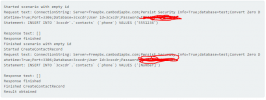
but here is the contact creation result
1623063220169.png
where it hasn't replaced the [Number]
1623063274672.png

I'm guessing there is something wrong with 3CX
 
You should surround the [Number] variable with single quotation marks: '[Number]'. This way the value is treated as a varchar and not a number.

Also, in your query, when you refer to the column name, use the "lying down" quotation mark:
`number`

That's different from:
'number'

which you're using in your contact creation statement. The regular quotation mark will treat 'number' as a varchar with value number, which will never be equal to the actual number.
 
  • Like
Reactions: Evolute IT
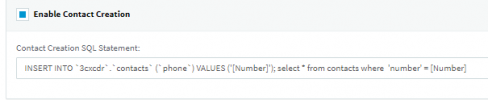
Thanks for that, do you mean like I did here?1623208200183.png

Why does the first statement work but the second doesn't?
 
Thanks for that, do you mean like I did here?View attachment 22421

Why does the first statement work but the second doesn't?
Are you using the standard MySQL template? How are you configuring the SQL statements for contact lookup and contact creation?
 
Just tested the MySQL template and the contact creation works fine replacing the [Number] variable. So there must be something wrong in your SQL statement.
 
Could you share your contact creation statement.
 
Could you share your contact creation statement.
It's similar to what we have in our documentation:
SQL:
INSERT INTO contacts (firstname, lastname, phonebusiness) VALUES ('New', '3CX Contact', '[Number]');SELECT id AS contactid, firstname AS firstname, lastname AS lastname, companyname AS companyname, email AS email, phonemobile AS phonemobile, phonemobile2 AS phonemobile2, phonehome AS phonehome, phonehome2 AS phonehome2, phonebusiness AS phonebusiness, phonebusiness2 AS phonebusiness2, phoneother AS phoneother, faxbusiness AS faxbusiness, faxhome AS faxhome,pager AS pager, photourl AS photourl FROM contacts WHERE phonemobile LIKE '%[Number]%' or phonebusiness like '%[Number]%' or faxbusiness LIKE '%[Number]%';
 
  • Like
Reactions: Evolute IT
I have built a new 3CX server V18, built a new MySQL server using Server version: 10.1.48-MariaDB-0+deb9u2 Debian 9.13.

Copied and pasted your statement and still get this.

Request text: ConnectionString: Server=mypbx.com;Persist Security Info=True;database=test;Convert Zero Datetime=True;Port=5000;Database=3cxcdr;User Id=3cxcdr;Password=password
Statement: INSERT INTO contacts (firstname, lastname, phonebusiness) VALUES ('New', '3CX Contact', '[Number]');SELECT id AS contactid, firstname AS firstname, lastname AS lastname, companyname AS companyname, email AS email, phonemobile AS phonemobile, phonemobile2 AS phonemobile2, phonehome AS phonehome, phonehome2 AS phonehome2, phonebusiness AS phonebusiness, phonebusiness2 AS phonebusiness2, phoneother AS phoneother, faxbusiness AS faxbusiness, faxhome AS faxhome,pager AS pager, photourl AS photourl FROM contacts WHERE phonemobile LIKE '%[Number]%' or phonebusiness like '%[Number]%' or faxbusiness LIKE '%[Number]%'

It is not translating '[Number]' into 5551234


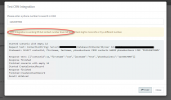
Also this
CRM Integration is working OK but contact number does not exist. Check log for more info or try a different number.

Statement: select * from contacts where `phonebusiness` = 5551234

Response text: [{"id":17,"firstname":"New","lastname":"3CX Contact","phonebusiness":"5551234","companyname":"","email":"","phonemobile":"","phonemobile2":"","phonehome":"","phonehome2":"","phonebusiness2":"","phoneother":"","faxbusiness":"","faxhome":"","pager":"","photourl":""}]
Response finished
Finished scenario with empty id

Can provide credentials for both servers if that will help
 
Last edited:
Ignore the bit about not finding contact as I have found out why now.
 
Not sure what is going on, just updated the CRM template I generated and went to upload the new version. Uploaded but then the system did not show the template as if there was an issue but it did report I had a new template update available, it was the one I had just uploaded and now it's working.
 
And now it's back to not working again. Not changing '[Number]' into the number

INSERT INTO `3cxcdr`.`cdr` (`callid`, `duration`, `time-start`, `time-answered`, `time-end`, `reason-terminated`, `from-no`, `to-no`, `from-dn`, `to-dn`, `dial-no`, `reason-changed`, `final-number`, `final-dn`, `bill-code`, `bill-rate`, `bill-cost`, `bill-name`, `chain`, `from-type`, `to-type`, `final-type`, `from-dispname`, `to-dispname`, `final-dispname`) VALUES ('[Number]', '[Duration]', '[CallStartTimeLocal]', '', '', '', '', '', '', '', '', '', '', '', '', '', '', '', '', '', '', '', '', '', '')

'INSERT INTO contacts (firstname, lastname, phonebusiness) VALUES ('New', '3CX Contact', '[Number]');SELECT contactid, firstname, lastname, companyname, email, phonemobile, phonemobile2, phonehome , phonehome2, phonebusiness, phonebusiness2, phoneother, faxbusiness , faxhome ,pager, photourl FROM contacts WHERE phonemobile LIKE '%[Number]%' or phonebusiness like '%[Number]%' or faxbusiness LIKE '%[Number]%''.
2021/06/13 22:15:54.469|11504|0039|Verb|The result of the SQL Query Execution is
'[{"contactid":73,"firstname":"New","lastname":"3CX Contact","companyname":"","email":"","phonemobile":"","phonemobile2":"","phonehome":"","phonehome2":"","phonebusiness":"[Number]","phonebusiness2":"","phoneother":"","faxbusiness":"","faxhome":"","pager":"","photourl":""},{"contactid":74,"firstname":"New","lastname":"3CX Contact","companyname":"","email":"","phonemobile":"","phonemobile2":"","phonehome":"","phonehome2":"","phonebusiness":"[Number]","phonebusiness2":"","phoneother":"","faxbusiness":"","faxhome":"","pager":"","photourl":""}]' .
 
Ignore the bit about not finding contact as I have found out why now.
Hi,

I am having the same issue. Could you please share what you found that fixed this?

Thank you!

1623619462147.png
 
How many numbers are you trying to match?
 
I set it to do an exact match. It does find the contact record. It shows it in the Response text.


Started scenario with empty id

Request text: ConnectionString: Server=192.168.1.209;Database=3CXCallerID;User Id=dbadmin;Password=systemaccount;

Statement: SELECT contactid, firstname, lastname, phonebusiness FROM contacts WHERE phonebusiness LIKE '%1234567890%'


Response text: [{"contactid":11,"firstname":"Joe","lastname":"Test","phonebusiness":"1234567890"}]

Response finished

Finished scenario with empty id

Started CreateContactRecord

Response finished

Finished CreateContactRecord

Result obtained


It just doesn't think it found a contact.
CRM Integration is working OK but contact number does not exist.
 
And now it's back to not working again. Not changing '[Number]' into the number

INSERT INTO `3cxcdr`.`cdr` (`callid`, `duration`, `time-start`, `time-answered`, `time-end`, `reason-terminated`, `from-no`, `to-no`, `from-dn`, `to-dn`, `dial-no`, `reason-changed`, `final-number`, `final-dn`, `bill-code`, `bill-rate`, `bill-cost`, `bill-name`, `chain`, `from-type`, `to-type`, `final-type`, `from-dispname`, `to-dispname`, `final-dispname`) VALUES ('[Number]', '[Duration]', '[CallStartTimeLocal]', '', '', '', '', '', '', '', '', '', '', '', '', '', '', '', '', '', '', '', '', '', '')

'INSERT INTO contacts (firstname, lastname, phonebusiness) VALUES ('New', '3CX Contact', '[Number]');SELECT contactid, firstname, lastname, companyname, email, phonemobile, phonemobile2, phonehome , phonehome2, phonebusiness, phonebusiness2, phoneother, faxbusiness , faxhome ,pager, photourl FROM contacts WHERE phonemobile LIKE '%[Number]%' or phonebusiness like '%[Number]%' or faxbusiness LIKE '%[Number]%''.
2021/06/13 22:15:54.469|11504|0039|Verb|The result of the SQL Query Execution is
'[{"contactid":73,"firstname":"New","lastname":"3CX Contact","companyname":"","email":"","phonemobile":"","phonemobile2":"","phonehome":"","phonehome2":"","phonebusiness":"[Number]","phonebusiness2":"","phoneother":"","faxbusiness":"","faxhome":"","pager":"","photourl":""},{"contactid":74,"firstname":"New","lastname":"3CX Contact","companyname":"","email":"","phonemobile":"","phonemobile2":"","phonehome":"","phonehome2":"","phonebusiness":"[Number]","phonebusiness2":"","phoneother":"","faxbusiness":"","faxhome":"","pager":"","photourl":""}]' .
Can you paste here the XML you see when you go to the 3CX Console > Settings > CRM > Show Template button? I want to see if you have the correct template, or somehow it was edited.
 
I have not manualy edited the code except to remove server and password

Code:
<?xml version="1.0"?>
<Crm xmlns:xsi="http://www.w3.org/2001/XMLSchema-instance" xmlns:xsd="http://www.w3.org/2001/XMLSchema" Country="US" Name="Database MySQL" Version="23">
  <Number Prefix="AsIs" MaxLength="[MaxLength]" />
  <Connection MaxConcurrentRequests="2" />
  <Parameters>
    <Parameter Name="Server" Type="String" Parent="General Configuration" Editor="String" Title="Server:" Default="servername;Persist Security Info=True;Convert Zero Datetime=True" />
    <Parameter Name="Port" Type="String" Parent="General Configuration" Editor="String" Title="Port:" Default="3306" />
    <Parameter Name="Database" Type="String" Parent="General Configuration" Editor="String" Title="Database:" Default="3cxcdr" />
    <Parameter Name="Username" Type="String" Parent="General Configuration" Editor="String" Title="Username:" Default="3cxcdr" />
    <Parameter Name="Password" Type="String" Parent="General Configuration" Editor="String" Title="Password:" Default="password" />
    <Parameter Name="LookupSQLStatement" Type="String" Parent="General Configuration" Editor="Sql" Title="Lookup SQL Statement:" Default="SELECT contactid, firstname, lastname, companyname, email, phonemobile, phonemobile2, phonehome , phonehome2, phonebusiness, phonebusiness2, phoneother, faxbusiness , faxhome ,pager,  photourl FROM contacts WHERE phonemobile LIKE '%[Number]%' or phonebusiness like '%[Number]%' or faxbusiness LIKE '%[Number]%'" />
    <Parameter Name="ContactUrlPrefix" Type="String" Parent="General Configuration" Editor="String" Title="Contact URL Prefix:" Default="https://mycrmurl/contacts/" />
    <Parameter Name="ContactUrlSuffix" Type="String" Parent="General Configuration" Editor="String" Title="Contact URL Suffix:" Default="/show" />
    <Parameter Name="ReportCallEnabled" Type="Boolean" Editor="String" Title="Enable Call Journaling" Default="True" />
    <Parameter Name="ReportCallSQLStatement" Type="String" Parent="ReportCallEnabled" Editor="Sql" Title="Call Journaling SQL Statement:" Default="INSERT INTO `3cxcdr`.`cdr` (`callid`, `duration`, `time-start`, `time-answered`, `time-end`, `reason-terminated`, `from-no`, `to-no`, `from-dn`, `to-dn`, `dial-no`, `reason-changed`, `final-number`, `final-dn`, `bill-code`, `bill-rate`, `bill-cost`, `bill-name`, `chain`, `from-type`, `to-type`, `final-type`, `from-dispname`, `to-dispname`, `final-dispname`) VALUES ('[Number]', '[Duration]', '[CallStartTimeLocal]', '', '', '', '', '', '', '', '', '', '', '', '', '', '', '', '', '', '', '', '', '', ''); INSERT INTO calls (contactnumber, agentextension, description, calldatetime, callduration) VALUES ('[Number]', '[Agent]', '3CX PhoneSystem Call', '[DateTime]', '[Duration]')" ListValues="" />
    <Parameter Name="CreateContactEnabled" Type="Boolean" Editor="String" Title="Enable Contact Creation" Default="True" />
    <Parameter Name="CreateContactSQLStatement" Type="String" Parent="CreateContactEnabled" Editor="Sql" Title="Contact Creation SQL Statement:" Default="INSERT INTO contacts (firstname, lastname, phonebusiness) VALUES ('New', '3CX Contact',  '[Number]' );SELECT contactid, firstname, lastname, companyname, email, phonemobile, phonemobile2, phonehome , phonehome2, phonebusiness, phonebusiness2, phoneother, faxbusiness , faxhome ,pager,  photourl FROM contacts WHERE phonemobile LIKE '%[Number]%' or phonebusiness like '%[Number]%' or faxbusiness LIKE '%[Number]%'" />
  </Parameters>
  <Authentication Type="Basic" />
  <Scenarios>
    <Scenario Type="SQLDatabase">
      <Query SkipIf="" DatabaseType="MySQL" ConnectionString="Server=[Server];Port=[Port];Database=[Database];User Id=[Username];Password=[Password]" StatementPasses="2" Statement="[LookupSQLStatement]" />
      <Rules>
        <Rule Type="Any" Ethalon="">contactid</Rule>
      </Rules>
      <Variables>
        <Variable Name="ContactID">contactid<Filter /></Variable>
        <Variable Name="FirstName">firstname<Filter /></Variable>
        <Variable Name="LastName">lastname<Filter /></Variable>
        <Variable Name="CompanyName">companyname<Filter /></Variable>
        <Variable Name="Email">email<Filter /></Variable>
        <Variable Name="PhoneMobile">phonemobile<Filter /></Variable>
        <Variable Name="PhoneMobile2">phonemobile2<Filter /></Variable>
        <Variable Name="PhoneHome">phonehome<Filter /></Variable>
        <Variable Name="PhoneHome2">phonehome2<Filter /></Variable>
        <Variable Name="PhoneBusiness">phonebusiness<Filter /></Variable>
        <Variable Name="PhoneBusiness2">phonebusiness2<Filter /></Variable>
        <Variable Name="PhoneOther">phoneother<Filter /></Variable>
        <Variable Name="FaxBusiness">faxbusiness<Filter /></Variable>
        <Variable Name="FaxHome">faxhome<Filter /></Variable>
        <Variable Name="Pager">pager<Filter /></Variable>
        <Variable Name="PhotoUrl">photourl<Filter /></Variable>
      </Variables>
      <Outputs Next="" AllowEmpty="false">
        <Output Type="ContactUrl" Passes="0" Value="[ContactUrlPrefix][ContactID][ContactUrlSuffix]" />
        <Output Type="FirstName" Passes="0" Value="[FirstName]" />
        <Output Type="LastName" Passes="0" Value="[LastName]" />
        <Output Type="CompanyName" Passes="0" Value="[CompanyName]" />
        <Output Type="Email" Passes="0" Value="[Email]" />
        <Output Type="PhoneMobile" Passes="0" Value="[PhoneMobile]" />
        <Output Type="PhoneMobile2" Passes="0" Value="[PhoneMobile2]" />
        <Output Type="PhoneHome" Passes="0" Value="[PhoneHome]" />
        <Output Type="PhoneHome2" Passes="0" Value="[PhoneHome2]" />
        <Output Type="PhoneBusiness" Passes="0" Value="[PhoneBusiness]" />
        <Output Type="PhoneBusiness2" Passes="0" Value="[PhoneBusiness2]" />
        <Output Type="PhoneOther" Passes="0" Value="[PhoneOther]" />
        <Output Type="FaxBusiness" Passes="0" Value="[FaxBusiness]" />
        <Output Type="FaxHome" Passes="0" Value="[FaxHome]" />
        <Output Type="Pager" Passes="0" Value="[Pager]" />
        <Output Type="PhotoUrl" Passes="0" Value="[PhotoUrl]" />
      </Outputs>
    </Scenario>
    <Scenario Id="ReportCall" Type="SQLDatabase">
      <Query SkipIf="" DatabaseType="MySQL" ConnectionString="Server=[Server];Port=[Port];Database=[Database];User Id=[Username];Password=[Password];Persist Security Info=True;Convert Zero Datetime=True" StatementPasses="1" Statement="[ReportCallSQLStatement]" />
      <Variables />
      <Outputs Next="" AllowEmpty="false" />
    </Scenario>
    <Scenario Id="CreateContactRecord" Type="SQLDatabase">
      <Query SkipIf="[CreateContactEnabled]!=True" DatabaseType="MySQL" ConnectionString="Server=[Server];Port=[Port];Database=[Database];User Id=[Username];Password=[Password]" StatementPasses="1" Statement="[CreateContactSQLStatement]" />
      <Rules>
        <Rule Type="Any" Ethalon="">contactid</Rule>
      </Rules>
      <Variables>
        <Variable Name="ContactID">contactid<Filter /></Variable>
        <Variable Name="FirstName">firstname<Filter /></Variable>
        <Variable Name="LastName">lastname<Filter /></Variable>
        <Variable Name="CompanyName">companyname<Filter /></Variable>
        <Variable Name="Email">email<Filter /></Variable>
        <Variable Name="PhoneMobile">phonemobile<Filter /></Variable>
        <Variable Name="PhoneMobile2">phonemobile2<Filter /></Variable>
        <Variable Name="PhoneHome">phonehome<Filter /></Variable>
        <Variable Name="PhoneHome2">phonehome2<Filter /></Variable>
        <Variable Name="PhoneBusiness">phonebusiness<Filter /></Variable>
        <Variable Name="PhoneBusiness2">phonebusiness2<Filter /></Variable>
        <Variable Name="PhoneOther">phoneother<Filter /></Variable>
        <Variable Name="FaxBusiness">faxbusiness<Filter /></Variable>
        <Variable Name="FaxHome">faxhome<Filter /></Variable>
        <Variable Name="Pager">pager<Filter /></Variable>
        <Variable Name="PhotoUrl">photourl<Filter /></Variable>
      </Variables>
      <Outputs AllowEmpty="false">
        <Output Type="ContactUrl" Passes="0" Value="[ContactUrlPrefix][ContactID][ContactUrlSuffix]" />
        <Output Type="FirstName" Passes="0" Value="[FirstName]" />
        <Output Type="LastName" Passes="0" Value="[LastName]" />
        <Output Type="CompanyName" Passes="0" Value="[CompanyName]" />
        <Output Type="Email" Passes="0" Value="[Email]" />
        <Output Type="PhoneMobile" Passes="0" Value="[PhoneMobile]" />
        <Output Type="PhoneMobile2" Passes="0" Value="[PhoneMobile2]" />
        <Output Type="PhoneHome" Passes="0" Value="[PhoneHome]" />
        <Output Type="PhoneHome2" Passes="0" Value="[PhoneHome2]" />
        <Output Type="PhoneBusiness" Passes="0" Value="[PhoneBusiness]" />
        <Output Type="PhoneBusiness2" Passes="0" Value="[PhoneBusiness2]" />
        <Output Type="PhoneOther" Passes="0" Value="[PhoneOther]" />
        <Output Type="FaxBusiness" Passes="0" Value="[FaxBusiness]" />
        <Output Type="FaxHome" Passes="0" Value="[FaxHome]" />
        <Output Type="Pager" Passes="0" Value="[Pager]" />
        <Output Type="PhotoUrl" Passes="0" Value="[PhotoUrl]" />
      </Outputs>
    </Scenario>
  </Scenarios>
</Crm>
 
I see that you're specifying default values in the template. Can you use the standard 3CX template, and configure the values in the 3CX console?
 
Status
Not open for further replies.

Latest Posts

Forum statistics

Threads
112,323
Messages
591,896
Members
165,473
Latest member
NathanMitchell