- Joined
- Aug 20, 2021
- Messages
- 2
- Reaction score
- 1
Hi All,
I'm attempting to integrate my customer CRM (MySQL) with 3CX so customer names appears on handsets when inbound calls are received.
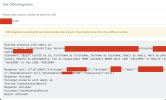
I've managed to connect 3CX to the database and when I perform a test "SELECT" query customer details are found however, 3CX returns an error "
CRM Integration is working OK but contact number does not exist. Check log for more info or try a different number."
When I interrogate the code below I can see the customer first name, surname, email and mobile however, 3CX is saying there were no results.
Thanks for your help
Started scenario with empty id
Request text: ConnectionString: Server=(**REMOVED**);Port=(**REMOVED**);Database=(**REMOVED**);User Id=(**REMOVED**);Password=(**REMOVED**)
Statement: SELECT CustID as id, Firstname as firstname, Surname as lastname, Email as email, Work as phonebusiness, Mobile as phonemobile, Fax as faxbusiness FROM customers WHERE Work LIKE '%551399%' or Mobile like '%551399%' or Fax LIKE '%551399%'
Response text: [{"id":6464,"firstname":"(**REMOVED CUSTOMER NAME APPEARS**)","lastname":"(**REMOVED CUSTOMER NAME APPEARS**)","email":"(**REMOVED CUSTOMER EMAIL APPEARS**)","phonebusiness":null,"phonemobile":"(**REMOVED CUSTOMER MOBILE NUMBER APPEARS**)","faxbusiness":null}]
Response finished
Finished scenario with empty id
Started CreateContactRecord
Response finished
Finished CreateContactRecord
Result obtained
I'm attempting to integrate my customer CRM (MySQL) with 3CX so customer names appears on handsets when inbound calls are received.
I've managed to connect 3CX to the database and when I perform a test "SELECT" query customer details are found however, 3CX returns an error "
CRM Integration is working OK but contact number does not exist. Check log for more info or try a different number."
When I interrogate the code below I can see the customer first name, surname, email and mobile however, 3CX is saying there were no results.
Thanks for your help
Started scenario with empty id
Request text: ConnectionString: Server=(**REMOVED**);Port=(**REMOVED**);Database=(**REMOVED**);User Id=(**REMOVED**);Password=(**REMOVED**)
Statement: SELECT CustID as id, Firstname as firstname, Surname as lastname, Email as email, Work as phonebusiness, Mobile as phonemobile, Fax as faxbusiness FROM customers WHERE Work LIKE '%551399%' or Mobile like '%551399%' or Fax LIKE '%551399%'
Response text: [{"id":6464,"firstname":"(**REMOVED CUSTOMER NAME APPEARS**)","lastname":"(**REMOVED CUSTOMER NAME APPEARS**)","email":"(**REMOVED CUSTOMER EMAIL APPEARS**)","phonebusiness":null,"phonemobile":"(**REMOVED CUSTOMER MOBILE NUMBER APPEARS**)","faxbusiness":null}]
Response finished
Finished scenario with empty id
Started CreateContactRecord
Response finished
Finished CreateContactRecord
Result obtained