Native Chat & Call Reports with 3CX Windows Softphone Release

ThomB_3CX

Staff member
Joined
Apr 28, 2022
Messages
839
Reaction score
1,291

Yealink Headset Support, Chat, and Call Recordings included in the latest Softphone.​

This release of the 3CX Windows Softphone includes the best of our recent betas which introduced Yealink headset support and native chat and call recordings functionality. Take hands-free phone calls with your Yealink headset, start SMS chats, ...
Continue reading the Original Blog Post.
 
Last edited by a moderator:
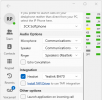
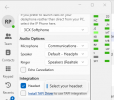
Yealink BH70 integration only works if connect via USB. Kind of defeats the point.

1723073676620.png
1723073653198.png
 
Finally! I've been waiting for the return of the native chat functionality in the windows application for a long time.

Great update guys!
 
@Rick Polinski yes correct, we have the BH70 in-house and Bluetooth is not supported.
Wireless headsets are only supported via dock (which are connected via USB)

You will notice also that not even Yealink USB Connect will register the device when connected.
It will most probably work with the usb wireless reciever but we do not have this available. Communicated with our Yealink rep to confirm this for you. Will keep you updated. Thanks
 
  • Like
Reactions: Evolute IT
thanks @ThomB_3CX .

I suppose it would be harder for Yealink to sell the more expensive models if they made the more affordable ones work properly ;)
 
Hi @Rick Polinski I got a reply from our rep at Yealink.
Indeed Bluetooth is not supported. You can have wireless communication with the headset via the:
- BHC70 dock => This I can confirm from my side that it works since we have this
- BT51-A dongle => Unfortunately this I cannot test since we do not have it
 
great update of the softphone, with the integrated chat, (as the chat is integrated now, i'm missing the resize the application option)
 
I must say I am still holding into the Legacy app (16.3.0.264).
Even the security concerns aside, from small features like simple branding to big ones, the Legacy app is still far more comprehensive in capabilities, slim, personally UX design choices which I feel are better, and even the panel has an actual wallboard (which as an admin I find convenient) which the new native does not as well as a few other settings of its own which I like.
So I am wondering how long will it take until the native is brought up to speed? Is there a timeline or road map that is viewable?
 
Hi @Rick Polinski I got a reply from our rep at Yealink.
Indeed Bluetooth is not supported. You can have wireless communication with the headset via the:
- BHC70 dock => This I can confirm from my side that it works since we have this
- BT51-A dongle => Unfortunately this I cannot test since we do not have it
Thanks @ThomB_3CX . I have ordered a BT51 dongle to test and will let you know.
 
Hi @ThomB_3CX

When making a call through the 'Manager Panel' the application crashes.
 
Hi @YuranL . Yes issue is reported and we will soon release a fix for this
 
  • Like
Reactions: YuranL
@ThomB_3CX and team great work on the new client for V20 we had settled on PWA for most installs, but all of the new additions recently allow us to add the windows client to the livery, thank you.

Doing some testing as a result of new windows app, having issues though with W63 paired with Fanvil X7C using windows app looks like usb connected gets confused and does not allow desk phone connection to headset to be toggled, starts off with speakerphone but pushing headset button on desk phone does not transmit sound to headset though visually connected to headset. This is true when starting from desk phone headset, sound is audible, we can hear the digits dialed but then when connected no audio. PWA having the same issue.

Maybe something in v20, firmware update on phone or a Yealink issue...

Have you seen this before; this is new behavior for us?
 
@ThomB_3CX and team great work on the new client for V20 we had settled on PWA for most installs, but all of the new additions recently allow us to add the windows client to the livery, thank you.

Doing some testing as a result of new windows app, having issues though with W63 paired with Fanvil X7C using windows app looks like usb connected gets confused and does not allow desk phone connection to headset to be toggled, starts off with speakerphone but pushing headset button on desk phone does not transmit sound to headset though visually connected to headset. This is true when starting from desk phone headset, sound is audible, we can hear the digits dialed but then when connected no audio. PWA having the same issue.

Maybe something in v20, firmware update on phone or a Yealink issue...

Have you seen this before; this is new behavior for us?

This is not something we test here. We only tested the WH63 when connected to a PC on its own working with our apps.

It might be the case that Yealink only certifies this headset to work with their own IP phones, and keep in mind that even those phones got a firmware update back in 2022 to support these headsets correctly...

Your best bet is to contact Yealink about it and see what they say because this falls outside of our scope I'm afraid..
 
@JohnS_3CX figured that was the course of action but since it has been working just fine and only discovered it while trying out the new V20 windows app thought I'd pass it by you all in case you ran across something similar. Thank you again..
 

Latest Posts

Forum statistics

Threads
112,131
Messages
590,898
Members
165,137
Latest member
Steve0792