


- Joined
- May 3, 2014
- Messages
- 122
- Reaction score
- 26
Hello All.
I am trying to create a CFD app with a user input component in the call flow. The intention is that the caller is required to dial a 3 or 4-digit number which is an extension, so in the user input option for the Valid Input I field, I put a transfer call component. My problem is that the transfer component I mentioned attempts to make an outbound call when we try the actual call to the CFD app. I do not know what the transfer Call To function should be.
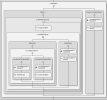
Here are some screenshots
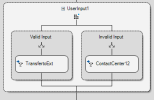
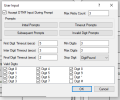
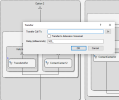
What I want like I said earlier is the user input will collect a 3 or 4-digit number which is the extension I wish to reach and then the transfer component will call the extension, but since any number can be dialed I need an expression that identifies the number as a 3CX extension.
Thank you for the assistance.
I am trying to create a CFD app with a user input component in the call flow. The intention is that the caller is required to dial a 3 or 4-digit number which is an extension, so in the user input option for the Valid Input I field, I put a transfer call component. My problem is that the transfer component I mentioned attempts to make an outbound call when we try the actual call to the CFD app. I do not know what the transfer Call To function should be.
Here are some screenshots
What I want like I said earlier is the user input will collect a 3 or 4-digit number which is the extension I wish to reach and then the transfer component will call the extension, but since any number can be dialed I need an expression that identifies the number as a 3CX extension.
Thank you for the assistance.
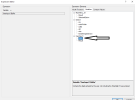


 igits), but will not do any other validation. That's what is considered a valid input from this component perspective. Then, in the Valid Input branch you need to run your additional checks. You can also have a counter to limit the loop to 3 iterations, but you need to add this logic manually.


