Need to pass a version number in the headers

Status
Not open for further replies.

penfold15

SMB User
Basic Certified
Joined
Apr 12, 2019
Messages
28
Reaction score
3
Hi All,

So this XML is breaking me.

I am trying to integrate with a system (docs here - https://highlevel.stoplight.io/docs/integrations/ab55933a57f6f-get-contacts) which is using the oauth2 authentication system,

So when making an API request it wants the Bearer Access Token in the headers AS WELL as a Version number

See Non working attempt here

Code:
      <Outputs AllowEmpty="false">
        <Output Type="HeaderName" Passes="0" Value="Authorization" />
        <Output Type="HeaderValue" Passes="0" Value="Bearer [AccessToken]" />
        <Output Type="BearerExpiration" Passes="0" Value="[ExpiresIn]" />
        <Output Type="Version" Passes="0" Value="test" />

I cannot put any more HeaderName or HeaderValue as it ignores the previous entry so how do I use XML to also send version number as described in the docs above

Many thanks
 
You will need to modify each requests and add headers to them. Look at the Zendesk template for examples.
 
Hi,

Thank you for your reply.

Do you have any examples of where this is working. I can see that Zendesk does not use Oauth2, I have tried this

Code:
<Scenario Id="" Type="REST">
      <Request Url="{DOMAIN]" MessagePasses="0" RequestEncoding="UrlEncoded" RequestType="Get" ResponseType="Json" />
            <Headers>
          <Value Key="Authorization" Passes="0" Type="String">Bearer [AccessToken]</Value>
          <Value Key="Version" Passes="0" Type="String">2021-05-15</Value>
        </Headers>
      <Rules>

but the headers do not appear. I have also commented out the "Outputs" but that means that no headers pass.

If you have any suggestions that would be great.
 
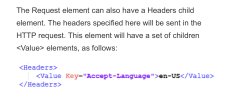
Headers should go into the Request element as a child. Also, Authorization isn't required as the Auth scenario already adds the OAuth parameter.
 
Headers should go into the Request element as a child. Also, Authorization isn't required as the Auth scenario already adds the OAuth parameter.
Hi,

Thank you for your help on this, I have reinstated the output sections and changed the requested type to
Code:
    <Scenario Id="" Type="REST">
      <Request Url="[DOMAIN]" MessagePasses="0" RequestEncoding="UrlEncoded" RequestType="Get" ResponseType="Json">
    <Headers>
     <Value Key="Version" Passes="0" Type="String">2021-05-15</Value>
    </Headers>
    </Request>

However, the auth code (Bearer etc) works but the version does not fire. Can you tell me what I am doing wrong?

Many thanks
 
Try it like this.

CBD54F45-3616-4074-B42D-3B03562EF2AA.jpeg
 
Hi,

Thank you for suggesting this, I have tried but it still does not work. For some reason the header just does not send. If you have any other ideas please do let me know.

Many thanks
I'm kinda of running out. @TheodorosG_3CX
 
Yea and me, thank you for trying though, much appreciated.
DM me the whole template please. I will try a couple things from my side.
 
If anyone has any suggestions on how to resolve this please let me know.

Thank you
 
Specifying the header as:
Code:
<Headers>
    <Value Key="Version" Passes="0" Type="String">2021-05-15</Value>
</Headers>

should work. We have this working in many templates. Are you sure the header is not being sent? Maybe the server is having problems processing it?
 
  • Like
Reactions: Evolute IT
Status
Not open for further replies.

Forum statistics

Threads
112,322
Messages
591,889
Members
165,470
Latest member
Robert Lee