New 3cx v18 installation blocked bij windows.

Status
Not open for further replies.

feestbeestzaandam

New User
Joined
Jun 6, 2009
Messages
27
Reaction score
0
I have uninstalled my 3cx server on my windows server.
Then i have download the last version V18 (18.0.7.312) from the official 3cx site, https://portal.3cx.com/customer/downloads
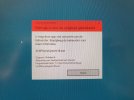
When i wanted to install it the next message appeers: This app is blocked for your safety.
And now i am without working 3cx server.
I have windows 10 Pro 22H2 and the 3cx has worked on this machine.
I think its beacause of the 3cx phone app that is inside it or beacause of the certificate that is blocked by windows.
Who has a solution/ workaround?
 

Attachments

  • 3cx server v18 blocked by windows .jpg
    3cx server v18 blocked by windows .jpg
    431.9 KB · Views: 26
Hi,

Can you please try opening the CMD (elevated with admin rights) and run the installer in CMD ?
 
When i execute 3CXPhonesystem18.exe
Then i got the message: invalid command line.
 
Hello, make sure to run the command prompt as Administrator, then use the cd command to go to the folder where the installer is, e.g "cd C:\Users\yourusername\Downloads" then run 3CXPhoneSystem18.exe from there.
 
I did so.
I will try to send a short movie when i do this.
 
Same for me.
I downloaded the latest version over customer portal, because of an nessesary update for a customer.
App ist blocked by windows defender. Windows server 2016 with all updates.
I already downloaded an older 18 version in 2022 and i am able to install this version
 
After 2 times restarting and then cmd on the commandline like pj3cx told me worked.
 
I attempted to download the Windows V18 installer last night and get the same thing. Windows properties on the .exe file says "Publisher: Unknown", and the Sectigo RSA Code Signing CA cert has been revoked by its certification authority. Same for the underlying DigiCert Timestamp cert- "A certificate was explicitly revoked by its issuer."
 
Hello @Mark_McClain,
Indeed sorry for the inconvenience, that's something we are aware of and that will be resolved automatically with our upcoming update v18 Update 7A as our new releases are signed with a new certificate already. You can safely use the said workaround with command prompt until then if you need to run the v18 Update 7 installer on Windows.
 
Hello @Mark_McClain,
Indeed sorry for the inconvenience, that's something we are aware of and that will be resolved automatically with our upcoming update v18 Update 7A as our new releases are signed with a new certificate already. You can safely use the said workaround with command prompt until then if you need to run the v18 Update 7 installer on Windows.
This is a problem in the case where I was building a failover server with a backup of the active server. If I used an installer file that was not the same version as the active server, the failover server wouldn't load the backup file due to a version mismatch. So I was stuck.
 
Status
Not open for further replies.

Forum statistics

Threads
111,974
Messages
590,081
Members
164,899
Latest member
mazet