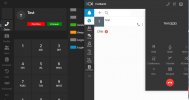
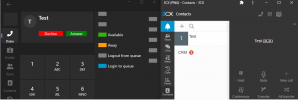
New 3CX Windows Softphone

Status
Not open for further replies.
I see you are from Germany - we just did one in London but we will surely do one in Germany also next year.
I was just about to say! We've found it fairly unfortunate that this years one is overseas...
Great news! If you're doing one closer to us or right here in Germany, our company head, my colleagues and I would look forward to it! :cool:
 
The softphone is meant to be a softphone, not the desktop app replacement. You can use PWA for a desktop app replacement which has a built in softphone as well. Those are the options available.

@gcf In terms of provisioning the phone, you can use PNP as the admin to approve auto installs. We have to check what provisioning options Windows Store offers, i am not sure there a whole lot. You mention SSO but we support SSO.

Hello Nick,

At my company, we only use "3CX Desktop app" softphone (1500 users). You support SSO for the webclient.

PWA is not a solution for us. PWA is not ringing when Chrome or Edge are closed... "3CX Desktop app" is still ringing when users close it with the X.

You should add option in order to autoprovision possible by product like Intune or GPO for "3CX Desktop Apps" or your new Microsoft Store App...
We think, it can possible by adding option during the installation to link the app with the server url... At a minimum, the login can be done thought your application and not thought the webclient...

We don't have time to contact 1500 users in order to explain them to login through the webclient and the to click on "Apps" and then "Provision"....

Other than that, your product is excellent.

(I'm sorry for my english, I'm not fluent...)

Regards,
 
@gcf Thank you for your feedback. PWA supports push so you will get a notification upon incoming call if closed? But yes if you use softphone its probably better. Do you have the mac address of thse computers, as we are considering making it possible to provision the softphone in a similar way to the deskphone. You can already do it with PNP now in fact
 
@gcf Thank you for your feedback. PWA supports push so you will get a notification upon incoming call if closed? But yes if you use softphone its probably better. Do you have the mac address of thse computers, as we are considering making it possible to provision the softphone in a similar way to the deskphone. You can already do it with PNP now in fact
Chming in unrelatedly again... If this is going to be possible, this definitely sounds huge!
 
@gcf Thank you for your feedback. PWA supports push so you will get a notification upon incoming call if closed? But yes if you use softphone its probably better. Do you have the mac address of thse computers, as we are considering making it possible to provision the softphone in a similar way to the deskphone. You can already do it with PNP now in fact
Unfortunately, our users ignore notifications more than ringtones...

Currently, we are using server v18 update 8B. Provision your 3CX Desktop App with PNP is available ? I've not noticed any documentation about that, but only for physical deskphone...

Yes, we have mac address of all our computers (wired and wireless card). How is it working if several users are working on the same computer and using different windows session ? (ex : teams working in shifts like call center)

Regards,
 
This is all for v20. if you have several users on the same computer they will have to login to the webclient. I dont think its a big thing.
 
Hey guys,
I think the new 3CX softphone looks really great. It's really nice to see that it comes close to the 3CX smartphone app. There are just a few things I noticed.

1. the softphone is probably supposed to be a supplement to the web client or the PWA. A huge problem that I see at the moment, however, is the Make Call. As soon as a user starts an action in the web client, the call must first be accepted on the softphone. For desk phones or smartphones, this has not been a problem up to now, but as both applications run on the same device, it must be possible to bypass the make call. It will be difficult to make users accept this extra click. Have you planned to optimize the cooperation between web client and softphone before the release?

2. under the "Team" tile, I can't filter by group. This works in the smartphone app and the current desktop app.

3. in the smartphone app, I can delete the call history. Will this also be possible on the softphone?

4) I think it's a shame that the chat function is hidden in a submenu.

5. it would be cool if you could make the input line in the dialer stand out a little from the background

6. will the size of the softphone be scalable? Currently, it takes up 1/4 of the entire screen ;)

I would be happy about an answer :)
 
  • Like
Reactions: NeilSmith_UBT
@Tyler.Calhoun Noted about the size of softphone, something we are addressing.

Please use it with v20, not with v18 I believe some of the poitns are because you are using it with V18. Makecall for example is meant for V20. Re 2,3,4 this will be added over time in upcoming releases...
 
Last edited:
OH NOOO SORRY Nick

I have actually used it with v18.

Tomorrow I'll test v20.

So in v20 a call from the PWA or the web client is started directly on the softphone and does not run via a Make Call?
 
No problem at all :) But yes V20 has improved makecall and it should not be like the way you said. Let me know if you have issues...
 
  • Like
Reactions: Tyler.Calhoun
@gcf Thank you for your feedback. PWA supports push so you will get a notification upon incoming call if closed? But yes if you use softphone its probably better. Do you have the mac address of thse computers, as we are considering making it possible to provision the softphone in a similar way to the deskphone. You can already do it with PNP now in fact
Its the default of Chrome, that notifications are disabled (Edge and Chromium it's enabled by default). This is something the has to done after the provisioning of the PWA by the user. Also the auto start of the PWA.

Will the MS Store Phone get a tray icon (background service)?
 
@Benedikt Machens system tray background service behaviour is not possible in the framework used. This is prescribed by Microsoft to have apps work the same however, we will be adding PUSH support to the softphone so it can wake up the app on receiving a call in a future release.
 
  • Like
Reactions: Benedikt Machens
@Benedikt Machens system tray background service behaviour is not possible in the framework used. This is prescribed by Microsoft to have apps work the same however, we will be adding PUSH support to the softphone so it can wake up the app on receiving a call in a future release.
Not the best policy from Microsoft :rolleyes:

Will PUSH open the Store-App or has it to be open aswell? I think many users will just close the Store-App if they don't need it and wonder, why no calls come in as in the DesktopApp/Windows-App
 
  • Like
Reactions: Tyler.Calhoun
@Benedikt Machens system tray background service behaviour is not possible in the framework used. This is prescribed by Microsoft to have apps work the same however, we will be adding PUSH support to the softphone so it can wake up the app on receiving a call in a future release.
I'm not sure if I agree with your answer as I have several apps installed directly from the Microsoft Store that provides background services and stays in the system tray even if I close them with the X button. For example, messaging apps, password managers, and even Teams business in the new version itself work in the same way. Therefore, it seems that there may be a point that you are missing in the setting while programming.

I am not interested in investigating how to program it myself, but I kindly ask you to investigate further as the system tray background service is available for Microsoft Store apps in general. It appears that you may have some issues with the chosen framework, but it is not related to the Microsoft Store.

As you provide a messaging app, it may be a good idea to reconsider your framework choice. This is just a suggestion, and I don't want to blame you. I just want to clarify my point.

Best, David
 
Our customers are using only the 3CX Desktop App to control either the Windows Legacy App (RDP) or a desk phone.
In v20, it seems both apps are gone without a proper replacement:
- there is no app with separate dialer, hotkeys, external application etc, which can control a desk phone
- there is no softphone, which can be controlled from webclient/PWA

That ultimately means, we can no longer use 3CX with remote desktop servers without a desk phone/smartphone.

I sincerely hope, that I missed something here.
 
Last edited:
  • Like
Reactions: tronic and N_G
No problem at all :) But yes V20 has improved makecall and it should not be like the way you said. Let me know if you have issues...
Hey @Nick Galea
I really wanted to test it and have already updated our test system today.

Unfortunately, it is as I described.
When I make a call in the PWA or the web client, I first have to accept the call in the new softphone.

Do I need to configure anything else so that the call is transferred directly to the softphone?

Webclient+Softphone

1700829155473.png

PWA + Softphone
1700829280851.png
 
Thats how its supposed to work. Just like with a smartphone or a deskphone. Else just run the softphone from the webclient or trigger the call from the softphone....

But we understand what you mean and will take it into consideration
 
Last edited:
You can control the new softphone via webclient
I tried again with a fresh install. I noticed, that my extension is not available, even when the client is started. I cannot make any calls. The rest is working fine (i see call logs, blfs etc.)
After creating another extension, the client is working with that profile. However, it's still not controllable, like the legacy app was controllable (you cannot hold, transfer or even dial tones).

I'm suprised, that I can still provision the desktop app with that method. Looks like it is working. Just noticed, that the admin portal is missing, which is not very surprising.
 
Will there be an update to resize the new windows 3cx application?
 
Status
Not open for further replies.

Forum statistics

Threads
111,973
Messages
590,079
Members
164,899
Latest member
mazet