New Chrome and Edge Browser Extensions (Beta)

We cant give a fixed date but the extension upgrade will happen soon. You can then go to v18 anytime and use the re install the old extension for those that are on linux or macos

@Danvarii Yes for as long as the extension works. There will then be a mac app and linux users would need to use a linux softphone or keep the webclient open as you said.....
 
Hi,
I'm a bit confused from reading this around the extension. We run Chromebooks and have some (not too many) users with the extension installed.

I've just upgraded to v18 and the existing installed extensions seem to still be working at the moment. Is this expected to change? I certainly wouldn't mind if calls & audio could all be handled through the web client as it is a bit of a pain to have both windows/apps open but it still seems to require the extension.

I tried the new extension but it seems to be more focused on just the click2call functionality with the external Windows app and seems to conflict or at least not be needed if using the full extension.

Thanks
David
 
Hi David - that's because the switch has not been made yet... The extension will have to be re installed for those users that want it. Link and blog post to come soon.. Sorry about confusion. Current extension will become "click 2 call" only.
 
Last edited:
  • Like
Reactions: Evolute IT
Hi David - that's because the switch has not been made yet... The extension will have to be re installed for those users that want it. Link and blog post to come soon.. Sorry about confusion. Current extension will become "click 2 call" only.
Hi Nick,

Thanks, just to confirm we will be able to re-install the current browser extension for customers who have not yet migrated to V18?
 
@Rhys Haskell no it requires v18 , sorry.v16 users can use the old windows app...
 
Last edited:
  • Like
Reactions: Evolute IT
Hi David - that's because the switch has not been made yet... The extension will have to be re installed for those users that want it. Link and blog post to come soon.. Sorry about confusion. Current extension will become "click 2 call" only.
Hi Nick, thanks. So the extension will just be for click-to-call, does the Webclient have all the functionality of the extension then?
 
Hi Nick, thanks. So the extension will just be for click-to-call, does the Webclient have all the functionality of the extension then?
Essentially yes, except the ability to detach the dialer so that it is an independent window. This however can be done using the new 3CX Desktop App.
 
  • Like
Reactions: Evolute IT
Essentially yes, except the ability to detach the dialer so that it is an independent window. This however can be done using the new 3CX Desktop App.
Thanks Chris. I haven't found how to use it as a softphone yet. I get the options for my deskphone, smartphone and browser extension. I see there are Audio/Video settings but can't see how to make calls fully in browser.
 
Thanks Chris. I haven't found how to use it as a softphone yet. I get the options for my deskphone, smartphone and browser extension. I see there are Audio/Video settings but can't see how to make calls fully in browser.
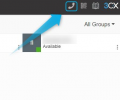
You mean the 3CX v18 Webclient? All you need todo is click on the little phone icon in the upper right corner to get the dialer:

1636127149224.png

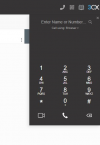
You should then see this:

1636127154577.png
 
  • Like
Reactions: Evolute IT
Hi Chris,

I have worked it out. If you have the extension installed, it shows Browser Extension but if you remove the extension then it shows Browser which makes sense.

I've removed the extension and the functionality all seems to be there so we're not losing anything.

Thanks
David
 
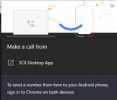
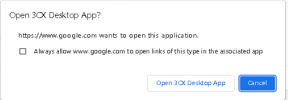
I've read all the replies, but I still can't figure out how to complete the 1-click dial from google chrome. I am on V18 and have the new 3CXDesktopApp installed, but when I click a number in Chrome, I have to click to tell it to open n 3CX Desktop APP, then tell it to dial. Is there a fix for this?

1639148247763.png
 
I've read all the replies, but I still can't figure out how to complete the 1-click dial from google chrome. I am on V18 and have the new 3CXDesktopApp installed, but when I click a number in Chrome, I have to click to tell it to open n 3CX Desktop APP, then tell it to dial. Is there a fix for this?

View attachment 26523

You have to add a dword value in the registry
 
Is this the value? Computer\HKEY_LOCAL_MACHINE\Software\Policies\Google\Chrome\ExternalProtocolDialogShowAlwaysOpenCheckbox

If so, I don't have anything after Google
 
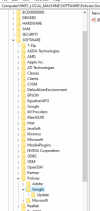
Thanks, and that's the article I have followed, but this is what my registry is showing me...

1639150270069.png
 
Is this the value? Computer\HKEY_LOCAL_MACHINE\Software\Policies\Google\Chrome\ExternalProtocolDialogShowAlwaysOpenCheckbox

If so, I don't have anything after Google
Sorry is this one

[HKEY_LOCAL_MACHINE\SOFTWARE\Policies\Google\Chrome] "ClickToCallEnabled"=dword:00000000
 
  • Like
Reactions: SweetAction
That did it! Thanks!
 
  • Like
Reactions: davide.bonavita
Sorry, but we are now getting this from each website we use...Is there a workaround to this as well?
1639156561285.png
 
click on "always allow etc.." and you are good to go

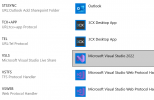
Edit: sorry do you mean even when you don't actually click on the numbers? Maybe the default apps are messed out, please double check that the 3CX Desktop App is selected for these two protocols only
1639157112985.png
 

Forum statistics

Threads
111,993
Messages
590,175
Members
164,931
Latest member
admintest