- Joined
- Jul 13, 2020
- Messages
- 8
- Reaction score
- 3
HI all,
I am running a 3CX TestPBX on Windows 10
- Standard Licence 16.07
- Sip Trunk from easybell.de
- firewall Check passed
I provisioned the phone and everything was working as exprected.
Then I tried to setup the voicemail, for this ext. - I can call the 99 but I don't hear any sound.
If I send to voicemail call to my android phone with 3cx ext. - I hear sound and everything is working fine, I can login to voicemail and hear voicemails.
Anyone here has an idea whats wrong?
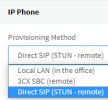
I provisioned the phone with my fqdn from outside the lan (as described by the 3cx help page) - cause I need to test the phone on another location.
So short:
1. What can I do or have to setup to get the voicemail sound on the Fanvil X7C
and another question
2. how can I setup ONE voicemail for a group of extensions - and
3. how do I call this groupvoicemail?
Thank you very much for your time and help
Regards
Stev
I am running a 3CX TestPBX on Windows 10
- Standard Licence 16.07
- Sip Trunk from easybell.de
- firewall Check passed
I provisioned the phone and everything was working as exprected.
Then I tried to setup the voicemail, for this ext. - I can call the 99 but I don't hear any sound.
If I send to voicemail call to my android phone with 3cx ext. - I hear sound and everything is working fine, I can login to voicemail and hear voicemails.
Anyone here has an idea whats wrong?
I provisioned the phone with my fqdn from outside the lan (as described by the 3cx help page) - cause I need to test the phone on another location.
So short:
1. What can I do or have to setup to get the voicemail sound on the Fanvil X7C
and another question
2. how can I setup ONE voicemail for a group of extensions - and
3. how do I call this groupvoicemail?
Thank you very much for your time and help
Regards
Stev