New feature: Override Office Hours

Status
Not open for further replies.

Jay Leccio

Silver Partner
Advanced Certified
Joined
Feb 14, 2018
Messages
61
Reaction score
9
We wanted to allow the receptionist to set Office close/open via the feature(Webclient) Override Office Hours.
The SIP trunk is setup with "Set up Specific Office Hours for this trunk" - unchecked
The Configure Office Hours (under Language & Office Hours Settings|) is set to 8am to 5pm.

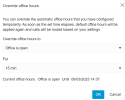
Tested, we used the Receptionists WebClient> Override office hours to Office closed for 1 hr. Test inbound call still got answered by IVR, as if the office is still open.

Anything we missed?
 
Hi,
When did you choose the closed hour? between 8am to 5pm?
in your test, did you took care to set the closed office hour before being in the concerned time ?
Otherwise the pbx switch to "office closed" is not trigerred
 
Hi, I set the Closed hour at around 4pm. Set it closed for 1 hour. double-checked and verified status says "Current office hours: Office is closed Until 08/03/2023 17:57" . I did an inbound test call then.

Still the SIP directed the call to digital receptionist(during office hours), rathen than going to destination when closed(outside office hours)
 
Hi @Jay Leccio

Under the Office Hours tab of the web client, what do you have set for "When Office is closed route to" destination?
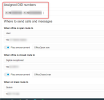
If you are calling a DID that is assigned directly somewhere (like the Digital receptionist) then the call will still route to that destination. Assign a DID to the Office Hours tab using the "Assigned DID numbers" menu and try with that number.
Also make sure you are editing the correct group when making the changes.
 
make sure you are selecting the incoming calls forwarded for external or internal calls as you need
 
Hi @Jay Leccio

Under the Office Hours tab of the web client, what do you have set for "When Office is closed route to" destination?
If you are calling a DID that is assigned directly somewhere (like the Digital receptionist) then the call will still route to that destination. Assign a DID to the Office Hours tab using the "Assigned DID numbers" menu and try with that number.
Also make sure you are editing the correct group when making the changes.
This is what I see when i set it to office closed via Webmail. 1678332230952.png
I am also calling a Call queue(mentioned in the initial description). Is it by-designed to have the call queue set to Office closed if we override it via Webclient? What is actually set to Office closed when I override it?
 
If you have a DID pointed directly at a Call Queue then that DID will not be affected by the office hours override.
Only DIDs that are pointed to Office Hours (or unassigned) will be affected by the override.

1678351856397.png

So if you want to switch where the number routes using the override functionality then you need to set up your DIDs via the Office Hours menu.
 
Thanks Yiannish, yes the DID is pointed directly to a Queue(which we cannot alter). So I guess the only way that the office hours would be overridden is by allowing the user to admin console rights and add a holiday, right?

 
Or tell the users to log out from the queue so the call will go to the destination of no answer to the queue.
 
  • Like
Reactions: Jay Leccio
Thanks Yiannish, yes the DID is pointed directly to a Queue(which we cannot alter). So I guess the only way that the office hours would be overridden is by allowing the user to admin console rights and add a holiday, right?

We had the same problem. We pointed the DID to the Call Group which then points to the CQ during BH and IVR for AH and now it works fine. Question for 3CX support. Can the "override Office Hours" but managed from the mobile phone app?
 
Question for 3CX support. Can the "override Office Hours" but managed from the mobile phone app?
The option is not included in the mobile apps as of yet but you can always login to your Webclient from the browser if you need to do this from a mobile device.
 
  • Like
Reactions: Evolute IT
Hi @Jay Leccio

Under the Office Hours tab of the web client, what do you have set for "When Office is closed route to" destination?
If you are calling a DID that is assigned directly somewhere (like the Digital receptionist) then the call will still route to that destination. Assign a DID to the Office Hours tab using the "Assigned DID numbers" menu and try with that number.
Also make sure you are editing the correct group when making the changes.
I am not seeing this option to assign a DID in the Office Hours tab. I am on v20, am I missing something?
 
I am not seeing this option to assign a DID in the Office Hours tab. I am on v20, am I missing something?
Hi,

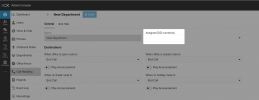
Please click Call Handling, then select the Department, and you will see the assign DID box:

1703235948933.png
 
Status
Not open for further replies.

Forum statistics

Threads
111,974
Messages
590,081
Members
164,899
Latest member
mazet