Solved New Snom D717 not showing up in 3CX console | pnp provisioning on local lan

Status
Not open for further replies.

lilait

Free User
Basic Certified
Joined
Jun 9, 2021
Messages
9
Reaction score
1
Steps:

-Snom D717 delivered with 10.1.33.37
-Manual Firmware Update to 10.1.73.16 Snom D717 FW: Maintenance release
(https://downloads.3cx.com/downloads...areupdates/snom/snomD717-10.1.73.16-SIP-r.bin)
- Phone not showing up under Phones (3CX System Management Console) - local LAN / same subnet - Phone get IP from DHCP
- Factory reset Phone
- Phone not showing up under Phones (3CX System Management Console)
- Connect Phone to Switch with Port mirroring and PC with Wireshark to monitor port.
- Filter Log with ip.dst==224.0.1.75
- Result: (6 entries)
1892 107.598306 10.10.10.49 224.0.1.75 SIP 519 Request: SUBSCRIBE sip:MAC%[email protected] |
- Network Capture from Web Interface (https://www.3cx.com/docs/capture-network-traffic/)
- Restart Phone
- Filter Log with ip.dst==224.0.1.75
7144 96.819868 10.10.10.49 224.0.1.75 SIP 519 Request: SUBSCRIBE sip:MAC%[email protected] |
7114 96.319568 10.10.10.49 224.0.1.75 SIP 519 Request: SUBSCRIBE sip:MAC%[email protected] |
- Phone not showing up under Phones (3CX System Management Console)

- Multicast working properly? Am I right?
- Provisioning works fine when I do enter the mac address in Provisioning Tab manually AND adjust the Provisioning Link (http://10.xx.xx.xx:5000/provisioning/xxxxxxx0f0j/cfg{mac}) on the snom web interface (Advanced > Update > Setting URL)

- Any Idea? :)
 
Is it only this D717 which is not provisioning, other phones other brands and model are ok ?
Are you able to DL provisioning file, from a browser, using link in extension ?
That phone was not used in STUN previously ?
No typo error in mac address ?
No VLAN ?
 
Hi,

Sounds like you made the PnP validation already so you can move on to the next step
https://www.3cx.com/docs/plug-and-play-ip-phone/

Depending on the network order of the interface 3CX may not be able to listen for multicast events.

Note: Unused LAN Adapters, WiFi and Bluetooth must be disabled and can not be used to join Multicast events.
 
Is it only this D717 which is not provisioning, other phones other brands and model are ok ?
all phones - no pnp popup under phones (3CX System Management Console)
Are you able to DL provisioning file, from a browser, using link in extension ?
What does DL provisoning mean? I am able to manual provision the Phones.
That phone was not used in STUN previously ?
No. brandnew Phone
No typo error in mac address ?
No
No VLAN ?
No
 
More information about your setup would help as well:

https://www.3cx.com/community/threads/information-to-provide-when-requesting-help.67558/

But yes it looks like your switch is working properly and passing multicast.
Setup:

3CX Version, Professional 16.0.8.9
W10 Pro, only local Lan, no VLAN, noch changes in hardware setup (Switch etc.), no STUN
Is the 3CX Server Hosted and where? local
IP Phone Make/Model/Firmware 10.1.73.16 Snom D717
Provisioning Method: Loca
Trunk Provider or Gateway Make/Model Sip Trunk Plusnet Germany
Has the Firewall Checker passed: YES
Are custom Phone Templates being used: YES but not for this Test
 
Hi,

Sounds like you made the PnP validation already so you can move on to the next step
https://www.3cx.com/docs/plug-and-play-ip-phone/
THX! I Thinks thats the information I need. Didn't found that page via google or here in the community.
Depending on the network order of the interface 3CX may not be able to listen for multicast events.

Note: Unused LAN Adapters, WiFi and Bluetooth must be disabled and can not be used to join Multicast events.

I think joins on the network interface is the right approach.
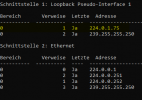
Here my cmd result:
1623317761989.png

I think the yellow marked entry should also appear under interface Ethernet?
Or do I have to delete it from the Loopback Pseudo Interface?

THX!
 
Hi,

Normally we recommend to keep only a single interface on your PBX (to avoid these issues)

But if you can manually ensure that the Ethernet interface (where 3CX listens) is joined, then it should start to work.
 
Thx! I will check that. Not sure where the Loopback Pseudo Interface belongs to. (Maybe Hyper-V Network settings or Wireshark?)
The Loopback Pseudo Interface is only visible in cmd network interface settings | Not in windows network settings gui

Can someone tell me if its safe to delete that pseudo interface? ;)
 
Probably installed with Wireshark Npcap package. If you uninstall the package it should safely remove the loopback.

Then just reboot your VM and check if joined in the multicast IP
 
Does Wireshark still work without that package?
 
No it will not work, it relies on it. But if you reinstall Npcap you have a choice to skip loopback installation if I remember correctly
 
removed NPcap > reboot > no effect
removed complete Wireshark with settings > reboot > no effect

I think I have to manually remove the Adapter.
 
My solution without deleting the Loopback Pseudo Interface:

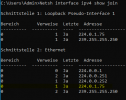
Adding a manual route for the IP 224.0.1.75 via cmd.
>route add 224.0.1.75 IP-PBX

Tadaaa:
1623321656382.png

Make it a static route to persist after reboot.
 
My last update:

After reinstalling wireshark the 224.0.1.75 IP was added to the joins of the main 3CX Ethernet Adapter:

1623322615167.png

A bit confusing... ;) All's well that ends well.
 
  • Like
Reactions: JohnS_3CX
Glad to hear, we can mark this one as solved then :)
 
Status
Not open for further replies.

Members Online Now

Forum statistics

Threads
111,832
Messages
589,283
Members
164,662
Latest member
DejanMDS