Solved New Snom Template Isn't Working

Status
Not open for further replies.

RHopkinson

Bronze Partner
Basic Certified
Joined
Mar 31, 2019
Messages
84
Reaction score
15
Hi All,

According to what I read about the new Snom US template (https://www.3cx.com/blog/news/snom-template/), it seems that all I needed to do was select the new "English (US)" option for Phone Display Language and then reprovision the phone. I tried that on my D785 (running fw version 10.1.64.17) to test, but none of the changes took effect (e.g., Transfer Behavior, Hold, and Auto-Dial). Can someone please tell me what I need to do to have these settings take effect?

Thanks,

Russell Hopkinson
Enterprise 16.0.8.9
 
Factory reset and reprovision from scratch, let us know.
 
I factory reset the phone, selected the "New" phone from the Phones menu in 3CX, and assigned it to my extension. I ensured that the "English (US)" option was still selected, and pressed OK. The phone provisioned immediately, but the functionality associated with the new template is still not there.
 
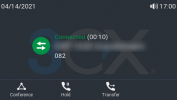
While on a call, does your screen have the following 3 options?
1621252876652.png
 
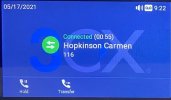
No, I only have two options:
d785screen.jpg
How did I lose my Conference option?
 
Hi @RHopkinson

Let's look through this together. Firstly, I have tested all these behaviors below and can confirm they they do in fact apply on my PBX 16.0.8.9 with a Snom D785 v10.1.64.17 when phone display language is set to "English (US)" and when using the default 3CX templates (currently ver. 109357). If you are using custom templates, I would not expect this to work as advertised. Judging from your screenshot, the settings don't appear to have been provisioned.

  • Transfer behavior– In the transfer dial screen, dialing a number and pressing OK or selecting the transfer key would usually blind transfer the active call. Instead, this updated setting allows a typical outbound call with options to safe transfer (“blind transfer”) or an attended transfer.
  • Hold– When placing an active call on hold, the user will no longer hear the dial tone.
  • Auto Dial– Auto dialing is set by default to 6 seconds after the last digit is dialed.
  • Call Waiting – While on an active call and receiving a second call, the new caller information is displayed on the main screen. While still on the active call, you will hear the call waiting tone; however, any action taken on the phone affects the new caller, not the active call.
  • Updated soft key displays when in different call states:
    • Connected Call – users will now see Conference, Hold, and Transfer
    • Call Holding – users will now see Conference, Retrieve, and Transfer
    • Incoming Call – users will now see Transfer


So what can you do?

  1. Delete the phone from the extension Provisioning tab, press OK to save changes
  2. Ensure the firmware is the correct version, and factory reset the phone. Do not press or set anything on the phone after the reset has completed, leave everything as is.
  3. When the phone appears in your Phones page (assuming LAN or SBC deployment) select it and click "Add Ext.". Don't assign it to an existing extension please
  4. Give it a name, and press OK. Do not edit anything else yet!
  5. Go to your updates section and notice whether a new template update appeared for Snom. Download it if it appears
  6. Now edit the new extension we created, and under Provisioning select display language "English (US)" and Date format to US, then press OK
  7. Go back to the Phones page, select the phone, and click Reprovision

Now as soon as you see the date format change on the screen, the phone will be provisioned and ready to retest the above new changes. The above will work, assuming you did not edit/modify your templates, and the phone should behave just like the one I have tested here.

Let us know how it goes!
 
  • Like
Reactions: Evolute IT
Today, the firmware version on the phone (10.1.64.17) was showing as unsupported in 3CX system management, so I updated the FW to 10.1.73.16, after which the Conference option was still missing. I logged into the phone's web interface and verified the FW version is now 10.1.73.16.

I then deleted the phone from the extension's Phone Provisioning tab, and factory-reset the phone (by unplugging it from the network, holding down the # key and choosing "1. Settings reset"). I pressed no keys on the phone afterward, and waited for it to boot.

I then checked the box next to the New phone in the Phones page and chose the Add Ext option, giving the new extension "TestExt" for the First Name. I pressed OK, and the phone immediately reflected the new extension info. I went to the Updates section, and there was one update with the name of "Snom 3x0, 7x0, 8xx", but the status showed as "Out Of Date" with an Installed Version of 109356 and the Online Version of 109357, so I did not download it.

I then went to the Phone Provisioning tab of the newly-created extension and changed the Phone Display Language from "English" to "English (US)" and changed the date format from "European" to "US format" and pressed OK.

I then went to the Phones page, selected the phone, and pressed the "Reprovision" button. It immediately changed the date format on the phone. I then placed an inbound test call from an external number and answered it on the phone, but found the Conference option is still missing, and the first three features (Transfer behavior, Hold, and Auto Dial) did not work as described.

I since reassigned the phone to my extension, but it is still not working correctly.
 
I went to the Updates section, and there was one update with the name of "Snom 3x0, 7x0, 8xx", but the status showed as "Out Of Date" with an Installed Version of 109356 and the Online Version of 109357, so I did not download it.

So you are telling us that you saw a template update but did not install it?

Please read my instructions again and re-do it without skipping any steps.
 
Your instructions said "Go to your updates section and notice whether a new template update appeared for Snom."

Since the update was displayed as "Out of Date" and the version was older than the online version, that did not seem to me like a "new" update.

Please confirm that you want me to download the "Out of Date" phone template when I re-do all of your steps again:

1622151599780.png
 
Your instructions said "Go to your updates section and notice whether a new template update appeared for Snom."

Since the update was displayed as "Out of Date" and the version was older than the online version, that did not seem to me like a "new" update.

Please confirm that you want me to download the "Out of Date" phone template when I re-do all of your steps again:

View attachment 22206
The template online is not out-of-date, yours is. That's what it means. You can see that your version is behind the online one.
 
Thank you for the clarification. I read "online" as meaning the running version on the PBX. I'll re-do the steps and advise of the resolution.
 
  • Like
Reactions: Evolute IT
All is working correctly now after repeating the steps and downloading the Snom update. Thanks to all for the assistance and education.
 
Excellent news Russel, glad to hear it is working correctly now!
 
Status
Not open for further replies.

Members Online Now

Forum statistics

Threads
111,832
Messages
589,280
Members
164,662
Latest member
DejanMDS