New Windows Desktop App Optimized for Speed

Status
Not open for further replies.

N_G

Founder
Joined
Jun 6, 2006
Messages
4,861
Reaction score
9,319
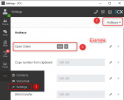
The final update for the Windows Desktop App is now available. Identical to the Web Client, it brings a faster interface and improved call management.

Web Client as a native Windows app​

The Desktop App has the same identical interface layout as the Web Client. Requiring no new learning, existing Web Client users can easily swit...
Continue reading the Original Blog Post.
 
Last edited by a moderator:
Does this mean that the MacOS port is soon due for release too ?
 
  • Like
Reactions: DavidM84
Any firm decision on adding the ability to launch desktop applications with parameters like the v16 desktop app? If not, it would be nice to at least see the ability to use a hotkey to trigger the CRM integration with the in-progress call instead of it automatically launching on incoming calls.
 
  • Like
Reactions: Energa and N_G
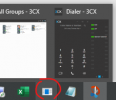
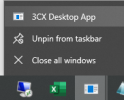
I noticed this after the last app update...the icon for the pinned (taskbar) shortcut eventually changes to a Windows default icon, because it is left pointing to an invalid location. I looked for it right after the update this time and it didn't change, but it is now the default icon ~5 hours later after the update (after I locked the screen and unlocked it later).

taskbar:
1636079028537.png
when right clicking icon:
1636079060311.png

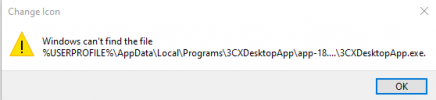
If I right click that "3CX Desktop App" menu item and choose Properties, the Target is invalid:
"C:\Users\username\AppData\Local\Programs\3CXDesktopApp\app-18.5.28\3CXDesktopApp.exe"
and if I click the Change Icon button I get error:
1636079146657.png
The "C:\Users\username\AppData\Local\Programs\3CXDesktopApp\app-18.5.28" directory does not exist, it is named just "app." I'm guessing this is because "app" was renamed for the upgrade, and the icon followed the rename?

If I right click the icon and "unpin from taskbar" the icon for the unpinned-but-still-running-program immediately changes to the 3CX icon, and I can pin it again to resolve the issue.

To recap/repro:
- start 3CX app
- pin icon
- install app upgrade on 3CX server
- upgrade app when prompted in the app, by clicking the button
 
Hello @SteveITS ,

Pinning the file on taskbar, by default sets the "Target' to the following path:
C:\Users\<Username>\AppData\Local\Programs\3CXDesktopApp\3CXDesktopApp.exe

It should not point to the version specific executable.

Can you please do the following:
1. uninstall
2. install from the following URL the previous build - https://downloads-global.3cx.com/downloads/v180/templates/clients/3CXDesktopApp-18.5.26.msi
3. Pin the shortcut by righclicking on traskbar.
4. Get the updated version and verify.
 
I noticed this after the last app update...the icon for the pinned (taskbar) shortcut eventually changes to a Windows default icon, because it is left pointing to an invalid location. I looked for it right after the update this time and it didn't change, but it is now the default icon ~5 hours later after the update (after I locked the screen and unlocked it later).

taskbar:
View attachment 25672
when right clicking icon:
View attachment 25673

If I right click that "3CX Desktop App" menu item and choose Properties, the Target is invalid:
"C:\Users\username\AppData\Local\Programs\3CXDesktopApp\app-18.5.28\3CXDesktopApp.exe"
and if I click the Change Icon button I get error:
View attachment 25674
The "C:\Users\username\AppData\Local\Programs\3CXDesktopApp\app-18.5.28" directory does not exist, it is named just "app." I'm guessing this is because "app" was renamed for the upgrade, and the icon followed the rename?

If I right click the icon and "unpin from taskbar" the icon for the unpinned-but-still-running-program immediately changes to the 3CX icon, and I can pin it again to resolve the issue.

To recap/repro:
- start 3CX app
- pin icon
- install app upgrade on 3CX server
- upgrade app when prompted in the app, by clicking the button
Hi!

Solution should be simple enough:
  1. Unpin the app
  2. Launch it from the Desktop Shortcut
  3. Pin it again
 
Nice to see that it is signed.
 
  • Like
Reactions: accentlogic
1.
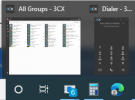
We used to recommend clients pin the softphone to the first location on the task bar so they could easily get to the phone by hitting windows key+1. Now that brings up the Team app not the dialer is there a way that it can be setup to bring but both windows to the top vs having to either click the icon, after hovering on the start menu or click the phone icon in the main app? its little but annoying!
1636124191679.png

2. question with this app be getting the drag and drop call routing that the old windows application had? we have receptionists asking as apparently that too was a thing used more than we realized?
 
install from the following URL the previous build
The first time I uninstalled it without unpinning, the icon changed to the default "document" (page) icon. (which I would count as Windows' issue not seeing the program doesn't exist anymore). The second time I left the icon unpinned and uninstalled, clicking the menu item to unpin it didn't do anything (also a Windows issue). I had to left click the icon, and let Windows prompt me to remove it since the program didn't exist.

Overall, I installed the old version, pinned the icon, and let it upgrade, and reproduced the issue, twice more. As before, I can unpin and re-pin to pick up the icon again.

The program does run, it's just the icon that is left incorrect.
 
@SteveITS ,

We identified an issue with pinned taskbar icon during update process that will be addressed on the upcoming release of Desktop App.
First time might require unplin and pin, but for concecutive updates should be OK.
 
I noticed this after the last app update...the icon for the pinned (taskbar) shortcut eventually changes to a Windows default icon, because it is left pointing to an invalid location. I looked for it right after the update this time and it didn't change, but it is now the default icon ~5 hours later after the update (after I locked the screen and unlocked it later).

taskbar:
View attachment 25672
when right clicking icon:
View attachment 25673

If I right click that "3CX Desktop App" menu item and choose Properties, the Target is invalid:
"C:\Users\username\AppData\Local\Programs\3CXDesktopApp\app-18.5.28\3CXDesktopApp.exe"
and if I click the Change Icon button I get error:
View attachment 25674
The "C:\Users\username\AppData\Local\Programs\3CXDesktopApp\app-18.5.28" directory does not exist, it is named just "app." I'm guessing this is because "app" was renamed for the upgrade, and the icon followed the rename?

If I right click the icon and "unpin from taskbar" the icon for the unpinned-but-still-running-program immediately changes to the 3CX icon, and I can pin it again to resolve the issue.

To recap/repro:
- start 3CX app
- pin icon
- install app upgrade on 3CX server
- upgrade app when prompted in the app, by clicking the button
To update you, we have a fix for this on the next update.

When it's released, you will though need to:
  1. Unpin the Desktop app
  2. Uninstall the Desktop App
  3. Re-install the latest version
  4. Re-pin the app
All subsequent updates after this though will not break the icon.
 
Last edited:
  • Like
Reactions: Evolute IT
Is there any way to pin the V18 dialer only, to the task bar to avoid bringing the desktop app up on screen?
 
  • Like
Reactions: Erminux
Is there any way to pin the V18 dialer only, to the task bar to avoid bringing the desktop app up on screen?
Not for the time being, but the next best thing I can think of is to set the "Open Dialer" hotkey, then the dialer will appear when you press it without needing the app pinned, all you need is to have it open in the Notification area, which should be automatic as it launches with Windows.
1639477363785.png
 
That does the job perfectly - thank you
 
  • Like
Reactions: NickD_3CX
Great app. The only drawback I see at this point is that it doens not pop up over full screen windows.
 
Great app. The only drawback I see at this point is that it doens not pop up over full screen windows.
Hi!

Yes we are aware and are planning to introduce a fix for this with the next release of the Desktop App. No ETA at the moment, but for sure will be after New Year.
 
  • Like
Reactions: lbonjean
Great app. The only drawback I see at this point is that it doens not pop up over full screen windows.
A small update, in the next version of the Desktop App that will be shipped with V18 U3, it should now be able to steal focus even when another app is in full screen mode.
 
The minimum width of the 3CX desktop app is way to wide.

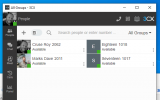
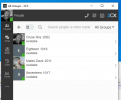
When you make it slightly wider the individual people go into 2 columns like so
1644508315092.png

but when you shrink the width less it only goes a little bit less wide
1644508346900.png

why dont you allow the app to shrink down so that the individual people are the same width as when i two columns.

The reason this is important to us is we have multi monitor setups and being a call centre the phone client needs to be on screen ALL the time so we want it pinned to the left hand edge of the screen as narrow as possible.

ALSO

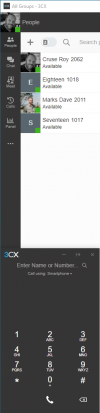
can we have an option where the dialler is pinned to the main app or displayed in a panel within that app rather than being a separate popup its super annoying

in an ideal world we would like the desktop app to be a single window thats much narrower something like this...

1644508555182.png
 
@uhs-roycruse
an we have an option where the dialler is pinned to the main app or displayed in a panel within that app rather than being a separate popup its super annoying
For this you could consider using the 3CX Webclient with PWA.
 
Status
Not open for further replies.

Forum statistics

Threads
112,025
Messages
590,368
Members
164,978
Latest member
FringeIT-Eric