Solved NFTables V18 - Port 5062 not allowed by default

Status
Not open for further replies.

Evolute IT

3CX MVP
Gold Partner
Advanced Certified
Joined
Feb 6, 2018
Messages
11,228
Reaction score
7,073
Hi guys,

This was something I noticed during the RC stage but it seems it wasn't modified for final release.

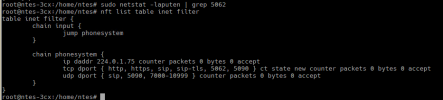
When using a 3CX FQDN and Teams integration, we need port 5062/tcp opened. This is easy from the Cloud provider side, but here's an issue:

1630677465471.png

The NFTables are not opening it. So we need manual SSH access to allow the port every time.

Can this be added to the default setup or, even better, be modified when we enable the Teams integration?
 
Hi Frederick,

Indeed in the RC stage this was not done, however in the Final release new installs this should be done by default now.
 
  • Like
Reactions: Evolute IT
Hi Frederick,

Indeed in the RC stage this was not done, however in the Final release new installs this should be done by default now.
It isn't. This screenshots comes from a brand-new 3CX ISO v18 install.
 
It isn't. This screenshots comes from a brand-new 3CX ISO v18 install.
Even after you enable Teams with a different FQDN, so 5062 is used, is not even added then?
 
Even after you enable Teams with a different FQDN, so 5062 is used, is not even added then?
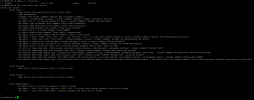
This is after enabling the integration (we use only 3CX FQDNs, so it's always a different one.)
1630680444366.png
I checked the rest of the file and it isn't added anywhere. (The SIP Server did restart.)
 
I have the same issue. The port check shows this is closed externally. Azure is open for 5062 TCP, yet the tool mentioned earlier shows the port closed:
https://ping.eu/port-chk/

5062 is listed in inet filter, but netstat shows nothing

1630877235744.png
 
I just performed a clean install using our ISO to check myself.
1630915735487.png

Just to be sure you are looking in the right place, if you are looking in file /etc/nftables.conf, that is not the only file.
Yes, there is a section in there for 3CX, but there is another file that is loaded: /var/lib/3cxpbx/Bin/nftables.conf .

@Nick W
If with netstat you don't see 5062, this has nothing to do with nftables, there is simply nothing listening on 5062. This should happen regardless.
Are you sure you have turned on Teams? could it be that the FQDN you used matches that of 3CX, so 5061 is used instead of 5062?
 
.etc.nftables.conf looks like this:

Code:
#!/usr/sbin/nft -f

# Flush the rule set
flush ruleset

# Translated by iptables-restore-translate v1.8.2 on Tue Jun  1 05:55:35 2021
# Completed on Tue Jun  1 05:55:35 2021
# Translated by ip6tables-restore-translate v1.8.2 on Tue Jun  1 05:55:35 2021
# Completed on Tue Jun  1 05:55:35 2021

/var/lib/3cxpbx/Bin/nftables.conf

Code:
#!/usr/sbin/nft -f

add table inet filter
add chain inet filter input
add chain inet filter phonesystem
insert rule inet filter input jump phonesystem
flush chain inet filter phonesystem

add table ip filter
add chain ip filter INPUT
add chain ip filter phonesystem
insert rule ip filter INPUT jump phonesystem
flush chain ip filter phonesystem

add table ip6 filter
add chain ip6 filter INPUT
add chain ip6 filter phonesystem
insert rule ip6 filter INPUT jump phonesystem
flush chain ip6 filter phonesystem

table inet filter {
        chain phonesystem {
                ip daddr 224.0.1.75 counter accept;
                tcp dport { 80,443,5060,5061,5090,5062 } ct state new counter accept;
                udp dport { 5060,5090,7000-10999 } counter accept;
        }
}

table ip filter {
        chain phonesystem {
                ip daddr 224.0.1.75 counter accept;
                tcp dport { 80,443,5060,5061,5090,5062 } ct state new counter accept;
                udp dport { 5060,5090,7000-10999 } counter accept;
        }
}

table ip6 filter {
        chain phonesystem {
                tcp dport { 80,443,5060,5061,5090,5062 } ct state new counter accept;
                udp dport { 5060,5090,7000-10999 } counter accept;
        }
}

Both seem fine to me.

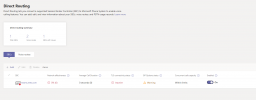
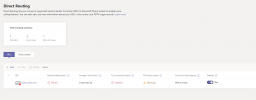
Teams is on, it just shows this....

1630916988736.png

The fqdn is a new one, to the public IP of 3cx, using our own domain. teams.blah.com

More on ticket 791497 if you fancy :)
 

Attachments

  • 1630916958382.png
    1630916958382.png
    53.2 KB · Views: 20
Interesting case!

I'll be monitoring it too, but my gut is that if the listening on the port is not starting at all, it may be something with the certificate file you used.
Personally, that would be the first thing I'd check.

Get prepared though to be asked for some additional files probably. I'd suggest sending support the new SupportInfo they asked for, but enable the SIP Server debugging mode first.

First set the PBX to Verbose, then run this:
Bash:
sudo /usr/sbin/3CXStopServices
sudo rm -rf /var/lib/3cxpbx/Instance1/Data/Logs/*
sudo rm -rf /var/lib/3cxpbx/Data/Logs/*
sudo sed -i '/isDebugMode/d' /var/lib/3cxpbx/Bin/3CXPhoneSystem.ini
sudo sed -i '/^tenants = Instance1.*/a isDebugMode = 1' /var/lib/3cxpbx/Bin/3CXPhoneSystem.ini
sudo /usr/sbin/3CXStartServices

After the services come back up, just generate the SupportInfo, now it will contain an additional file "3CXPhoneSystem.resip.log".

Important!
After you generate the SupportInfo, make sure you disable the debugging mode as it can grow VERY big:
Bash:
sudo /usr/sbin/3CXStopServices
sudo sed -i '/isDebugMode/d' /var/lib/3cxpbx/Bin/3CXPhoneSystem.ini
sudo /usr/sbin/3CXStartServices
 
Thanks Nick. I will do this now. The cert is from SSL.com but I will go and get another one. If you have a recommendation you know works, let me know. Prefer one that just hands me the PEM file too :)
 
Thanks Nick. I will do this now. The cert is from SSL.com but I will go and get another one. If you have a recommendation you know works, let me know. Prefer one that just hands me the PEM file too :)
No!
Don't get another certificate, it may be something simple like the formattation or the lack of intermediate certificates or something.
Let support check things first, then we see what needs to be done. You could also have a look inside the file and search for "5062".
 
I guess this is the issue?

Code:
10:11:08.114|7f67f2c27e40|BaseException.cxx(21): BaseException at ssl/Security.cxx:447 Failed opening PEM private key file
 
Please check that the Private key for the certificate, used for teams, matches the certificate you have uploaded under the team's configuration. We suggest creating the certificate again from scratch making sure that the private key is saved when generating the CSR and that the certificate is issued based on the correct private key.
 
Last edited:
I am speaking with support. It seems that the issuer sends a CRT, a Bundle and a private key. There are no PEM files here, but by research I should be able to take CRT, and put the bundle items below that in the file. Then it should rename to PEM and work. Apparently not.

Files with support now for test.
 
You usually need to take the CRT, edit it, then at the end of it, append all the content of the "Bundle" which is usually the intermediate certificates that are also required. You don't need to do anything to the key file.

You can also verify if the Cert and Key file are a pair using the following OpenSSL commands:
Code:
openssl rsa -noout -modulus -in <path to KEY file> | openssl md5
Code:
openssl x509 -noout -modulus -in <path to CERT file> | openssl md5

If the output of the 2 matches, then the Key and Cert files are the pair of each other.
If not, then it means that this is not the correct pair.

The output will look something like this:
1630925402636.png

FYI, OpenSSL exists on most Linux installations by default, but if you want to run it on Windows, you can get a Windows version of it from here.
 
You usually need to take the CRT, edit it, then at the end of it, append all the content of the "Bundle" which is usually the intermediate certificates that are also required. You don't need to do anything to the key file.
The crt file I have has the intermediates in it already. I tried just renaming it and using it, but no dice. Ill get there!
 
My word. It worked third reissue.

CRT (which had the intermediates in it) renamed to .PEM
Keyfile (in TXT) renamed to .PEM

Import, start, and now no errors.

Now onto the scripts :)

(Thanks all!)
 
I just performed a clean install using our ISO to check myself.
View attachment 24199

Just to be sure you are looking in the right place, if you are looking in file /etc/nftables.conf, that is not the only file.
Yes, there is a section in there for 3CX, but there is another file that is loaded: /var/lib/3cxpbx/Bin/nftables.conf .

@Nick W
If with netstat you don't see 5062, this has nothing to do with nftables, there is simply nothing listening on 5062. This should happen regardless.
Are you sure you have turned on Teams? could it be that the FQDN you used matches that of 3CX, so 5061 is used instead of 5062?
I will check on our customer's machine.
 
Update on my customer: we rebuilt the system completely but now we did figure out the private key is unable to load.

We will redo the certificate and see if that fixes it.
 
  • Like
Reactions: NickD_3CX
Status
Not open for further replies.

Forum statistics

Threads
112,149
Messages
590,965
Members
165,170
Latest member
SupportRock