Solved No attempt to register SIP trunk

Status
Not open for further replies.

JimB

Free User
Basic Certified
Joined
Jan 10, 2022
Messages
43
Reaction score
13
I have one sip trunk already set up, and working. Attempting to add a second, where the host is an IP address, but something is amiss. It shows green, but it doesn't work, and makes no attempt to register - nothing in the log at all. Disable All - it stays green. Enable all does nothing. Refresh registration does nothing, and there are no entries in the log. Tried everything I can think of, but no success - any ideas?
 
Hi @JimB

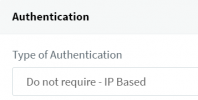
It looks to me that you have created an IP based trunk where no registration is required and the management console always shows them as green since there is no registration involved.
Navigate to your trunk, and under the General section check the type of authentication. For the PBX to attempt to register the option needs to be set to "Register/Account Based"
1645688808005.png
 
Thanks Yiannis - that makes sense. So 3CX assumes as there's no authentication, it works, and shows green. I wonder why it doesn't work then.... More investigation required.
 
The activity log should be able to provide more details as to why calls are not working. Start with your outbound rules and work from there.
 
Nothing in the log at all, Yiannis. Outbound rules are fine, same two set up as for the previous (working) trunk. Time to speak to the provider I think.
 
Let us know what you find
 
Now getting this in the log if I try to make an outgoing call:

Call or Registration to 01xxxxxxxxx@(Ln.10001@iHub) failed.
86.53.140.100 replied: 403 Forbidden-Source Endpoint Lookup Failed; from IP:86.53.140.100:5060
 
Assuming that 86.53.140.10 is the IP of the provider it looks like they are rejecting the call because they do not recognize the source (your public IP probably). Since this is an IP based trunk you should whitelist your IP with them.
 
Exactly how I saw it too, Yiannis. I wonder if it's been set up with a mistake in our public IP. (static) This highlights to me how utterly stupid IP Address based (rather than password authentication) services are. What happens if you have a dynamic IP, or if your main service fails, and you auto failover to a different one? Totally stupid.
 
There are merits to both methods. Many will argue that IP based trunks are more secure than authentication based ones because of the IP lock. Some authentication based providers even lock the trunks down with an IP as well.
Of course the drawback is that the IP needs to be updated if it changes. Some IP based providers can now whitelist FQDNs so if your FQDN IP changes it will auto update in the providers database.
 
That makes sense. Whitelisting the FQDN should be an essential.
 
OK, sorted. I had to change the "user part" and "host part" entries in the Outbound parameters.
 
  • Like
Reactions: YiannisH_3CX
Glad to see the issue has been resolved.
 
  • Like
Reactions: JimB
Status
Not open for further replies.

Latest Posts

Forum statistics

Threads
112,324
Messages
591,897
Members
165,476
Latest member
awan05