Solved No audio after update from v16 to v18

Status
Not open for further replies.

D1g1t@7N4t1v3

Bronze Partner
Advanced Certified
Joined
Apr 28, 2022
Messages
4
Reaction score
2
We've been having intermittent audio issues after updating from v16 to v18. The issue seems to only occur when it's a 3CX PBX calling another 3CX PBX. So for instance when we call our customer. To our knowledge, it doesn't happen when the customer calls us. It only seems to be when we call the customer. The customer doesn't seem to be having issues with any other incoming calls. It's only when we call the customer from our 3CX system. When the issue happens there is no audio. I can look at the call log on the customer's system and see that the system answered the phone and the IVR is playing. I just don't hear anything on my end. I can hang up and call the customer back and the issue may or may not present itself. This issue appeared once we upgraded the customer to v18 from v16. I thought maybe the issue would resolve once we upgraded our system v18, but no such luck. We started seeing the same issue with other clients as we upgraded them to v18.
 
Firewall checker is all good?
I would like to see both pcap files, one for working call and second one for no audio call
 
A quick and easy test to do that might help narrow this down would be to replicate the issue again while having both 3CX PBX's recording the call. Listen to both call recordings and compare what was recorded with what was heard during the actual call (by both call parties).

Is there something different, if yes what? Which audio is missing, outgoing incoming and in what direction.
 
Thank you guys for your response and sorry for my slow reply. Initially, I thought the firewall checker was good. But since the question was posed I figured I would double-check before responding. I found that the client in question cannot pass the firewall checker. No matter how I go about it I cannot seem to resolve the source port remap issue with the customer's firewall. The customer in question is running a SonicWALL firewall. To my knowledge, there are two ways to disable source port remapping in SonicWALL. You can disable it per the outbound NAT rule or you can disable it globally by checking the box to enable consistent NAT. It is also my understanding that you must use one or the other and cannot use both. I have gone both ways with it, even rebooting the firewall between the configuration changes. And it just doesn't seem to be honoring the setting and keeps remapping the source ports. At least according to the firewall checker which I trust.

One of the reasons for waiting before I responded. Was because upon looking into the firewall, I also discovered the client's firewall due for replacement in a couple of weeks. So after trying to disable source port remapping and failing. I figured I'd wait for the new firewall to be installed and see if the problem resolves. Unfortunately, the issue did not resolve.

So two different SonicWALL firewalls and I can't seem to get it to stop remapping source ports for this client. The new one is even one of the new v7 firewalls.

Any trick to get these things to stop remapping the source port? Besides not using a SonicWALL lol.

To answer the question posed by ChrisC. If I call the customer, my audio is getting to them, but their audio is not making it to me. From the testing and packet captures we've done. We see that customer 3CX PBX is sending the audio, but it appears to be getting lost at the firewall. I'm assuming because of the source port remaps.
 
We typically enable consistent NAT and make the outbound NAT policy say disable source port remap. We make the rules manually and never use the wizard. SonicWall is the only firewall we sell to customers.
 
I've now tried se
We typically enable consistent NAT and make the outbound NAT policy say disable source port remap. We make the rules manually and never use the wizard. SonicWall is the only firewall we sell to customers.
I've now tried with both options set. I even rebooted the firewall and made sure that it was running the latest firmware. I also rebooted the 3CX system. And the thing is still remapping source ports. I event deleted and manually recreate the NAT rules and still no luck. These things just seem determined to remap source ports.
 
Steps that @SteveITS referenced work. They did change source port remap a little on SonicOS 7.

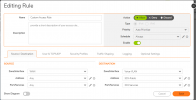
Inbound Rule:
rule-in.PNG

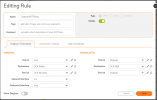
NAT IN:
NAT-In.PNG

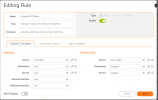
NAT OUT:
NAT-Out.PNG

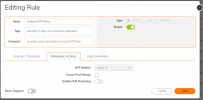
Source port remap should not be ticked
Nat-Out1.PNG
 
I may have missed it above but did you go through https://www.3cx.com/docs/sonicwall-firewall-configuration/ ?
This was the issue. I used this guide as a reference for my setup but gave it a second look after you asked. Everything was as specified in the article with the exception of 1 thing in both the outbound and inbound NAT rule.

On the inbound NAT rule, I had the inbound interface set to any instead of X1. In this case, we are using X1 as the WAN interface.

On the outbound NAT rule, I had the original service set to the 3CX service group instead of any.

Once I made mentioned change on both the outbound and inbound NAT rule. I can pass the firewall test.

Appreciate everyone's responses and helping me dig through this config to find my mistake. Thank you.
 
Status
Not open for further replies.

Members Online Now

Forum statistics

Threads
111,832
Messages
589,282
Members
164,662
Latest member
DejanMDS