No Console login after upgrade to V20

Prajesh

Customer
Joined
Feb 21, 2025
Messages
9
Reaction score
0
Hello,

We have successfully upgraded to v20 from V18.9B on our on premise 3CX installation running on Windows Server 2019

Prior to the upgrade a new extension was created and given a unique email address. The extension was also given system owner rights.

We took a backup and uploaded this backup as part of the V20 installation. The installation succeeds with a banner page that shows the system owner email address and the url for login

We can now not login into the management console. It shows the login page ( split dns has been configured ). I have tried a reset password with the system owner email but do not get a email to reset ( have checked spam,junk folders ). I have also tried to login with the system owner extension and password. This does not work either.

As a test, i set up a soft phone and can register to 3CX with the system owner extension, id and password.

Have tried to go back to and older version but this fails with either a " either a database is too new " or "licence key is invalid".

Can anyone help me with this. I am back on V20 with no login.

Many thanks
Prajesh
 
What message do you see when you try to log in?
 
You don't/cant log into the management console after V20 upgrade. You need to log in via the web client URL
 
You don't/cant log into the management console after V20 upgrade. You need to log in via the web client URL
 
You don't/cant log into the management console after V20 upgrade. You need to log in via the web client URL and use the admin/cog Icon in the lower left-hand corner of the web client to access the admin tabs.
 
You don't/can't log into the management console after V20 upgrade. You need to log in via the web client URL and use the admin/cog Icon in the lower left-hand corner of the web client to access the admin tabs.
 
You don't/cant log into the management console after V20 upgrade. You need to log in via the web client URL
Hello Mick,

Thank you so much for your response.

Sorry for confusion. I used the management console term instead of the webclient url.

I login using https://"fqdn":443 and split dns is setup.

many thanks Mick
 
Can you answer SteveITS's question?
 
What message do you see when you try to log in?
Hello Steve,

Thank you very much for your response.

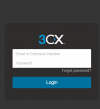
When I login using the webclient url I get the login page as per attached.

I then try to login using the email address set for the system owner.

This is the same as the email address I use to access the account at https://portal.3cx.com

I used the same password as used to access the account portal and i get and incorrect username or password.

I am no expert but could it be that I have missed a step?.

When I upgraded from v18.5 to 18.9B and created the system owner with the email address assigned, the previous root owner got a one time pin code to verify the account. This was forwarded to me but when I open the link it takes me to the same page as https://portal.3cx.com and I was able to login in with my email account and the password for the portal.

Have I missed a step in defining the system owner account at 3CX? and is this why I cannot reset the password. Don't get any response.

Or should the email address for the system owner account be different to the one used to manage the account at https://portal.3cx.com

Thank you again Steve, very grateful for any assistance

Prajesh
 

Attachments

  • webclient login.PNG
    webclient login.PNG
    8.3 KB · Views: 5
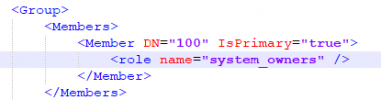
Open your backup and go to the XML file that is contained within.

search for "system_owners"

1740129411900.png

You should see your extension that you defined as a system owner there. This is to verify that you actually do have a system owner defined.

Then do a search in the XML for "<EmailAddress>youremailaddress@yourdomain</EmailAddress>" with the email of the system owner.

If you get more than one hit, then you messed up and do not have a unique email address on your extension
 
Or should the email address for the system owner account be different to the one used to manage the account at https://portal.3cx.com
The system owner email address just has to be unique on this specific PBX and NOT assigned to any other user.
 
The system owner email address just has to be unique on this specific PBX and NOT assigned to any other user.
Thank you so much Nicholas, Very grateful.

I have checked the xml file and found the entry


<Member DN="1001" IsPrimary="false">
<role name="system_owners" />
</Member>

there is only one unique entry for the email address that i have specified.

I think I have made a mistake somewhere as IsPrimary="false"

I tried to go back to version 18.9B but the installer i have is for 18.0.9.31 and the backup is from 18.0.9.35 and it does not allow.

Is there anyway i can download the installer for 18.0.9.35

I have tried restoring the backup from version <version>18.0.5.418</version> but this give me an error regarding the license key

Again not an expert but could i change the xml file, zip it up again and restore

Really very grateful for help
 
There is always a risk of corrupting data if you are going to make an change to anything in the backup.

You will be doing this at your own risk.

If you extract the XML file and make the necessary changes you can ten put the XML file back in to the backup zip. Do not extract everythig and make another ZIP.

Try this, and let us know how it goes.
 
Thank you Nicholas and other experts.

I had also reached out to customer care at 3cx. They have no record of my system owner email account and I am guessing that the one time pincode was the key to getting the link between 3cx and the system owner account. They have suggested a clean install.
I was hoping that they would be able to send me a link again to get the account linked to the pbx.

Will ask otherwise I will be back on the forum to get advice from the experts.

I understand that once a installation is upgraded to V20 the key is also upgraded and cannot be used with a lower version.

My only hope is to modify the xml file and do the restore and hope that the system will reach out to 3cx and i will get a chance to verify the system owner email address.

If anyone has any thoughts, will be really grateful.
 
Hello,

I tried to go back to version 18.9B but the installer i have is for 18.0.9.31 and the backup is from 18.0.9.35 and it does not allow.

Is there anyway i can download the installer for 18.0.9.35


I was in the same situation. Try to install from scratch a 3cx, blank without specific configuration. update it to the vers. 18.0.9.35 and after that restore your backup.

Cheers
 
If you do a search for SMTP in your XML is it set to 3CX?
 
  • Like
Reactions: Curtis C
@Prajesh So when you try to log in, you get no message or error at all, and just see the same login form?

The 3CX customer portal account is separate from your 3CX server. It can use use the same email. It may or may not have the same password.
 
Hello,

I tried to go back to version 18.9B but the installer i have is for 18.0.9.31 and the backup is from 18.0.9.35 and it does not allow.

Is there anyway i can download the installer for 18.0.9.35


I was in the same situation. Try to install from scratch a 3cx, blank without specific configuration. update it to the vers. 18.0.9.35 and after that restore your backup.

Cheers
Thank you so much,I can see a spark of light now.
Very grateful
 
@Prajesh So when you try to log in, you get no message or error at all, and just see the same login form?

The 3CX customer portal account is separate from your 3CX server. It can use use the same email. It may or may not have the same password.
Hello Steve,

When i login i see the page, i then put the email and password , it shows same page but gives a " incorrect username or password message".

Thank you so much Steve for clarifying 2nd point. i was a bit confused myself.

I am going to try the tip to do a plain install of v18 and then upgrade to V8.9B and then restore. Just a bit worried that the licence key may not be accepted. Will have to try and see.

Very grateful for all super experts helping out.
 

Members Online Now

Forum statistics

Threads
111,832
Messages
589,283
Members
164,662
Latest member
DejanMDS