No more replay of voicemails

Status
Not open for further replies.

NogNeetMachinaal

New User
Joined
Jan 12, 2021
Messages
9
Reaction score
0
Team,

Over the past few days I tried to activate the Android client.
This is not working as expected - registration stops without anything specific on why that is.
I assume that it has something to do with not having a FQDN in the registration URL.
The provisioning link says: http://192.168.139.245:5000/provisioning/%Random_Folder_Name%
The "select interface" has only the IP adres and the local domain being itv.lan => nothing that includes the hostname.
Meaning the fqdn is 3cx.itv.lan. However, I can't find a way to change this => suggestions?

In an attempt to get this going, I made some config changes.
Somewhere in the process, I lost (re-)playing voicemails with the phone.
Meaning that in the past, I dialed 99, the system picked-up and started explaining the options.
At the moment, when I dial 99, the system picks-up and nothing happens => everything is quiet.
The phone is a Grandstream model DP-750 with a 720 handset.
The webclient works as expected and still allows me to (re)play voicemails.
Any suggestions here?


Thank you - Will
 
Does your grandstream phone work at all anymore? It sounds like the provisioning settings were changed.

As for the app- has the firewall checker passed? If so you can make sure that Block Remote Tunnel connections isn't checked under the extensions options tab.
 
  • Like
Reactions: NogNeetMachinaal
The "select interface" has only the IP adres and the local domain being itv.lan => nothing that includes the hostname.
The configuration file for the 3CX Clients contains both the external address(FQDN) and the internal address of the 3CX PBX. The "Select Interface" setting only affects the internal address, meaning that the FQDN is always present in the config no matter what you set the interface to in the Extension's settings. That said, the fact that the "Select Interface" option has the local IP of the PBX selected should not affect the device's ability to reach the PBX when remote.

This is not working as expected - registration stops without anything specific on why that is.
I assume that it has something to do with not having a FQDN in the registration URL
Based on the above, the fact that it unregisters should have nothing to do with it. To get more info on this, how have you determined that it unregisters? What do you see exactly, do you get a specific message on the android device?


At the moment, when I dial 99, the system picks-up and nothing happens => everything is quiet.
The phone is a Grandstream model DP-750 with a 720 handset.
Since this is not a 3CX Supported device, I can't really recommend anything specific, but, what you could do to at least narrow it down is to maybe, factory reset it, configure it as you did the first tome but on a newly created extension so that, if it works, you can at least confirm that it is a configuration issue. You could then compare the new extension settings with the old and hopefully figure out what is causing it. As mentioned above, since the device is not supported, we cannot guarantee normal functionality or that it work at all for that matter.


Also, do let us know if the firewall checker passes as mentioned by jcostlow.
 
  • Like
Reactions: NogNeetMachinaal
Thank you for the detailed explanation.

At the moment, when I dial 99, the system picks-up and nothing happens => everything is quiet. The phone is a Grandstream model DP-750 with a 720 handset.

This one turned out to be related to a firmware upgrade => rebooting the devices solved it.

What do you see exactly, do you get a specific message on the android device?

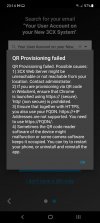
Yes - see attached image with the complete message.

Also, do let us know if the firewall checker passes as mentioned by jcostlow.

  • resolving 'stun-eu.3cx.com'... done
  • resolving 'stun2.3cx.com'... done
  • resolving 'stun3.3cx.com'... done
  • resolving 'sip-alg-detector.3cx.com'... done
  • testing 3CX SIP Server... failed (How to resolve?)
    • stopping service... done
    • detecting SIP ALG... not detected
    • testing port 5060... Mapping does not match 5060. Mapping is 20000. (How to resolve?)
    • starting service... done
  • testing 3CX Tunneling Proxy... failed (How to resolve?)
    • stopping service... done
    • testing port 5090... full cone test failed (How to resolve?)
    • starting service... done
  • testing 3CX Media Server... failed (How to resolve?)

As you can see the firewall checker didn't pass. However, I'm still able to receive and place calls. that doesn't stop me from receiving and placing calls.

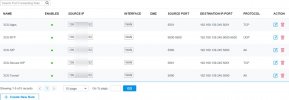
The second screenshot show the forwarding rules in the firewall (i.e. TL-ER7206).

Any suggestions?


Cheers - Will

=====

Screenshot_20210731-231424_3CX.jpg
 

Attachments

  • 2021-08-02_10h43_50.jpg
    2021-08-02_10h43_50.jpg
    68 KB · Views: 2
Does your grandstream phone work at all anymore? It sounds like the provisioning settings were changed.

As for the app- has the firewall checker passed? If so you can make sure that Block Remote Tunnel connections isn't checked under the extensions options tab.

See also my other response:
- the phone is working again after a reboot.
- the firewall checker didn't pass.

Block Remote Tunnel connections isn't checked under the extensions options tab.

This isn't checked.

Thank you for the support so far.


Cheers - Will
 
Since port 5090 (3CX Tunnel port) failed along with SIP and the RTP ports your app won't be able to register over the internet.

Your firewall rule looks like it only allows the port forwarding from source IP 109.x.x.x when it needs to be all.

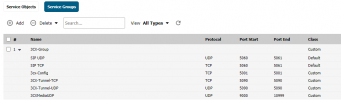
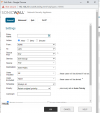
Here is rule and service group on my SonicWall for comparison

Service Group:
group.PNG

Rule:
rule.PNG

For SonicWall there is a NAT Policy as well but just sharing the basic setup of the rule.
 
  • Like
Reactions: NogNeetMachinaal
Security wise we have a ZeroRisk policy. Meaning it is considered mandatory be as specific as possible with port forwarding rules.

If the source-IP is set to all, then malicious port scanning systems can connect. If open ports are found, these systems start with automated login attempts.

On top of that: since we don't have visibility on the software modules in the TCP- and UDP-stack, a hacker my find and exploit holes that we are not aware of.

Combined, this leads to the ZeroRisk policy and the strong preference of working with an explicit source adres in the forwarding rules.
So if there is another service/host needed for the app(s) to work, then we would like to make that explicit and add it to the forwarding rules. Suggestions what that could be?

What is the port range indicated as 3CXMediaUDP used for?


Kind regards - Will
 
You are correct that port scanning systems can scan and attempt to connect. 3CX has security settings for protecting from failed auth attempts and port scanning. Most firewalls like SonicWall also have security services you can license and enable to help.

If you leave your rules locked down then the app won't work outside your network and/or any SBC if you needed later. Port 5090 is the tunnel port and required for the app/SBC.

I called the RTP range media since it actually carries the voice traffic when I made the rules.
 
  • Like
Reactions: NogNeetMachinaal
If you leave your rules locked down then the app won't work outside your network and/or any SBC if you needed later. Port 5090 is the tunnel port and required for the app/SBC.

Just changed the settings and allowed all IP's => still the same result.
I also tested with the Android phone in the same subnet as the 3CX-VM => same result.

So it doesn't really matter - inside or outside the LAN - with or without all IP's - the end result is the same for the Android client.

  • resolving 'stun-eu.3cx.com'... done
  • resolving 'stun2.3cx.com'... done
  • resolving 'stun3.3cx.com'... done
  • resolving 'sip-alg-detector.3cx.com'... done
  • testing 3CX SIP Server... failed (How to resolve?)
    • stopping service... done
    • detecting SIP ALG... detected (sent c2cc8e5d ≠ 06cf1c4f) (How to resolve?)
    • testing port 5060... Mapping does not match 5060. Mapping is 1063. (How to resolve?)
    • starting service... done
  • testing 3CX Tunneling Proxy... done
    • stopping service... done
    • testing port 5090... done
    • starting service... done
  • testing 3CX Media Server... canceled
    • stopping service... done
    • testing ports [9000..9398]... done
      • testing port 9000... done
      • testing port 9002... done
      • testing port 9004... done
      • testing port 9006... done
      • testing port 9008... done
      • testing port 9010... done

As you can see, the story is somewhat different for the firewall check => this is improved (but still not finished).

The fw is licensed for its full capabilities.
 
Are you scanning the QR code from the welcome email or PBX admin/webclient? If from the PBX are you accessing from URL instead of IP?

It usually works after port 5090 is opened and accessing via URL.
 
The Android client only allows scanning the QR-code from the PBX admin/webclient - nothing else.

The URL: http://192.168.139.xxx:5000/provisioning/random_prov_folder
Not if it is relevant: this url can not be reached from a browser.
And yes, this is the correct IP and configured interface.
 
@NogNeetMachinaal

Regarding the following two:
1627890619484.png

1. Check if SIP ALG or other similar services are running on the firewall and disabled them.
2. Make sure port preservation is ensured by disabling any port remapping features on the firewall.

The above however should not affect the 3CX mobile client ability to provision as that will happen over the 3CX's HTTPS port which by default is 5001or 443.

This by itself should not yield any results since it is only the provisioning folder. You need to specify the actual provisioning file as well so what you're seeing is expected.


Try the following:

1. If the 3CX mobile client is remote to the 3CX PBX, from a PC on the same network as the mobile, check if you can access the Management Console of 3CX. If yes, use the QR from within Extensions >> Edit to provision the android device.

2. If the 3CX mobile client is local (local routing is possible) to the 3CX PBX, from a PC on the same network as the mobile, again, check if you can access the Management Console of 3CX using the local IP(NOT the FQDN) e.g https://3CX_Local_IP: Port. If yes, use the QR from within "Extensions >> Edit" to provision the android device.

3. If none of the above work, using the provisioning file within the welcome email directly on the android device. If the device asks how it should be opened select the 3CX App.
 
Status
Not open for further replies.

Latest Posts

Forum statistics

Threads
111,982
Messages
590,120
Members
164,909
Latest member
Jacob.Ive