


- Joined
- Oct 31, 2024
- Messages
- 162
- Reaction score
- 110
Hello,
we are using private 3CX webmeeting server.
Since few weeks we sometimes get an error when joining a meeting:
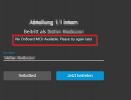
Other user can join the meeting without problems.
Sometimes the problem can be fixed by changing the network, changing the browser, restarting the client or just trying to login several times.
We don't see any logic when this problem occurs and for whom.
Any ideas?
Are there any logfiles with more informations?
we are using private 3CX webmeeting server.
Since few weeks we sometimes get an error when joining a meeting:
Other user can join the meeting without problems.
Sometimes the problem can be fixed by changing the network, changing the browser, restarting the client or just trying to login several times.
We don't see any logic when this problem occurs and for whom.
Any ideas?
Are there any logfiles with more informations?
Last edited:


