Solved No option to invite participants in Quick Meeting

Status
Not open for further replies.

ca_maer

Customer
Joined
Nov 5, 2019
Messages
49
Reaction score
8
When using the webclient and launching a Quick Meeting, according to this doc: https://www.3cx.com/user-manual/video-conferencing/ there should be a button to invite particiant in the upper right corner menu but I don't have such option. There is also no pop-up with the invite link when starting the meeting.
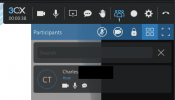
Screen Shot 2021-11-01 at 9.26.59 AM.png

How can I get the link to the meeting to send to the participants ?

Our 3CX version is 18.0 Update 1

Thanks
 
When using the webclient and launching a Quick Meeting, according to this doc: https://www.3cx.com/user-manual/video-conferencing/ there should be a button to invite particiant in the upper right corner menu but I don't have such option. There is also no pop-up with the invite link when starting the meeting.

View attachment 25572

How can I get the link to the meeting to send to the participants ?

Our 3CX version is 18.0 Update 1

Thanks
To get the link enabled, you need to set the user's Click2Meet settings as "Requires you to connect to meeting first". "Approve participants that join the meeting" might be needed as well.
 
To get the link enabled, you need to set the user's Click2Meet settings as "Requires you to connect to meeting first". "Approve participants that join the meeting" might be needed as well.
That was it ! Thanks !
 
Status
Not open for further replies.

Forum statistics

Threads
111,973
Messages
590,076
Members
164,895
Latest member
jasonkkrause