Solved No outbound call using PSTN Generic Gateway in 3CX V20

Status
Not open for further replies.

cbsac

Customer
Basic Certified
Joined
Apr 5, 2016
Messages
7
Reaction score
3
I have been using Dinstar DAG FXO (4Port) Gateway long before without any issues. After the recent upgrade to the 3CX V20, the issue starts.
I am using the Hosted version of 3CX, and all users are using SoftPhone v20.0.0.434.0.
Inbound calls are working properly, I can receive calls and able to transfer to another extension smoothly without any error.

My issue now is I can't make any Outbound calls using the Dinstar DAG FXO (4Port) Gateway.

Event ID
12294
Date & Time
04/26/2024 1:30 PM
Details
Call or Registration to 88886236@(Ln.XXXXXX@XXXXXXX) has failed. sip:124.105.XXX.XXX:43036 replied: Request Timeout (408)


Any input on where to start on this is appreciated.
 
Hi there.
The error seems to come from the IP of the provider/FXO correct?
 
Hi,
The IP address is the public IP Address of my Network.
It does not route the calls to the FXO gateway.
 
So you mean there is an issue with the port forwarding and it won't reach the FXO?
Can you see anything on the FXO logs?
 
No logs related to outbound calls, not even reach the FXO Gateway.
I also consult with the vendor of Gateway, they said they couldn't find any logs that calls from softphone are routed to the Gateway.
 
Yes, but do you see the SIP Register message from the 3CX System is reaching to the actual device?
It can be a networking NAT port forwarding issue
 
The 3CX trunk will send outgoing calls to the IP and port that you have set (not one that the device registers with)...I assume it is 124.105.XXX.XXX:43036. That should be the public IP of the router that your gateway is behind. The router will then have to port forward 43036, to the local IP of your gateway.
Do you not have access to the 3CX activity Logs? If you do, then set to Verbose and follow a call attempt.
 
The 3CX trunk will send outgoing calls to the IP and port that you have set (not one that the device registers with)...I assume it is 124.105.XXX.XXX:43036. That should be the public IP of the router that your gateway is behind. The router will then have to port forward 43036, to the local IP of your gateway.
Do you not have access to the 3CX activity Logs? If you do, then set to Verbose and follow a call attempt.
Hi Leejor,

Correct, the 124.105.XXX.XXX:43036 is our Public IP address and is configured on our FW.
No port forward has been defined in FW going to the Local IP Gateway (Dinstar DAG FXO) ever since 3CX v18

I have here sample activity logs set to verbose.

Level
Warning
Event ID
12294
Date & Time
04/29/2024 2:38 PM
Details
Call or Registration to 88886236@(Ln.XXXXX@XXXXX_XXXXX) has failed. sip:124.105.XXX.XXX:33208 replied: Request Timeout (408)


Warning
1229404/29/2024 2:38 PMSIP ServerCall or Registration to 88886236@(Ln.XXXXX@Route1) has failed. sip:124.105.XXX.XXX:33208 replied: Request Timeout (408)
Warning1229404/29/2024 2:38 PMSIP ServerCall or Registration to 88886236@(Ln.XXXXX@Route2) has failed. sip:124.105.XXX.XXX:33208 replied: Request Timeout (408)
Warning1229404/29/2024 2:37 PMSIP ServerCall or Registration to 88886236@(Ln.XXXXX@Route3) has failed. sip:124.105.XXX.XXX:33208 replied: Request Timeout (408)
 
@cbsac
3CX System is not able to reach your gateway when trying to register.
You will need to do the NAT and firewall port forwarding there so that the PBX can reach the SIP port of the gateway.
 
I was able to resolve the issue "No Outbound Calls" without the port forwarding.
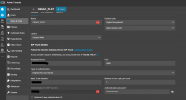
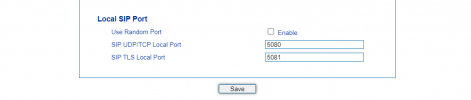
From the 3CX Console "Generic Gateway" I update the port to 5080 and the same with the settings from my Dinstar DAG FXO

1714379729348.png

1714380112108.png
 
Great job, and thank you for the feedback provided.
Have a nice day
 
Status
Not open for further replies.

Forum statistics

Threads
111,953
Messages
589,914
Members
164,849
Latest member
BillyAkansel