


- Joined
- Oct 3, 2021
- Messages
- 1
- Reaction score
- 0
Hi,
I'm new with 3CX, and I need to replace an hosted call center. I want to do this with AWS EC2 vm, and Twillio trunk.
I create my trunk on Twillio interface, configure that with the guide (https://www.3cx.com/docs/twilio-elastic-sip-trunking/) that I found on 3Cx documentation. I can receve inbound call in my trunk (dtmf, 2 way voice is OK) but I cant make outbound calls. I check and recheck my configuration, all seems good
Couple of points:
In activity log, I see this when I try to make outbound call: 10/03/2021 1:37:27 AM - : Failed to create outbound lines to call 18194255555
And the most interresting is when I capture the trafic during call:
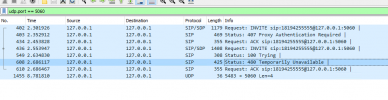
Why the source and destination IP is localhost??? Is there an option that I missed somewhere else???
Thanks!
Bigmat
I'm new with 3CX, and I need to replace an hosted call center. I want to do this with AWS EC2 vm, and Twillio trunk.
I create my trunk on Twillio interface, configure that with the guide (https://www.3cx.com/docs/twilio-elastic-sip-trunking/) that I found on 3Cx documentation. I can receve inbound call in my trunk (dtmf, 2 way voice is OK) but I cant make outbound calls. I check and recheck my configuration, all seems good
Couple of points:
- I disable the E164 option.
- my outboud rules is correctly created (check and double check...)
- 3cx version 16.0.8.9, hosted on Windows server
- Firewall all green checked and activated
- My trunk with Twillio is up
- Registrar: xyz-ca.pstn.twillio.com
- Outbound proxy: xyz-ca.pstn.twillio.com
- type of auth: do not require Ip based (and auth is ok)
- Defaut caller id: my trunk DID on Twillio (+1818614xxxx)
- I can make outbound call to another trunk I've configured (with changes on outbound rules... )
In activity log, I see this when I try to make outbound call: 10/03/2021 1:37:27 AM - : Failed to create outbound lines to call 18194255555
And the most interresting is when I capture the trafic during call:
Why the source and destination IP is localhost??? Is there an option that I missed somewhere else???
Thanks!
Bigmat


