• We do not provide troubleshooting help for unsupported phones. Please try with a supported phone.
  • V20 Update 10 Alpha 2 Learn more

No provisioning GPX 2160

Status
Not open for further replies.

David Fr 87

Free User
Joined
Mar 3, 2022
Messages
5
Reaction score
0
Hello,

I can't provision a GPX2160.
I have updated the firmware, reset the phone to the factory setting.
The phone appears well on the 3cx server. I assign it an existing extension 400, I check the configuration in lan mode and in French and I click on OK.
The phone does not restart, nothing happens. It appears as new on the server and yet by checking the configuration of the 400 extension I see that the phone appears.
I have the impression that the phone does not take the configuration.

We are in V18, under Windows Server 2019.
Local installation only. no open port for access to and from outside.
Computer stations with a softphone work fine.
I have 2 alcaltel temporis terminals set up manually that also work.

What should I do?
Sincerely
David
 

Attachments

Hi David,

Firstly start by following this guide and installing the correct firmware on the device. Your version is different.
https://www.3cx.com/sip-phones/grandstream-gxp21-series/

I noticed that you have edited your ID, and that the IP of the PBX is in a different range than the phone. This might cause problems, it could very well be that the phone cannot contact the 3CX system to provision itself.

Check the Blacklist and ensure the IP of your phone has not been blacklisted.

I think you should do the following now:

1. select the phone from the list and click Reject (Rejeter), and perform a factory reset and wait for the phone to become ready again.

2. If the phone appears in the list again, select it, and assign it to a brand new extension. DO NOT make any changes to the extension - you must leave everything default!

3. You can now assign the phone to your extension, from the Phones page.

Please try this method first, and let us know how it goes.
 
Hello,

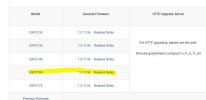
The firmware is the last updated (see capture grandstream site).

https://www.3cx.com/sip-phones/grandstream-gxp21-series/ : Of course I started with that.

Concerning the IP it's normal, the mask is 254, the ranges 0 and 1 communicates without problem.

What do you mean by "edited your ID"?

I checked the ip is not blacklisted.

What you propose in 1 and 2 I have already tried and it did not change anything.

David
 

Attachments

  • firmware.JPG
    firmware.JPG
    34.5 KB · Views: 2
Hello David,

There is a very specific reason I recommended you use the firmware provided by 3CX, and which can be found following our guide: We do not support or test other versions, so while we are troubleshooting together, I cannot be sure that the results you get will match the ones I have tested here in our office. Grandstream also performs tests on the version we serve to ensure compatibility with our platform.

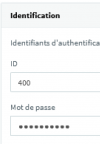
There is also a very specific reason I recommended you to use a new extension with default settings, and this is because I noticed you changed your randomly generated ID for that extension:
1646408152325.png

I wanted to make sure that the phone will receive fresh, randomly generated, and 3CX-compliant settings which are already known to work, and this will give us the best possible chances to remove any variables that could be preventing your from getting the phone to work.

As for the IP range, I don't really know how your network is setup and cannot make any assumptions, I depend on you to check that one :)

By the way, if you are a little familiar with WireShark, you can open the 3CX management console and run a capture on one tab in your browser, while on a second tab you can try to assign the phone. Filter the capture for the IP of the phone, and you should see 3CX sending it a NOTIFY message. At the same time, you can log into your phones web UI and also run a capture via the phone itself which should show the NOTIFY arriving. Finally, on both captures, you should see the phone sending 3CX an http GET request which includes its mac address a la "cfgMACADDRESS.xml"


I hope this information is useful to your for further troubleshooting!
 
Bonjour

J’espère avoir fait ce qu’il fallait.
Vous trouverez 3 traces :
dump-3cx : capture du serveur 3cx lors du provisionnement GPX
gpx2160 : capture du gpx2160 lors de son alimentation
et
gpx-redemarrage : capture lors du redémarrage du gpx2160

Pour info :
ip gpx : 0.82
ip de 3cx : 1.126

Best regards
 
I did it.
I changed the IP address of the phone with an ip in 1.
Why the range in 0 is not taken into account ?
The server in 1 pings the phone in 0 and vice versa.

But I have 2 other problems:
as soon as the phone is provisioned my admin password to connect to the phone UI does not work anymore.

The French parameter is not taken into account in the provisioning from 3cx. The phone remains in English.

Can you help me?

David
 
Hi David

The Ping test only proves that ping works and not much else. It's possible to have ping working, yet everything else might still be problematic.

If you look at your 3CX provisioning page, you will see that we also provision a UI password. You can read the password there.

But before you do, I think you should delete the phone from your extension (and press OK to save), then perform a factory reset.

The phone will restart, and you will see it appear as "New" under the phones page.

Select the phone and click the Assign button on top to assign it to an extension.

This will take you to the provisioning page under the extension, but before you press OK to save, first change the language to french.

After this the phone should provision, restart, and then come online in French.
 
Hi,
Ok for the password.
Concerning the French I had already gone through this.
I will try again next time when I have the time.
I put it in French via the IO of the phone

Thanks for the advice.

David
 
Status
Not open for further replies.

Forum statistics

Threads
112,149
Messages
590,965
Members
165,170
Latest member
SupportRock