No Remote Phonebook

Status
Not open for further replies.

tbc-tech

SOHO User
Joined
Jun 11, 2024
Messages
19
Reaction score
0
After we updated to version 20 none of our Yealink phones can "download" the remote phonebook. A user can still dial by the extension on which a phone is assigned to and that other phone will ring, but no one can lookup an extension to see who that extension belongs to, so they can make sure the correct person is getting contacted.

I saw where people have mentioned that this has to do with a certificate issue since version 20 has different security for provisioning. Others have mentioned that resetting the phones might fix it, but that would be very time consuming.

The phone models we currently have deployed are T22P, T23G, T31G, T40G all with updated firmwares. Any suggestions on how to get phones to "download" the remote phonebook in version 20 will be greatly appreciated.
 
After we updated to version 20 none of our Yealink phones can "download" the remote phonebook. A user can still dial by the extension on which a phone is assigned to and that other phone will ring, but no one can lookup an extension to see who that extension belongs to, so they can make sure the correct person is getting contacted.

I saw where people have mentioned that this has to do with a certificate issue since version 20 has different security for provisioning. Others have mentioned that resetting the phones might fix it, but that would be very time consuming.

The phone models we currently have deployed are T22P, T23G, T31G, T40G all with updated firmwares. Any suggestions on how to get phones to "download" the remote phonebook in version 20 will be greatly appreciated.
Im facing the same issue but phonebook works with me if ip phone on the same vlan with 3cx server
 
After we updated to version 20 none of our Yealink phones can "download" the remote phonebook. A user can still dial by the extension on which a phone is assigned to and that other phone will ring, but no one can lookup an extension to see who that extension belongs to, so they can make sure the correct person is getting contacted.

I saw where people have mentioned that this has to do with a certificate issue since version 20 has different security for provisioning. Others have mentioned that resetting the phones might fix it, but that would be very time consuming.

The phone models we currently have deployed are T22P, T23G, T31G, T40G all with updated firmwares. Any suggestions on how to get phones to "download" the remote phonebook in version 20 will be greatly appreciated.

Did you followed the manual? https://www.3cx.com/sip-phones/yealink-t20p-t22p-t26p-t28p/
 
In a local network the phonebook is pulled via HTTP

1722243524231.png

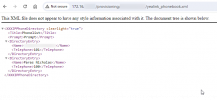
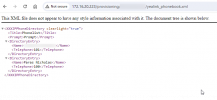
If you get that URL and enter it into a browser, you should ideally see the phonebook in XML format

1722243745228.png

For some reason your phone doesnt seem to have that access.

Things to check.

Firmware of the phone. Please be on the latest supported firmware from 3CX, not the vendor
Network routing allows HTTP(S) access from the phone to the PBX
 

Attachments

  • 1722243625812.png
    1722243625812.png
    21.1 KB · Views: 26
Last edited:
  • Like
Reactions: bitn2
Status
Not open for further replies.

Members Online Now

Forum statistics

Threads
111,832
Messages
589,278
Members
164,662
Latest member
DejanMDS