- Joined
- Jan 25, 2022
- Messages
- 22
- Reaction score
- 11
- 3CX Version: Professional Annual 18.0.7.312
- Server location: Hosted by 3CX
- Server OS: Debian? (Hosted by 3CX)
- IP Phone Make/Model/Firmware version: Yealink T54W version 96.86.0.74
- Provisioning Method: STUN
- Trunk Provider or VoIP Gateway Make/Model: Voiceflex
- Has the Firewall Checker passed: N/A
- Are custom Phone Templates being used: No
We have run into an issue where 1 or more phones sometimes have no transmission or one-way transmission. It could be just 1, many or all phones that are affected. SIP packets are not blocked, but RTP packets are. Internal calls are affected too so it's not the SIP trunk. Restarting the phone usually does not fix the problem. Restarting the router does fix it, but the problem sometimes returns days, weeks or months later. This only seems to happen with DrayTek routers. SIP ALG is disabled.
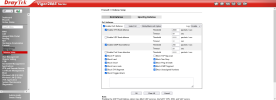
I have narrowed it down to 'Port Scan detection' being enabled under Firewall » Defense Setup. Disabling this solves the problem. DrayTek describe this as below.
Source: https://www.draytek.co.uk/support/guides/kb-denial-of-serviceEnable Port Scan detection
Port Scan attacks involve sending lots of packets to many ports in an attempt to find services that respond. When detected, the Vigor router will monitor the port-scanning Threshold rate and send out a warning if malicious exploration behaviour is detected.
By default, the Vigor router sets the threshold as 2000 packets per second. That means, when 2000 packets per second received, they will be regarded as an “attack event”.
Has anyone else had this or similar problems?
Secondly, having gotten the phone working by disabling the above, there was then intermittent poor speech quality (dropped packets/speech breaking up) on the same phone as above. We resolved this by disabling 'Block TCP flag scan' on the router. DrayTek describe this as below.
Source: https://www.draytek.co.uk/support/guides/kb-denial-of-serviceBlock TCP flag scan
Any TCP packet with the anomaly flag setting is dropped. Those scanning activities include no flag scan, FIN without ACK scan, SYN FINscan, Xmas scan and full Xmas scan.
Does 3CX send packets with the anomaly flag set?
I'm asking the same/similar questions of DrayTek.
Not blaming anyone; just trying to get to the bottom of this as we are concerned about leaving some of these protections disabled.
See also attached screenshot from the router.