Noise on line when answering receiving call. Noise is similar to old Dial-Up.

CharmQuark

Premier Customer
Joined
Jan 12, 2025
Messages
27
Reaction score
4
We have hosted enterpise phone system. It is version 20 Update 7 (no AI yet). The queue agents always connected to the phone system through the company network either through VPN working from home or on the company premises. I'm the phone system Admin with the rights of the phone system owner. I don't have any access and rights to administer the company network. Sometime when a call comes the agent picks up the line and hears the noise similar to the noise of the old Dial-UP connection. The agent disconects the line and the same client dials up again and the connection is normal this time. It happens average 1 time per 100 calls.
I'm wondering if there are some settings on the company internal network to give some privileges to 3CX phone system? It may be any other concerns I am able to take into condsideration?
I would appreciate any suggestions, recomendations etc.
Thank you
 
Regarding your question, the system does not generate fax tones for inbound calls or fax tones in general unless it's a fax extesnion set to G.711 override when using a fax server. This may be coming from the caller's side; please check with your VoIP provider.
 
Thank you Charles,
What happened step-by-step:
1. The client called the company main number and was connected to Digital Receptionist
2. The client made a choice in Digital Receptionist and was transferred to a queue
3. The call was transferred to a free agent extension
4. Agent picks up the line and hears some noise which IS NOT a dial-up but resembles it.

There is no Fax server or Fax extension involved. That was a client human call but the voice was distorted to the level of white noise with resemblance of old Dial-Up tone.

I could imagine that IP packets were not disassembled/assembled the right way on our hosted phone system or at the end of a Windows App client on a laptop. Codecs are in the order PCMU, PCMA, G722, G729, OPUS for all LAN and WiFi connected laptops.

We can live with this but when I say to an agent that the agent missed a call yesterday (which is documented in log files) the agent says in contrary the agent has a distorted call today which I have witnessed.

Nevertheless I am grateful for the response.
VK
 
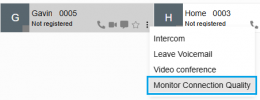
In this scenario, you can collect more information using the built-in call quality monitoring. For this, navigate to your 'Team' page and look for one of the user extensions, to then click the 3 dots icon. Then, click on 'Monitor Connection Quality' to enable this feature for that extension:

1770148058081.png


Once enabled, wait until the issue manifests once again. Navigate to Admin > Reports and create a Call Log report. Find the entry of the issued call and click the 3 dots icon at the right-side of the entry, to then click on 'Show call quality report' to see a report from that particular call. Check whether any jitter or packet loss is detected for the call and from which side.
 
Last edited:
  • Like
Reactions: CharmQuark
Thank you Charles,
What happened step-by-step:
1. The client called the company main number and was connected to Digital Receptionist
2. The client made a choice in Digital Receptionist and was transferred to a queue
3. The call was transferred to a free agent extension
4. Agent picks up the line and hears some noise which IS NOT a dial-up but resembles it.

There is no Fax server or Fax extension involved. That was a client human call but the voice was distorted to the level of white noise with resemblance of old Dial-Up tone.

I could imagine that IP packets were not disassembled/assembled the right way on our hosted phone system or at the end of a Windows App client on a laptop. Codecs are in the order PCMU, PCMA, G722, G729, OPUS for all LAN and WiFi connected laptops.

We can live with this but when I say to an agent that the agent missed a call yesterday (which is documented in log files) the agent says in contrary the agent has a distorted call today which I have witnessed.

Nevertheless I am grateful for the response.
VK
Additionally to my colleague's reply, if you are working with a partner, you can always contact them to open a support ticket on your behalf.
 
In this scenario, you can collect more information using the built-in call quality monitoring. For this, navigate to your PBXs 'Team' page and look for one of the user extensions, to then click the 3 dots icon. Then, click on 'Monitor Connection Quality' to enable this feature for that extension:

View attachment 50872


Once enabled, wait until the issue manifests once again. Navigate to Admin > Reports and create a Call Log report. Find the entry of the issued call and click the 3 dots icon at the right-side of the entry, to then click on 'Show call quality report' to see a report from that particular call. Check whether any jitter or packet loss is detected for the call and from which side.
This is a Golden Advise!
Thank you. I knew about Monitor Connection Quality but did not imagine HOW to apply this tool.
 
I'm not entirely convinced that the steps outlined above by CharmQuark are accurate. I think there is a good chance that someone is calling your phone system with a fax machine. I have doing VoIP systems for 25+ years and in all that time I have never heard a call-quality issue sound like a fax machine or old dial-up modem (yes, I remember those days well).

I had to ask myself, but how does a fax machine navigate the IVR to be routed to the queue? I believe some fax machines can be configured to send DTMF signals, so it is possible for the call to get past the IVR.

I think a Wireshark will answer this question. It will tell you where the phone call originated from so we are accurately match the caller to the offending modem-sounding call. And we can hear the call audio in the capture.

I'm proven wrong probably every single day, but that's my hunch.
 
  • Like
Reactions: Charles_3CX
Additionally to my colleague's reply, if you are working with a partner, you can always contact them to open a support ticket on your behalf.
Thank you. If I were not Admin I would take this advise :)
The issue is not so crucial (we can live with this)
 
I'm not entirely convinced that the steps outlined above by CharmQuark are accurate. I think there is a good chance that someone is calling your phone system with a fax machine. I have doing VoIP systems for 25+ years and in all that time I have never heard a call-quality issue sound like a fax machine or old dial-up modem (yes, I remember those days well).

I had to ask myself, but how does a fax machine navigate the IVR to be routed to the queue? I believe some fax machines can be configured to send DTMF signals, so it is possible for the call to get past the IVR.

I think a Wireshark will answer this question. It will tell you where the phone call originated from so we are accurately match the caller to the offending modem-sounding call. And we can hear the call audio in the capture.

I'm proven wrong probably every single day, but that's my hunch.
Thank you VoIPTools.

I always give a chance to such an assumption. Users/clients are able to invent absolutely unimaginable things.

But the call with distorted voice has been made by our regular customer. 100% not by a fax machine. The client called back in 1 min and the voice was perfect (nearly).
Also we have hosted 3CX phone system. I don't have access to the internal process. And Wireshark (and similar) is prohibited on our company network.

VK
 
The packet capture will show if that noise is coming in from the call source, in which case you need to take it up with your SIP Trunk provider, as they should then be able to check whether it happens in their network or even further up stream.
 
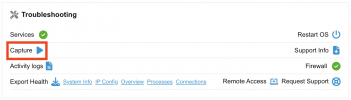
Just to clarify, you do not need to run Wireshark live to capture traffic with it. You can use the capture tool built into 3CX Dashboard, and download the capture to a "safe" machine.

1770189934601.png
 
That was a client human call but the voice was distorted to the level of white noise

This is quite telling: You will typically hear white noise when a codec is being misinterpreted: codec mismatch, SRTP mismatch, transcoding errors.
 
Just to clarify, you do not need to run Wireshark live to capture traffic with it. You can use the capture tool built into 3CX Dashboard, and download the capture to a "safe" machine.

View attachment 50876
Another Golden advice. Thank you very much Kevin!
I will be back to this thread after I find something.
 

Latest Posts

Members Online Now

Forum statistics

Threads
111,852
Messages
589,386
Members
164,691
Latest member
Daz1964