Solved Normal phone cannot register via Router Phone

Status
Not open for further replies.

Kwang Mien

Silver Partner
Advanced Certified
Joined
May 14, 2020
Messages
255
Reaction score
17
Hi,

I am using 3cx version 18 (update 6)

I have setup a Router phone (Fanvil X4U-V2 with extension 101) and a Normal Phone (Fanvil X3U with extension 106) based on the instructions in here
https://www.3cx.com/sip-phones/fanvil-x3-x5/

Both Router and Normal phones are on the same network. My 3cx is in our Data Center. The Router Phone and Normal Phone are provisioned with their extensions.

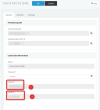
The setting on the Normal Phone (pls see below) shows that the Normal Phone is pointing to the Router phone (extension 101)
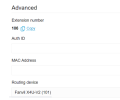
1676526944336.png

The Route Phone is registered but the Normal Phone 's register failed.

I did a wireshark capture for the Registration for the Normal Phone. From the capture, it shows that the Normal Phone sends the REGISTER directly to our 3cx instead of going to the Router Phone. The SIP 403 came from 3cx.

Can anyone advise how to make the Normal Phone registers via the Router Phone ? Did i miss any settings ?


Thank you.

Regards,
Kwang Mien
 
Hi Kwang Mien,

Just reboot your normal phone and it will start working.

Can you confirm?
 
Hi Kwang Mien,

Just reboot your normal phone and it will start working.

Can you confirm?
Hi John,

i restarted it but still it was not able to register. And the REGISTER went to 3cx directly.
Also tried to reset to factory default, and phone restarted. But REGISTER went to 3cx directly.
 
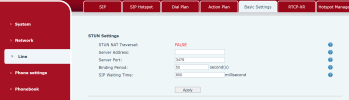
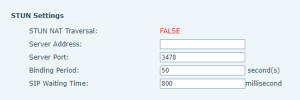
In your normal phone's web UI click Line >> Basic Settings

Do you see exactly the same values as my example below?
1676544079703.png
 
Hi John,

Yes. same setting under the STUN settings.

I noticed in the System -> Auto Provision, under Static Provisioning Server, the Server Address is configured to point to my 3cx.

Also under System->Auto Provision-> SIP Plug and Play (PnP), there is no setting. There should be a setting in Plug and Play to point to the Router Phone. Is that correct ?

1676595348186.png
 
OK just wanted to make sure it was set to FALSE like above.


Also under System->Auto Provision-> SIP Plug and Play (PnP), there is no setting. There should be a setting in Plug and Play to point to the Router Phone. Is that correct ?
Nope, this should be empty so nothing to worry about.


Ok let's check one final thing, the most important part:
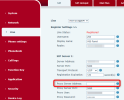
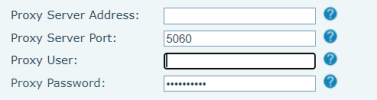
Go to Line > SIP > Is the Proxy there empty??
1676627104311.png
 
Hi Joh
OK just wanted to make sure it was set to FALSE like above.


Nope, this should be empty so nothing to worry about.


Ok let's check one final thing, the most important part:
Go to Line > SIP > Is the Proxy there empty??
View attachment 34335
Hi John,

Yes. it is empty for Proxy Server Address. Is there other settings need to check ?

1676855802492.png
 
Ok this makes sense now, we have confirmed it. The phone has not been provisioned correctly and is missing some information.

The 3CX Event log in the management console may have some information for you. Search it using your phone's mac address and keep clicking the load more button until you find some messages. Alternatively, purge the log and start again to see if a new message appears:

a) make sure your extension name does not contain any special characters. Fanvil has a limitation that will cause the phone to fail correct provisioning

b) make sure the routing device is indeed registered and working because without this, the provisioning of a normal phone will end up like the one you have now

c) factory reset the normal phone using this procedure here (and make note of the exception for U series)

d) when the phone reset is completed, login again and ensure that the enote SIP account remains empty

e) you can now provision it and it should work. this time the proxy field should get filled in if everything was done correctly.

Let us know how it goes!
 
Ok this makes sense now, we have confirmed it. The phone has not been provisioned correctly and is missing some information.

The 3CX Event log in the management console may have some information for you. Search it using your phone's mac address and keep clicking the load more button until you find some messages. Alternatively, purge the log and start again to see if a new message appears:

a) make sure your extension name does not contain any special characters. Fanvil has a limitation that will cause the phone to fail correct provisioning

b) make sure the routing device is indeed registered and working because without this, the provisioning of a normal phone will end up like the one you have now

c) factory reset the normal phone using this procedure here (and make note of the exception for U series)

d) when the phone reset is completed, login again and ensure that the enote SIP account remains empty

e) you can now provision it and it should work. this time the proxy field should get filled in if everything was done correctly.

Let us know how it goes!
Hi John,

I did the following, but the Normal Phone is not registered and the Proxy Server Address is empty

a. There is no special char in the extension name
b. Router Phone is registered.
c. Factory reset the Normal Phone
d. Login to the Normal Phone and checked that the SIP account is empty
e. Followed the steps in https://www.3cx.com/sip-phones/fanvil-x3-x5/ for Normal Phone. One time Pin is generated
f. Rebooted the Normal Phone
g. Upon reboot, Entered the extension and one time Pin
h. I can see the extension name appearing on the Phone LCD. However phone is not registered and Proxy Server Address setting is empty.

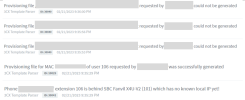
Below are some errors in the Event Logs related to the provisioning

1676987539425.png

Can you advise ?

Thanks.
 
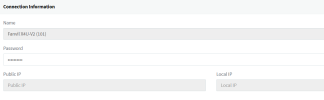
Let's look at your router phone's SBC under SIP Trunks:

a) Does it have a Public IP? (what IP is it?)
b) Does it have a local IP? (what IP do you see here especially?)
(send me these IPs as a private message please)

c) Also tell me the firmware version of your X3U


1676988736688.png
 
Let's look at your router phone's SBC under SIP Trunks:

a) Does it have a Public IP? (what IP is it?)
b) Does it have a local IP? (what IP do you see here especially?)
(send me these IPs as a private message please)

c) Also tell me the firmware version of your X3U


View attachment 34376
Hi John,

a. there is no IP for the router phone SBC

1676989360711.png

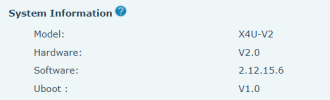
b. The firmware version of X3U is 2.4.12
 
And the firmware of your router phone?
 
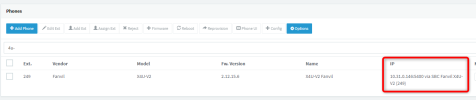
Ok we are on to something now. Go to the Phones pages in 3CX

You will see your Router phone registered there. What IP does it show?

1676989789850.png
 

Attachments

  • 1676990014216.png
    1676990014216.png
    22.8 KB · Views: 4
The public IP or a LAN IP like 192.168.x.x?

Please send me the IP in the private message so I can see.
 
Thanks John, for taking the time to troubleshoot on this issue.
Issue was the Router Phone misconfiguration due to X4U was upgraded only after adding the "Router Phone".
 
  • Love
Reactions: JohnS_3CX
OK after reviewing this case it looks like the issue was caused by the following:

1. Initially the X4U-V2 was configured as a plain X4U and it retained the wrong configuration.

2. After the firmware was upgraded and the phone was removed and re-added as a Router phone, but it still remembered the old configuration.

3. This meant that the SBC was not active, and the PBX provided this information
1676994607455.png

4. The X3U (normal phone) which relied on the router phone was provisioned, but it was missing critical information: the SBC IP which is needed in order to register.

The solution:
- Reset and reprovision router phone first. It will come up and populate its public and local IP in the SBC page of the MC as confirmation.

- Make sure you remove your IP from the blacklist if you got blacklisted! (otherwise provisioning will fail)

- Reset and reprovision the X3U so it can now receive proper configuration and will also register as expected.
 
Status
Not open for further replies.

Members Online Now

Forum statistics

Threads
111,834
Messages
589,287
Members
164,663
Latest member
svdDGS