Not able to get Server Side Tab under CRM Integration

Status
Not open for further replies.

ganeshevate

Free User
Joined
Aug 4, 2021
Messages
12
Reaction score
0
In 3CX Management Console,

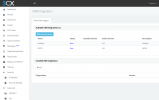
In Setting, under CRM Integration there is only Client Side but Server Side not available. What should to do for it? Attaching screenshot with the same.
 

Attachments

  • Screenshott.PNG
    Screenshott.PNG
    49.4 KB · Views: 13
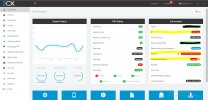
On the front screen of 3CX management console does it say 'Professional' under license in the information window

You could also try refreshing your license Settings - License Settings - Refresh License Key Information.

Reboot of server ?
 
Showing Activation Failed 16.0.8.9

I refreshed but still the same
 
Showing Activation Failed 16.0.8.9

I refreshed but still the same
Run a firewall checker and make sure it's all green.

This could be:
- Internet not working
- Firewall blocking outbound
- DNS not working

Where is the PBX hosted?
 
Got this message before getting logged in to Management Console,
Warning!
Your license key is not activated! Login to the Management Console > Settings > License and re-activate your key.
Facing issue while login as well. Every time i need to install 3CXPhoneSystem.

Under Information

IP Address - Error IP Address Mismatch
License Activation - Failed
Maintenance Expiry - Expired

  • resolving 'stun-eu.3cx.com'... done
  • resolving 'stun2.3cx.com'... done
  • resolving 'stun3.3cx.com'... done
  • resolving 'sip-alg-detector.3cx.com'... done
  • testing 3CX SIP Server... failed (How to resolve?)
    • stopping service... done
    • detecting SIP ALG... failed (How to resolve?)
    • testing port 5060... used by '3CXPhoneSystem':8016 (How to resolve?)
    • starting service... done
 
Last edited:
Is the license used on another system somewhere? Like a Hosted by 3CX or an old Google Cloud instance (we see that a lot.)
 
Also, if you're on Linux, use the Dashboard > Terminal and do "ping activation.3cx.com" and make sure it works.
 
Open a CMD and do the same ping command.
 
Check your internet configuration: DNS and such.
 
I think first i need to activate the license key as 'Activation Failed'
 
How can i activate license
 
Your internet connection is on the Windows machine, not the 3CX software. The activation fails because it cannot reach the activation server.

You need to fix your internet (probably DNS or something) first and then the system will activate and you'll be able to use it.

Where is the PBX hosted? On-premise or Cloud?
 
Your internet connection is on the Windows machine, not the 3CX software. The activation fails because it cannot reach the activation server.

You need to fix your internet (probably DNS or something) first and then the system will activate and you'll be able to use it.

Where is the PBX hosted? On-premise or Cloud?
i do not have idea about PBX, attaching first page on 3CX Management Console
 

Attachments

  • InkedScreennnnn_LI.jpg
    InkedScreennnnn_LI.jpg
    703.9 KB · Views: 4
Okay, do you have access to the Windows machine hosting the 3CX PBX? Where it is installed.

If so, does that machine have Internet access (like, open Chrome or Edge and load Google.)
 
Status
Not open for further replies.

Latest Posts

Forum statistics

Threads
111,982
Messages
590,120
Members
164,909
Latest member
Jacob.Ive