Solved "Not found" calling from the app

Status
Not open for further replies.

cleanden

Premier Customer
Joined
Feb 18, 2021
Messages
19
Reaction score
5
Phone: Samsung S10
Android: v10
App: v16.6.2.89
3CX PBX: v16.0.8.9
Network Connection: WiFi and LTE / IPv4
Client is not on the same network as the PBX

My 3CX server is running onsite as a Proof of Concept before doing it again for real in the cloud. Following are my observations:
  • From the softphone I can have my Android app call another extension successfully, but from the app itself I get a quick flash of "Not found" then nothing
  • If I switch my cell phone from my (segregated) Guest WiFi to the Internal WiFi it starts working as you'd expect, but this is not a workable solution
  • Conversely, my guy in CA is working from home at the moment and using his home WiFi, but he gets "Not Found" also
  • If I switch my WiFi off and use my cell service I also get "Not Found"
It appears like the Android app isn't using the FQDN but rather it's trying to connect to the local IP and failing.

I tried changing "Network interface for registration and provisioning" on my extension to use the FQDN but as that hasn't actually been set up I wasn't able to test it.
 
Hmm, in testing from home I am unable to successfully use the Android app, web client or softphone.

Firewall tests are all successful so I'm at a loss to explain what's wrong here.
 
Hi cleanden,

Are you using dynamic IP for the 3CX Phone System?
Could it be that the IP Address changed?
 
Your app needs to reach the PBX on on the tunnel port (5090 by default).

If the wifi you used does not provide a path to that, or if you haven't properly forwarded your ports, then the app will not be able to make calls successfully. Check your port forwards first and foremost, and also run the 3CX firewall checker after you have completed your port forwards.
https://www.3cx.com/docs/ports/


Also, what do you mean exactly by this, can you elaborate please?
  • From the softphone I can have my Android app call another extension successfully, but from the app itself I get a quick flash of "Not found" then nothing
 
Your app needs to reach the PBX on on the tunnel port (5090 by default).

If the wifi you used does not provide a path to that, or if you haven't properly forwarded your ports, then the app will not be able to make calls successfully. Check your port forwards first and foremost, and also run the 3CX firewall checker after you have completed your port forwards.
https://www.3cx.com/docs/ports/


Also, what do you mean exactly by this, can you elaborate please?
  • From the softphone I can have my Android app call another extension successfully, but from the app itself I get a quick flash of "Not found" then nothing
I have the following ports forwarded:
  • 5000 - TCP
  • 5001 - TCP
  • 5060 - TCP & UDP
  • 5090 - TCP & UDP
  • 9000-9398 - UDP
  • 10600-10999 - UDP

So, from Windows app if I select desk phone to dial *777 or the other extension I set up, my cell phone app will start ringing and connect me. Conversely, If I pick up my cell phone and from the android app itself I dial *777 or the other extension it says "Not found"
 
I've had some time to think about this: "I tried changing "Network interface for registration and provisioning" on my extension to use the FQDN but as that hasn't actually been set up I wasn't able to test it." and it makes me wonder if I need that DNS entry because when I'm on the LAN it's working.

My account on the android app shows Local PBX as an internal IP, and External PBX shows mycompany.co.3cx.us which I assumed would work as it resolves and my Web UI is running on that same URL.
 
Some initial things to do:
1. You should have the entire range of 9000-10999 UDP forwarded, not just the ones you mentioned
2. Run the firewall checker and ensure everything passes. If anything fails it should be addressed first

Afterwards, do the following please:

1. Create a brand new extension, leave all settings default
2. Just add your email to the extension, and send yourself a welcome email
3. Delete and reinstall the 3CX mobile app
4. Turn off WiFi
5. Turn on LTE only
6. Use the QR included in the email to provision the app

If successful, the app should be able to call *777 provided nobody else is using at the moment.
The test should be over LTE only, to ensure your local network is not involved in the test at all.
 
Some initial things to do:
1. You should have the entire range of 9000-10999 UDP forwarded, not just the ones you mentioned
2. Run the firewall checker and ensure everything passes. If anything fails it should be addressed first

Afterwards, do the following please:

1. Create a brand new extension, leave all settings default
2. Just add your email to the extension, and send yourself a welcome email
3. Delete and reinstall the 3CX mobile app
4. Turn off WiFi
5. Turn on LTE only
6. Use the QR included in the email to provision the app

If successful, the app should be able to call *777 provided nobody else is using at the moment.
The test should be over LTE only, to ensure your local network is not involved in the test at all.
I'm working from home today so this is a good day to test this, and after running through all of that I still get Not Found when I dial *777 from the app.
From the Windows app I get Call failed, Declined
The Web client connects but I can hear no echo

I don't remember seeing this failure before in the Firewall Check:
detecting SIP ALG... not detected
but I suspect it's because I don't have any SIP trunks connected at this point. I am assuming that everything should work internally even without Trunks.
 
The webclient probably fails due to the incomplete port forwards.

By the way, have you spoken with your 3CX Partner yet? They may be able to take a look at the logs and assist you further.
 
The webclient probably fails due to the incomplete port forwards.

By the way, have you spoken with your 3CX Partner yet? They may be able to take a look at the logs and assist you further.
Gah! My laptop speakers were muted.
Webclient works, Desktop app via softphone says Call failed, Declined and via Desk Phone it calls my Android app which works
 
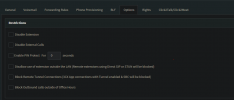
Hi, Declined, could that mean you have not unchecked disallow use of extension outside LAN?
1614269619159.png
 
Hi, Declined, could that mean you have not unchecked disallow use of extension outside LAN?
View attachment 20869
Thanks Michael.
I did have that checked still, per John's suggestion not to change any defaults, but even after unchecking it there is no change while I'm off-LAN.

Thanks,
Alex
 
Solved it by enabling Allow calls from/to external SIP URIs and pasting in my FQDN

Thanks for your assistance!
 
  • Like
Reactions: VasilisV_3CX
Status
Not open for further replies.

Members Online Now

No members online now.

Forum statistics

Threads
111,831
Messages
589,277
Members
164,660
Latest member
RJenkinsROCK