Not registering on LTE network

Status
Not open for further replies.

Peter Bata

Joined
Dec 22, 2016
Messages
12
Reaction score
0
Running version 15.0.0 on our on-premise Debian server

I am currently running 3CX in a test environment. Dynamic IP

Devices:

1 Cisco 303 IP phone
1 iPhone 5 running latest 3CX client
2 Samsung Galaxy Tab A running latest 3CX client

All devices are "On Hook" when using internally over WiFi. Inbound / Outbound calls, and calls to all extensions functioning properly.

When out-of-office, WiFi is turned off / Telus LTE gets switched on.

Cannot get beyond "Registering" None of the devices go "On Hook" Tried re-provisioning same result.
Verified port forwarding. All appears fine at router. FQDN provided by 3CX resolves to my public IP.

Your assistance will be greatly appreciated.

Peter
 
Last edited:
Hello @Peter Bata

Please make sure that you pass the firewall checker to rule out any firewall issues and also make sure that under extension settings / Phone provisioning the option "Use 3CX Tunnel for remote connections (3CX Client only)" is enabled.
 
  • Like
Reactions: Peter Bata
Check the 3CX server log to see if there a registration attempt, and any error messages that may be associated with it. Don't forget the extension option, that by default, blocks registration from outside the local LAN.
 
  • Like
Reactions: Peter Bata
Check the 3CX server log to see if there a registration attempt, and any error messages that may be associated with it. Don't forget the extension option, that by default, blocks registration from outside the local LAN.
Hello @Peter Bata

Please make sure that you pass the firewall checker to rule out any firewall issues and also make sure that under extension settings / Phone provisioning the option "Use 3CX Tunnel for remote connections (3CX Client only)" is enabled.

First off, let me take a second to thank you for responding. I appreciate it.

Firewall checker: All passed with success.
Phone provisioning option is enabled.
 
Here is an update. After my original post yesterday, I decided to let things be as they were. I did not bother with the issue again till approx midnight when I decided to repeat what I had done earlier in the day. Which was to disable WiFI and enable LTE. I tried the same while out visiting a client today and everything functioned as expected.

Bingo, just like that all devices went On Hook and I was able to make inbound and outbound calls. Go figure. I had not made any modifications whatsoever. Bizarre.

Thank you all for chiming in. I appreciate it immensely.

Peter
 
Last edited:
Check the 3CX server log to see if there a registration attempt, and any error messages that may be associated with it. Don't forget the extension option, that by default, blocks registration from outside the local LAN.

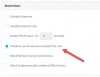
Hello leejor. Are you referring to the section that I am making reference to in the attached screenshot. If so, that option was checked when I made an outbound call from a clients premises this morning. So, theoretically, I was outside my LAN. But was using one of our Samsung Tablets. The manual reads:
  • Disallow use of extension outside the LAN – Blocks any registrations from outside of the network. This setting applies to IP phones.
 

Attachments

  • 3CX Restrictions - 2017-01-27_12-45-21.jpg
    3CX Restrictions - 2017-01-27_12-45-21.jpg
    29.5 KB · Views: 17
That option is checked by default to prevent an extension being used outside that LAN without prior approval. Unless you were using VPN, the extension should not register if seen as being outside the local LAN. You should see a log to that affect.

Is there a possibility that the original problem was a result of both Wifi and 4G being enabled at the same time?
 
That option is checked by default to prevent an extension being used outside that LAN without prior approval. Unless you were using VPN, the extension should not register if seen as being outside the local LAN. You should see a log to that affect.

Is there a possibility that the original problem was a result of both Wifi and 4G being enabled at the same time?

No, I absolutely made sure to turn off Wifi followed by the enabling of the mobile data option on my tablets settings.

As far as the LAN option goes: As I said in an earlier post, I was at a clients this morning with two of our tablets. (LTE enabled only) This client is definitely outside of our LAN

Thank you very much for your time and assistance.


Peter
 
Check the 3CX server log to see if there a registration attempt, and any error messages that may be associated with it. Don't forget the extension option, that by default, blocks registration from outside the local LAN.
By the way, when you say "server log", is that the same as the activity log that is available from the dashboard.

Thank you
 
Sorry, I should have been more specific as there are more than one "server" logs. Activity log should show you registration attempts.

It will show the IP, that the device is registering from (and port), which might explain why registration is allowed even if the option is set to prevent it.
 
  • Like
Reactions: Peter Bata
Sorry, I should have been more specific as there are more than one "server" logs. Activity log should show you registration attempts.

It will show the IP, that the device is registering from (and port), which might explain why registration is allowed even if the option is set to prevent it.
Understood. Thank you. I downloaded and installed 3cxbinlogviewer. Seems to be quite thorough. Although, I haven't had much time to work with it yet
 
Status
Not open for further replies.

Members Online Now

Forum statistics

Threads
111,832
Messages
589,285
Members
164,662
Latest member
DejanMDS