- Joined
- Aug 26, 2021
- Messages
- 12
- Reaction score
- 3
Notes:
Check if you can access your SBC to reboot before you start the upgrade.
Make a full backup AND a smaller one with only licensing and FQDN info. I think the max upload for backup is 4 gig if you use the 3cx web install.
If you are following this guide https://www.3cx.com/docs/upgrading-pbx/ steps 3 moving forward are all after you finish the upgrade.
I was not able to run the upgrade via the v18 web console so I used the "install" under "my systems" with the recover from backup option.
Questions:
On the count down page for the new install when it finally refreshed it took me back to the start of the installer process. I did not get a success email or user and password. Is this normal if you restore as a part of the install? Any way to check the logs that the process finished successfully?
If I place my v18 backup on a FTP server, can I point my v20 install to it for a restore? Any way to just restore the old voicemails? Backup file is 11 Gig.
Pro Tip:
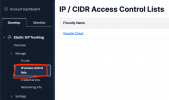
If you are getting a message similar to "your admin has blocked this call" for all outbound calls after your upgrade, check that you have your new server ip address allowed in Twilio IP access control lists (see attached).
Check if you can access your SBC to reboot before you start the upgrade.
Make a full backup AND a smaller one with only licensing and FQDN info. I think the max upload for backup is 4 gig if you use the 3cx web install.
If you are following this guide https://www.3cx.com/docs/upgrading-pbx/ steps 3 moving forward are all after you finish the upgrade.
I was not able to run the upgrade via the v18 web console so I used the "install" under "my systems" with the recover from backup option.
Questions:
On the count down page for the new install when it finally refreshed it took me back to the start of the installer process. I did not get a success email or user and password. Is this normal if you restore as a part of the install? Any way to check the logs that the process finished successfully?
If I place my v18 backup on a FTP server, can I point my v20 install to it for a restore? Any way to just restore the old voicemails? Backup file is 11 Gig.
Pro Tip:
If you are getting a message similar to "your admin has blocked this call" for all outbound calls after your upgrade, check that you have your new server ip address allowed in Twilio IP access control lists (see attached).