Solved O365 SSO Issue

Status
Not open for further replies.

dza

Customer
Joined
Jun 5, 2019
Messages
29
Reaction score
4

I have integrated Office 365 with my 3CX PBX, and the configuration appears to be complete. Office 365 Single Sign-On (SSO) is enabled on the PBX, and the integration settings were set up as per the documentation listed here https://www.3cx.com/docs/manual/microsoft-365/
However, when I attempt to log in to the 3CX web client using my Office 365 account:
  1. I click the Sign in with Microsoft 365 option.
  2. I enter my email, password, and complete the 2FA process.
  3. After authentication, I am redirected back to the login page instead of being logged in.

Can you assist in identifying what might be causing this issue and provide guidance on resolving it? I replicated the same issue on multiple browsers and also in private/incognito mode
 
Did you figure this out. I have the same issue after upgrading to V20, U5 Final
 
No. I still have the same issue.
 
Not sure if this helps or not, but I got mine working.

After upgrading to V20, the MS logon button is present. When you select it, the screen refreshes and redisplays, but no logon.

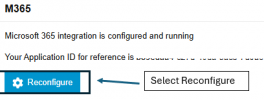
  • I removed the registered app from 365 Entra.
    1743435383407.png

  • In the 3cx Admin Console, I configured integration for 365 which created a new app registration in Entra.
    1743435415380.png

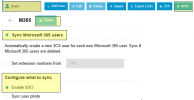
  • In the Users / M365 tab, I enabled M365 Sync, SSO1743436529565.png
    • Caution: We changed email domains a few years ago...
      • After having 400+ duplicate accounts created with new extensions, and everyone getting an email about the change....
      • After I realized what happened I updated some of the users so their 3cx email actually matched the 365 domain, then deleted all the new fake accounts
      • I also have call queues that are used to send voicemail to a shared mailbox so multiple people can check it. I did not want them synced.

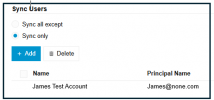
      • So... I selected to sync only certain accounts.
        1743436337048.png

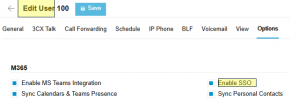
      • Last verified checked the users who were not working to make sure SSO was checked on the options page
        1743436419428.png
 
I think I am having a similar issue as you all.

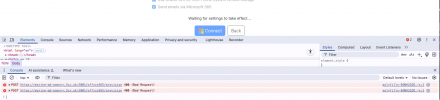
Was doing my weekly systems review and saw that my M365 integration wanted a reconfiguration. I attempted to complete the process but the website (integration.3cx) showed "waiting for settings to take effect" then nothing. I have tried the following:

  • I have attempted the configuration process on Safari and Chrome thinking it could be an issue with the browser.
  • I have removed the parameters for Office365_config, restarted my system and deleted the application on Microsoft entra. attempted again and then the process gets to the same place and then doesn't create anything on Microsoft entra.
  • I have rolled back my changes and attempted the reset again with also updating the parameter office365_config_reset_cache with a 1 (now removed) but same issue.
Our office uses Microsoft 365 for everything so this configuration is needed.

Any help would be amazing, could this be an update issue and we are waiting for a new update to resolve?

Google Chrome showed this information as it was waiting for the settings to take effect.

CleanShot 2025-06-11 at 12.52.29.png

Safari shows the following error as well

CleanShot 2025-06-11 at 13.01.13.png

It seems their current version may have an incorrect start date in the configuration for M365 to set up the application and connect the website.

Any help would be appreciated.

Regards

Darren
 
Okay, minor update issue still persists but on the "all applications" page on entra, there were now 20 3cx applications, I have deleted them all and left safari trying to connect it but something is throwing a 400 error to complete the configuration
 
I;
Not sure if this helps or not, but I got mine working.

After upgrading to V20, the MS logon button is present. When you select it, the screen refreshes and redisplays, but no logon.

  • I removed the registered app from 365 Entra.
    View attachment 47232

  • In the 3cx Admin Console, I configured integration for 365 which created a new app registration in Entra.
    View attachment 47233

  • In the Users / M365 tab, I enabled M365 Sync, SSOView attachment 47239
    • Caution: We changed email domains a few years ago...
      • After having 400+ duplicate accounts created with new extensions, and everyone getting an email about the change....
      • After I realized what happened I updated some of the users so their 3cx email actually matched the 365 domain, then deleted all the new fake accounts
      • I also have call queues that are used to send voicemail to a shared mailbox so multiple people can check it. I did not want them synced.

      • So... I selected to sync only certain accounts.
        View attachment 47237
      • Last verified checked the users who were not working to make sure SSO was checked on the options page
        View attachment 47238
I followed your instructions, but I'm still having the same issue. Any thoughts?
 
I think i went through all those in an attempt to resolve the issue.

The final solution was my time was out of sync with real time. Once the time sync issue was resolved everything started working again
 
  • Like
Reactions: KyriacosS_3CX
Status
Not open for further replies.

Latest Posts

Forum statistics

Threads
111,973
Messages
590,075
Members
164,895
Latest member
jasonkkrause