Odoo integration

Status
Not open for further replies.

Qly

Gold Partner
Advanced Certified
Joined
Apr 7, 2020
Messages
14
Reaction score
5
Hi,

I would like to integrate Odoo with 3CX.
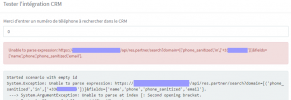
I installed a REST API module on Odoo, and I tried to create the template via the Wizard, but I always have this error "HTTPStatusCode=MethodNotAllowed" when requesting the number.

In fact, the REST API to search number used by Odoo is PATCH, and we cannot use PATCH with HTTP (correct me if i'm wrong)

There is a lot of Odoo modules that can be used to have REST API on Odoo, so all the results may vary according to the module used.
Does anyone has already successfully integrated Odoo with 3CX ? (what module were you using, and what template have you created ?)

Thanks in advanc for your help.
Adrien
 
Hello Adrien,

You can only invoke GET or POST HTTP requests from the template. A PATCH request makes no sense in this case, as you're not partially modifying anything. A contact lookup should be GET (some APIs require POST), but never PATCH. That would be a wrongly designed API.

Regards.
 
  • Like
Reactions: Evolute IT
Hello Ernesto,

Thanks for your answer ! :)
I changed the REST API module I used previously for a better one.

I can now request with GET instead of PATCH.

However, i'm still not able to request from 3CX.
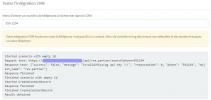
A program such as "ARC RET API" successfully requests and returns parameters, while I have "API KEY invalid" with the 3CX CRM Tester.

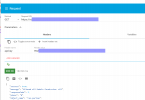
This is working :

1610010797613.png


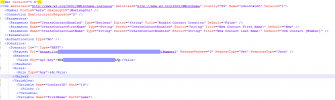
But this is not :
(I tried to put the header in the scenario request)

1610010854316.png


1610010969548.png

Do you notice any errors in the template ?
Thanks for you help.
 
Found the error,
The template was missing an indentation in the request ...

Create the value with the template instead of manually in the .xml helps ! :)

1610011347744.png
 
I'm facing another error now.

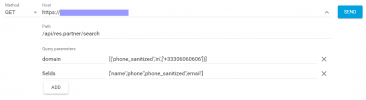
I successfully request from ARC with this request (search number in database)

1610021708596.png


But CRM template is not accepting it, and I don't know how to write it

Any idea ?

1610021776650.png
 
Found the error,
The template was missing an indentation in the request ...

Create the value with the template instead of manually in the .xml helps ! :)

View attachment 19953
Yes, in the original template the Headers element was outside of the Request element. Now it's inside and the request considers it.

I'm facing another error now.

I successfully request from ARC with this request (search number in database)

View attachment 19963


But CRM template is not accepting it, and I don't know how to write it

Any idea ?

View attachment 19964
Change the following:
  • [ >> {{
  • ] >> }}
Because opening and closing square brackets are reserved to define variables. This is explained here:
https://www.3cx.com/docs/server-side-crm-template-xml-description/#h.2oikrv8ncny6
 
  • Like
Reactions: Qly
I changed to the encoded version and it worked :

1610029340403.png


Thanks for your time !
 
  • Like
Reactions: edossantos
Just curious, what REST API are you using to integrate this? Because from what I know Odoo doesn't have a native REST API, correct?
 
Indeed. Only xmlrpc.

I tried a module name "OpenAPI" (free) (the one that was not working with PATCH)
Now i'm using this one :

1610029508296.png
 
Thanks for the feedback! Let me know if you have any other issues.
 
I'm blocked now to create contact.

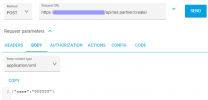
This POST works with ARC :


1610983944221.png

But not this one from the template :

1610984002245.png

Any idea what could be wrong ?
Thanks
 
In the template, you're specifying that the content-type is XML, but it should be JSON. If you specify XML, the items from the PostValues element will be converted to XML and not to JSON. In the request that works, you're sending the body as JSON, so the contect type should be "application/json".
 
I tried using json, but the API returns me that it's a bad request, that's why I used XML.
But i'm not quite sure how to write the xml part ...


API returns :

"message": "400 Bad Request: <function RestWebServices.createSearchData at 0x7f60007ab950>, /api/res.partner/create/: Function declared as capable of handling request of type 'http' but called with a request of type 'json'",
 
After checking the request in the template, I think the problem is the RequestEncoding attribute. You're using:
RequestEncoding="UrlEncoded"

But you should use:
RequestEncoding="Json"
 
  • Like
Reactions: Qly and Evolute IT
The JSON being sent is properly formatted. You should check with the API guys what they expect in this case...
 
Hi,

I contacted the module's support and they told me I have to send the data in plain text.
Is 3CX able to do that ?

Thanks
 
Hi,

I contacted the module's support and they told me I have to send the data in plain text.
Is 3CX able to do that ?

Thanks
Yes, in the Request element you can specify the Message attribute, and there send the text with the format you need. You might also need to specify the RequestContentType attribute as text/plain.
 
  • Like
Reactions: Qly
Thanks !

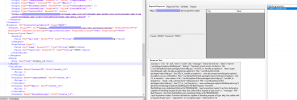
Working now, here's the request if someone need :

1611929686046.png
 
  • Like
Reactions: edossantos
Status
Not open for further replies.

Latest Posts

Forum statistics

Threads
112,324
Messages
591,897
Members
165,475
Latest member
lastshadow