Solved Office Hours for After Hours

Status
Not open for further replies.

mygeeknc

Bronze Partner
Basic Certified
Joined
Mar 25, 2019
Messages
28
Reaction score
7
We have a DID that is used for after hours calls separate of our main DID. I only want the after hours DID to ring from 17:00 on a weekday until 07:59 the next morning. It doesn't appear that I can do this, the interface disables the OK button. What's the proper way to set this up?
 
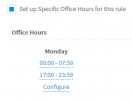
Add 17:00-23:59, and then, 00:00-07:59.
 
Right, I thought about that too but I can put multiple times. So for example to do this correctly I'd need two times. 17-23:59 and 00:00 - 07:59 for each weekday. I can't seem to do that either.
 
Right, I thought about that too but I can put multiple times. So for example to do this correctly I'd need two times. 17-23:59 and 00:00 - 07:59 for each weekday. I can't seem to do that either.
You should be able to. Where are you doing this setting? Inbound rules or main system hours?
 
Inbound rules for this DID, the main system hours are set to 08:00 - 17:00.
 
Inbound rules for this DID, the main system hours are set to 08:00 - 17:00.
You should be able to do this:

1627835064030.png

Can you confirm?
 
  • Like
Reactions: ChrisC_3CX
I think I was having a brain fart, I thought it was asking me to change the existing time. Thanks for your help @Frederick Marcoux
 
  • Like
Reactions: Evolute IT
Status
Not open for further replies.

Forum statistics

Threads
111,974
Messages
590,081
Members
164,899
Latest member
mazet