- Joined
- Apr 14, 2021
- Messages
- 98
- Reaction score
- 59
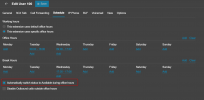
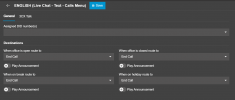
This is a configuration I have in v18 for one DID
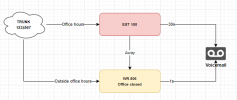
In V20 I tried:
Option 1
-Assigned DID 1234567 to extension 100.
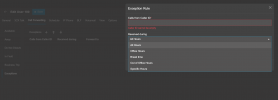
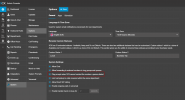
-Set up a department "Dep1" with office hours from 7am to 11am, and assigned ext. 100 to the department. (took me a while to figure out the AM-PM text in the set time range modal is actually a button to toggle AM/PM, there's no indication it's a button)
-If I call 123456 at 2pm, extension 100 rings.
Option 2
- Assigned DID to ext 100
- Set up office hours for the extension
- If I call outside the office hours I specified, it still rings
What's the purpose of setting office hours for the extension if there's no routing possible? Does it switch status?
Option 3 (this seems the correct way, am i right?)
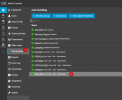
-Assigned DID 1234567 to Dep1 group,
- Routed when office is open to ext 100.
- Routed when office is closed to IVR office closed
- This works, I'm just not sure this is the correct way
- (if I route office closed to "End call" I get an audio that says that the destination number is busy, shouldn't it just drop the call?)
So far option 3 is the one that makes sense to me. Just wanted to check if I'm understanding the logic correctly
Let's say I have a GNR with 100 DID's and each number calls a different extension. Setting up office hours using option 3 I would have to create a department for each extension, correct? (or one ring group for each extension)
thanks
In V20 I tried:
Option 1
-Assigned DID 1234567 to extension 100.
-Set up a department "Dep1" with office hours from 7am to 11am, and assigned ext. 100 to the department. (took me a while to figure out the AM-PM text in the set time range modal is actually a button to toggle AM/PM, there's no indication it's a button)
-If I call 123456 at 2pm, extension 100 rings.
Option 2
- Assigned DID to ext 100
- Set up office hours for the extension
- If I call outside the office hours I specified, it still rings
What's the purpose of setting office hours for the extension if there's no routing possible? Does it switch status?
Option 3 (this seems the correct way, am i right?)
-Assigned DID 1234567 to Dep1 group,
- Routed when office is open to ext 100.
- Routed when office is closed to IVR office closed
- This works, I'm just not sure this is the correct way
- (if I route office closed to "End call" I get an audio that says that the destination number is busy, shouldn't it just drop the call?)
So far option 3 is the one that makes sense to me. Just wanted to check if I'm understanding the logic correctly
Let's say I have a GNR with 100 DID's and each number calls a different extension. Setting up office hours using option 3 I would have to create a department for each extension, correct? (or one ring group for each extension)
thanks