


- Joined
- Nov 2, 2021
- Messages
- 19
- Reaction score
- 2
Hi All
I've been playing around with off system backups
So having my backups go to an offsite storage
Took a little to get setup and working but works (want as much security as I can )
)
One issue I've run into
When I do a manual backup so log into the system and tell it to backup now works 100% ok to my offsite FTP server
But Scheduled Backups fail
Keep getting the following
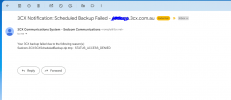
Your 3CX backup failed due to the following reason(s):
Sedcom-3CX\3CXScheduledBackup.zip.tmp : STATUS_ACCESS_DENIED
Now I can log in right now and run a backup and will work then Schedule 5 minutes later and it will fail
This is Happening on V18 and V20 Systems
Any thoughts
I've been playing around with off system backups
So having my backups go to an offsite storage
Took a little to get setup and working but works (want as much security as I can
) One issue I've run into
When I do a manual backup so log into the system and tell it to backup now works 100% ok to my offsite FTP server
But Scheduled Backups fail
Keep getting the following
Your 3CX backup failed due to the following reason(s):
Sedcom-3CX\3CXScheduledBackup.zip.tmp : STATUS_ACCESS_DENIED
Now I can log in right now and run a backup and will work then Schedule 5 minutes later and it will fail
This is Happening on V18 and V20 Systems
Any thoughts


