On Premise Fanvil Language and Time Zone NTP not found #2

Status
Not open for further replies.

Alle CTEC

Silver Partner
Advanced Certified
Joined
Sep 11, 2023
Messages
356
Reaction score
44
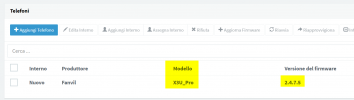
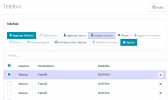
The main ticket has been closed as resolved but the 3cx problem is not because if you select the extension in the telephone screen and assign it to an extension only the X3U template appears and not the X3U PRO. Otherwise, by adding the phone from the user screen with the correct template and mac address it is supplied but in phones I am left with the attached screen
 

Attachments

  • Step01.PNG
    Step01.PNG
    15 KB · Views: 6
Most likely again this is because of wrong firmware.

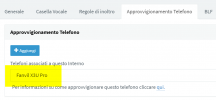
Please notice how my user agent appears for the correct firmware version:
1697036198544.png

So when I assign it automatically, the system detects it as a X3U Pro
1697036244339.png
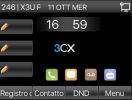
Finally the phone provisioned with the correct language and time:
1697036419139.png
 
  • Like
Reactions: Alejandro_3CX
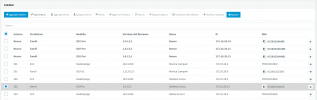
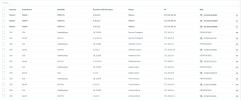
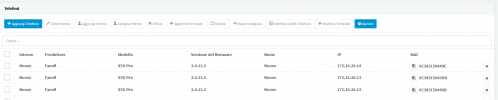
The attached screens show you that the phone appears 2 times and in the correctly supplied one I have inhibited functions such as reboot.
 

Attachments

  • Qaurto.PNG
    Qaurto.PNG
    37.6 KB · Views: 4
  • Terzo.PNG
    Terzo.PNG
    49.8 KB · Views: 5
  • Primo.PNG
    Primo.PNG
    20.9 KB · Views: 4
  • Secondo.PNG
    Secondo.PNG
    3.7 KB · Views: 4
Today I realized that if I selected assign extension from the phones menu it automatically set the model as X3U without the possibility of changing it. Differently, adding the telephone from the telephone provisioning users menu is associated correctly but remains as in the screens in the telephone menu.

the phones' firmware cannot be updated from 3cx
 
Last edited:
the phones' firmware cannot be updated from 3cx
Here you can find the supported firmwares, please download the correct firmware and update de device.

Then perform a full factory reset and give it a try.
 
I downloaded the firmware but it doesn't load due to error
 
In the past I have provisioned phones that had a more up-to-date firmware and the control panel offered me to downgrade the firmware right during the provisioning phase, in this case it does not do so. Furthermore, I have X5U-V2 correct firmware 2.12.16.22 and X3U 2.4.12 and I am unable to transfer calls. Either he goes blind or assisted. I can't give the customer a procedure to decide what to do
 
As per provided screenshots you are using X3U PRO and the firmware should be 2.4.7.5
Also what steps do you make to transfer the call? Additionally this applies to call transfer for external calls or to internal as well?
 
I have 2 X5U-V2 phones and 1 X3U and these are perfectly aligned with 3cx firmware ok on these phones whether it is internal or coming from external. Whether using the transfer or xfer key, the phone only performs the transfer set in the user menu. The customer instead asks me for a simple procedure to carry out both operations. Which can be done from the client as an example because it has 2 buttons, one for blind transfer and the other for assisted transfer Thank for spport
 
Mostly for Fanvil devices you have to:
For manual transfers ensure you are using this method:

- Press "Xfer"
- Type the extension
- Either press "Xfer" again for Blind
- Or press "Dial" for Attended, speak to the other person, and press "Xfer" to complete the transfer

Now if you want to transfer for example to another extension, why you do not use the BLF?
 
I will carry out some tests and let you know in the meantime, thanks
 
Let me know the results
 
updates:

Fanvil X3U Pro factory reset phone, turning on the phone by pressing the # button. The phone starts with IP 192.168.1.179 and responds to the wan port web menu firmware update effects firmware upload but does not perform any updates. the phone remains still left for an hour nothing to do. rebooted and starts with 2.4.12.5

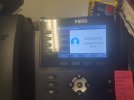
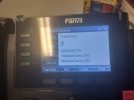
Fanvil X5U-V2 phones the procedure sent and works only if you do not use the blf keys. Because you press xfer and the digit key appears only after pressing the first digit of the number. If you use blf, the option set in the users panel is valid. I attach the screen shots
 

Attachments

  • Fanvil Transfer.PNG
    Fanvil Transfer.PNG
    4.6 KB · Views: 5
  • 20231012_163202.jpg
    20231012_163202.jpg
    3.5 MB · Views: 5
  • 20231012_163214.jpg
    20231012_163214.jpg
    2.7 MB · Views: 5
  • 20231012_163210.jpg
    20231012_163210.jpg
    2.6 MB · Views: 5
The recovery mode gives you a specific IP to visit so you can provide it with the firmware file.

Your PC NIC must also be in the same IP range otherwise the web interface will not be reachable.
 
Of course I turn on the phone with the # key pressed and it starts in recovery mode http://192.168.1.179 I connect with my PC IP 192.168.1.x to the WAN port of the phone I open the browser http://192.168.1.179 the the screen shows me the firmware, I click upgrade, it uploads, then it tells me I have uploaded the firmware, wait for the phone to restart. I waited more than an hour the phone did nothing.
 
The transfer issue is related to the option User -> Phone Provisioning -> "Select the transfer method used (Blind or Assisted) when pressing a DSS key"

I checked and this option does not appear on snom phones

Both 3cx version18.08.939
 
This is device specific, you should contact Fanvil for this.
 
It is not specific to the device but it is an option that appears in Yealink phones and Fanvil phones. It does not appear in Snom phones which in fact allow you to make a blind or assisted transfer with the BLF keys.
 
Update regarding the firmware, Fanvil support is verifying the issue of Firmware downgrade to 2.4.5.7 For the BLF transfer there are no solutions Yealink and Fanvil are not supported like SNOM
 
Whatever option is offered on the phone is not something that is controlled from 3CX. This is something that has to do with the vendor.
 
Status
Not open for further replies.

Members Online Now

No members online now.

Forum statistics

Threads
111,835
Messages
589,289
Members
164,665
Latest member
dominik.pepel