Solved On Premise Fanvil Language and Time Zone NTP not found

Status
Not open for further replies.

Alle CTEC

Silver Partner
Advanced Certified
Joined
Sep 11, 2023
Messages
356
Reaction score
44
Problem with 3cx on premise phones Fanvil X5U-V2 and X3UPRO Phones do not correctly take language and time settings defined in the provisioning menu. If I go into the phone to configure them manually it no longer registers
 
Hi @Alle CTEC what is the firmware version on the phones?

is the system running version 18.0.8.939?

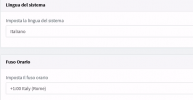
what is the default time zone configured in the pbx? if you go to the dashboard --- click on date do you see the correct time zone, date and hour?

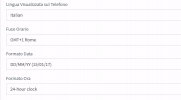
could you please share a screenshot of the phone provisioning tab
 
The control panel version is the latest 18.0.8.939. Phones with central firmware I attach screen shots. I attach a screenshot of an interior. The option you indicated does not exist on the dashboard. However, here is a screen with the time zone of the control panel. The station's time is perfect. The options I pass to the phones are not implemented, language, time and ringtone

Thank you
 

Attachments

  • 3CX Time.PNG
    3CX Time.PNG
    13.6 KB · Views: 4
  • Fanvil Provisioning.PNG
    Fanvil Provisioning.PNG
    23.8 KB · Views: 4
  • Fanvil Firmware.PNG
    Fanvil Firmware.PNG
    5.7 KB · Views: 4
this is an on premise installation, did you install on windows? if so then validate that the OS is using the correct time zone please.

Then set the phones with the default time zone.
 
Debian iso 3cx but is the switchboard time correct?
 
Also, check that you are using Google DNS, the phones need to resolve correctly the ntp server pool.ntp.org

Check in your network that dhcp option 2 or 42 are not in use.
 
I don't use direct Google DNS but an internal DNS on which I performed the DNS split which performs forwarding on Google DNS. but I would like to use an internal ntp that I pass to the phones but they don't understand
 
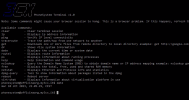
Here is the 3cx timetable from the terminal
 

Attachments

  • 3cx date.PNG
    3cx date.PNG
    186.7 KB · Views: 4
Mamma mia, please bear in mind that the phones take the time from the ntp server and not from the pbx.

when you set the time zone on the phones, this is only to apply the time zone parameter within the provisioning template, they will get the time from the ntp server for the specific time zone configured.

Try to use the default ntp, without any custom ntp server, nor dhcp option 2 or 42, use the default settings resolving correclty the ip of pool.ntp.org and this should work out of the box ;)
 
I enabled ntp.pool.org and it correctly took the time and time zone that it didn't take before. I don't understand why it didn't synchronize the time zone and above all why it doesn't take the ntp server which passes the dhcp to it. I know that the time passes to the ntp server but the time zone and the time format are passed on to the control panel and it didn't receive them
 
Well, then is not a problem with the 3CX as you mentioned at the beginning, I just wanted to let you know this works out of the box and you could confirm it, then if you try to change the things you will need to know what you are doing and troubleshoot from there.

Have a good one my friend!
 
This is because I didn't even get the timezone, the given format and the ringtone set by 3cx. ???? does the phone have to have the correct time to perceive these options?
 
From the phones menu --- you can select the device and click on Config, there you will see the template with the settings you have set.

Phones must be running with the default template and not a custom one.
 
I have not changed the phone template. The only thing I tried to set on the phone is get time from dhcp. But I haven't changed any options on the control panel template. The phones are new firmware updated from 3cx. And the phones were provisioned from the phones menu as they were detected as new. the only change was the time updated via ntp. Anyway, thank you very much for the support
 
  • Like
Reactions: Alejandro_3CX
You are welcome, have a great week ahead! :D
 
Instead the problem was actually 3cx I noticed that the phone was recognized as X3U and not as X3UPRO I had to delete the extension and recreate it manually not as self-recognition and now everything works even internal ntp
 
Instead the problem was actually 3cx I noticed that the phone was recognized as X3U and not as X3UPRO I had to delete the extension and recreate it manually not as self-recognition and now everything works even internal ntp
I disagree entirely that this is a 3CX issue. The evidence can bee seen in your screen shot we can see you are using the wrong firmware with the wrong user agent being sent to 3CX.
1697027588925.png


3CX cannot recognize the phone correctly and assign the right settings if you are not using the correct firmware.

Please install the supported version version as per here so it can be recognized correctly like you see in my example below:
1697027631631.png
 
  • Like
Reactions: Alejandro_3CX
Status
Not open for further replies.

Members Online Now

Forum statistics

Threads
111,834
Messages
589,287
Members
164,664
Latest member
dominik.pepel