On Version 18 and Current Maint - FQDN CHange

Status
Not open for further replies.

dancestop

Customer
Joined
Jan 18, 2022
Messages
12
Reaction score
0
I can change my "Setting for Direct SIP Calls" to "activate.3cx.com" but my "Fully Qualified Domain Name" cannot be changed (right above "Setting for Direct...") and has a message above this box to that affect. Am I changing the 'activate.3cx.com' in the correct place?
 
As you are running ver 18, just install the update when available

the only thing you may have do it open up 3cx server access to fqdn activate.3cx.com if you block outbound 3cx access to the internet

Put back the settings you have changed

More info here https://www.3cx.com/blog/releases/fqdn-endpoint-change/
 
Last edited:
Hi @dancestop

What were you trying to achieve here, and why?
 
I simply did not understand the change for FQDN. I am a novice and have previously updated to current OS level and will wait for fix later in the year. I have backed out the change I made.
 
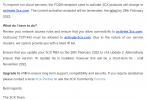
If you are referring to this email below that we sent recently, it was a general reminder to make sure nobody is caught by surprise by the following change:

- The activation FQDN was activation.3cx.com for everything until V18 Update 1

- From V18 Update 2, we are now using the new servers at: activate.3cx.com

Since this is a big change, and we know a lot of customers have strict firewall rules, we wanted to let everybody know so they can update theirs and their customer's firewalls. Most people will not have to do anything at all if their firewall did not already have strict outbound rules.

Just to make it 100% clear, you do not change anything on the 3CX system. Those who may need to make changes will make them on their firewalls only.

Ok how can I be 100% sure everything will be fine?

- First update to "V18 Update 2"
- Click the Refresh button your licence via the management console
- If the license refresh works, you are good to go
- If the license refresh fails (an error will appear), you might have to review your firewall rules and try again


3CX | FINAL REMINDER [Action Required] Change of FQDN Endpoint

1642598216748.png
 
Not quite same situation but new user, install 3CX on a Pi a couple of months ago.
The "FINAL" was a surprise as no previous info.

Would be useful to build on the info provided by JohnS_3CX above in future Email alerts.

The Email (only) hints at having V18 means you do not need to take any action on the PBX itself.
Does not say explicitly that only change needed is on a firewall that can have FQDN entries (like expensive ones)
Does not mention the V18 build see Dashboard under Information/Version = 18.0 Update 2 (Build 314)

(as there is always logic in these update Emails then a flow chart would be really handy and show the questions and steps required to check as this flow of thoughts must be {even subconsciously} be in the mind of the person writing the Email? )

To check you update status on Dashboard hit the big blue icon bottom right.. "Updates" :)

Hopefully you will get...

Your system is up to date. Last checked: Today, 17:55
Automatically update 3CX

3CX will automatically check and download available and relevant updates on the selected date/time. Updates including 3CX supported firmwares for your existing IP Phones, language files, PUSH certificates and sip trunk templates will be applied automatically.

3CX "RELEASE" updates will also be downloaded and installed automatically. If the update is a "Alpha/Beta (unstable)" update, then this will not be automatically installed and must be installed manually if needed. Alpha/Beta updates are used to evaluate an upcoming version before it is officially released and should be used for testing and evaluation purposes. Do not install Alpha/Beta updates on your production systems.

When updates are applied, all 3CX Services will be restarted numerous times. So it is important that the checking for updates is done at a time when the pbx is in Out of office hours.

On Linux systems, this option also automatically installs Debian Security Updates.

-------------------------------------------------------------------------------------------------------------------------------
I like the PBX, I like the above too, it means with backups on (hope you have) {must look for a way to manually or automatically copy the completed backup to another disk somewhere i.e. off the Pi SD card } you don't have to do any normal updates and for those of us with a simple router/firewall no action needed.
 
Hi @Burt99

Thanks for your feedback! It's understandable that if you only recently joined 3CX, some things may not make sense immediately, but that's perfectly fine - this is what our forum is here for.

If you have any questions or need clarifications, we will always be here to provide answers and assistance. And by we, I mean both 3CX Staff, 3CX Partner, and the 3CX Community at large.

By the way, did you know that you can perform backups on remote destinations straight from 3CX? We support Google Storage, FTP, SFTP and SMB. So as soon as your system completes a backup, it will upload it to your destination of choice, to be safely stored outside of your machine. And with backup rotation, you can have say your last 5 rolling backups, so you can have more than just the last restore point.

We highly recommend newcomers take full advantage of our 3CX Academy that covers most of what you will need, and additionally you can look at the right sidebar of this forum page for free "Upcoming Webinars" that we provide with our 3CX Trainer.
 
Thanks for info on "remote destinations" really useful !
 
  • Like
Reactions: JohnS_3CX
Status
Not open for further replies.

Forum statistics

Threads
111,974
Messages
590,083
Members
164,901
Latest member
Silent_Guru