- Joined
- May 18, 2021
- Messages
- 68
- Reaction score
- 20
Hi all,
I'm having a real headscratcher here maybe someone else could point me in the right direction.
Some specs:
two different 3CX installs, one RPI 4, one windows, same VoIP provider
3CX 16.0.8.9 on both machines
Sitting behind the same make/model of firewall but different sites and IP addresses, identical firewall rules.
both 3CX firewall tests are green (Full Cone NAT + no ALG)
3CX delivers audio on the trunks has been checked, re-invite and replace has been unchecked.
same for all extensions. 3CX delivers audio, re-invite and replace has been disabled.
When making a call, 3CX => external number, we have two way audio.
When taking a call, external => local extension, we have two way audio
When forwarding a call to an extensions voicemail => One way audio, external caller hears the message to record. But the recordings are empty.
When forwarding a call to an external number => One way audio, external caller can hear the person on the line, but calleé that receives the forward hears nothing
when forwarding a call to an 3cx app on mobile => One way audio again, the external caller hears the person on the line but the app is silent.
When making an internal call 3CX remote extension on mobile app to 3CX internal extension => two way audio.
I'm currently leaning towards an issue with the Provider, since the moment a call is being transferred there is no audio.
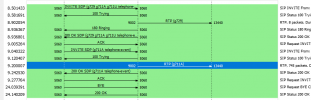
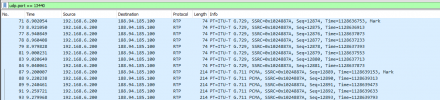
When tracing this kinds of calls, I can also only see audio leaving the 3CX server, but never receive audio.
Any help would be greatly appreciated.
I'm having a real headscratcher here maybe someone else could point me in the right direction.
Some specs:
two different 3CX installs, one RPI 4, one windows, same VoIP provider
3CX 16.0.8.9 on both machines
Sitting behind the same make/model of firewall but different sites and IP addresses, identical firewall rules.
both 3CX firewall tests are green (Full Cone NAT + no ALG)
3CX delivers audio on the trunks has been checked, re-invite and replace has been unchecked.
same for all extensions. 3CX delivers audio, re-invite and replace has been disabled.
When making a call, 3CX => external number, we have two way audio.
When taking a call, external => local extension, we have two way audio
When forwarding a call to an extensions voicemail => One way audio, external caller hears the message to record. But the recordings are empty.
When forwarding a call to an external number => One way audio, external caller can hear the person on the line, but calleé that receives the forward hears nothing
when forwarding a call to an 3cx app on mobile => One way audio again, the external caller hears the person on the line but the app is silent.
When making an internal call 3CX remote extension on mobile app to 3CX internal extension => two way audio.
I'm currently leaning towards an issue with the Provider, since the moment a call is being transferred there is no audio.
When tracing this kinds of calls, I can also only see audio leaving the 3CX server, but never receive audio.
Any help would be greatly appreciated.