Ongoing issues with PUSH notifications

Dale_MFG

SOHO User
Joined
Mar 10, 2025
Messages
8
Reaction score
3
I'm posting this in the iOS channel as it seems to be a more pronounced issue here, however it seems that I and many others are having Push Notification issues with the 3CX mobile application on iOS and Android devices.

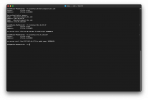
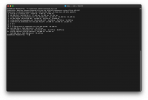
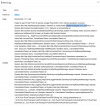
My personal investigation appears to lead to issues with the 3CX server (self-hosted) communicating with the 3CX hosted Push Notification servers (pbxservicespush.3cx.com:443) - in all cases where mobile devices fail to get a notification of an incoming call, this domain is called out on the error screen (Screenshot 1). This domain appears to be running behind a Cloudflare proxy which is blocking the connection for an unknown reason (screenshot 2) - Cloudflare Ray ID: 983ceec6d9251480 should be usable to investigate the nature of the block on their end.

Checking the domain with NSLOOKUP (screenshot 3) and TRACEROUTE (screenshot 4) indicates that there is a viable route between the site where our self-hosted 3CX server resides and the domain in question, and we've confirmed that there is no outbound blocking of services to this domain/IP within our site routers, so outside of Cloudflare arbitrarily blocking our server's service requests to the push notification servers, there appears to be nothing that should be preventing the push notification requests to complete.

This has been an ongoing and extremely frustrating issue for both myself and my staff who rely on being able to contact our management team through this system - I had originally posted about this issue back in May and eventually the chat simply stopped after attempting to follow up with a 3CX rep on the matter. As a result of this, (as well as the fact that this appears to be an ongoing issue with 3CX based on the flood of posts in the forums,) it's causing me to seriously re-evaluate our phone system needs going forward, which is extremely unfortunate considering we have been using the system for a few years now and have overall been fairly happy with the platform and it's capabilities.

I would appreciate a response and path to resolution of this issue as quickly as possible.
 

Attachments

  • Screenshot 1.png
    Screenshot 1.png
    209.5 KB · Views: 23
  • Screenshot 2.png
    Screenshot 2.png
    100.5 KB · Views: 21
  • Screenshot 3.png
    Screenshot 3.png
    145.9 KB · Views: 19
  • Screenshot 4.png
    Screenshot 4.png
    151.8 KB · Views: 20
Hello,

A general question, is there IPv6 on the PBX server? as that can some times mess with routing.

Also check if the time on the PBX server is correct.
 
Hello Dale_MFG,

Like yriacosS_3CX, already did mention, please check if you have IPv6 on the 3CX server.
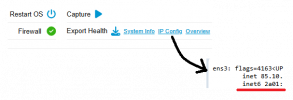
Login to the Admin - Dashboard, and click on IP Config:

1758717639327.png
New webpage with IP details should open, please find "inet6" if on Linux machine.

Paulo
 
Thank you for the quick response on this... the last time I reached out about this issue nobody mentioned potential IPv6 issues.

I can confirm that there was an IPv6 address on the server, even though the rest of our network runs IPv4 only - I've since disabled IPv6 on the interface and rebooted the server, and will continue to monitor if there are any other issues with this.

Also, can confirm time on the server is correct to our local timezone.
 
  • Like
Reactions: paulodagraca
I've since disabled IPv6 on the interface and rebooted the server
Windows or Debian 3CX?

Disabling IPv6 in the 3CX administration won't be enough. We disable it on the system.

On Debian, in the /etc/sysctl.conf file:
net.ipv6.conf.all.disable_ipv6 = 1 ,
on Windows, in the registry as recommended by Microsoft:
HKLM:\SYSTEM\CurrentControlSet\Services\Tcpip6\Parameters: DisabledComponents = 255 and EnableICSIPv6 = 0 .
 
  • Like
Reactions: paulodagraca
Our install is running in Debian - and yes, I did use the sysctl configuration to disable IPv6 system-wide, and rebooted the server.

Sadly, the issue persists after disabling IPv6 - another screenshot of an error from today is attached for reference.

Considering that going to the server referenced in a browser returns a message that the connection is blocked at Cloudflare, I have to wonder if perhaps something in the chain is being rate controlled?
 

Attachments

  • Screenshot 2025-09-24 at 2.35.09 PM.png
    Screenshot 2025-09-24 at 2.35.09 PM.png
    231.1 KB · Views: 22
Our experience is that it is the DNS settings of the telephone system that prevent the PUSH messages from being delivered. ymmv
 
Our experience is that it is the DNS settings of the telephone system that prevent the PUSH messages from being delivered. ymmv
Are you able to expand on this a bit? I'm confused as to how DNS configuration can intermittently impact the ability for my self-hosted server to establish an outbound connection to a 3CX hosted server, especially when DNS lookups and traces from the server to the destination servers appear to process without issue.

At this stage, I appreciate any information you can provide as this has been driving me and my team nuts for more than a year now.
 
Well, our experience has shown that not all DNS servers are suitable for resolving DNS queries completely and reliably on the local machine. This used to be less of a problem.

If this issue crops up here and there - you can usually spot it quite quickly in the logs -then we simply switch to a different DNS server.

The Telekom (we're based in good old Germany) is one such example. If the DNS server in /etc/resolv.conf is problematic, we either configure a firewall that uses and caches reliable DNS servers, or we configure 3CX to use Quad9 or Google's DNS servers. That usually solves the problem. Unfortunately, there's no one-size-fits-all solution :\

edit:
Some ISPs not only offer their own DNS servers, but also strongly encourage their use, and may even block or redirect DNS queries to other servers. That's another problem as well.
 
Last edited:
Well, our experience has shown that not all DNS servers are suitable for resolving DNS queries completely and reliably on the local machine. This used to be less of a problem.

If this issue crops up here and there - you can usually spot it quite quickly in the logs -then we simply switch to a different DNS server.

The Telekom (we're based in good old Germany) is one such example. If the DNS server in /etc/resolv.conf is problematic, we either configure a firewall that uses and caches reliable DNS servers, or we configure 3CX to use Quad9 or Google's DNS servers. That usually solves the problem. Unfortunately, there's no one-size-fits-all solution :\
Got you. Sadly, I don't think that this is the case in our instance - we have a split-horizon DNS in place, and our internal DNS server is configured to use Cloudflare's DNS as it's next hop, which hasn't had any resolution problems for any other outbound lookups that we're aware of. We've also confirmed that external resolution to our self-hosted server via the FQDN configured in our 3CX portal works as expected.
 
Hello @Dale_MFG ,

Just to mention this here, it may not impact you as you have the DNS sorted.
Anyone reading this later in time may bennefit. (i hope)

If you use an 3CX provided FQDN, than use Google DNS ( 8.8.8.8 and 8.8.4.4 ) !
This can be set in the network settings of the server.

Back to your question.
You could set the FQDN (pbxservicespush.3cx.com) in the hosts file of the server.
In this case the FQDN will be pinned to IPv4 and DNS is not needed for this FQDN (just as a test for some days).

If it fails again, it is not a DNS problem for sure. If it is stable for a few days, you can assume it is a DNS problem.

I know its not a direct fix, but hopefully will help you to move to a fix.

Paulo
 
You could set the FQDN (pbxservicespush.3cx.com) in the hosts file of the server.
Oh no, sorry but I don't think that's a good solution, but ymmv
 
It is not a sollution !

In this case the FQDN will be pinned to IPv4 and DNS is not needed for this FQDN (just as a test for some days).
...
I know its not a direct fix, but hopefully will help you to move to a fix.

Did mention this very clear !
 
  • Like
Reactions: fxbastler
Our install is running in Debian - and yes, I did use the sysctl configuration to disable IPv6 system-wide, and rebooted the server.

Sadly, the issue persists after disabling IPv6 - another screenshot of an error from today is attached for reference.

Considering that going to the server referenced in a browser returns a message that the connection is blocked at Cloudflare, I have to wonder if perhaps something in the chain is being rate controlled?
I see the error message changed to "cannot assign requested address".

Did you let the PBX know it no longer has IPv6 available? Perhaps it's still trying to bind there. Running "ip -a" on the machine to verify there really isn't any mention of IPv6 would be good.

1758778106434.png
 
  • Like
Reactions: fxbastler
I see the error message changed to "cannot assign requested address".

Did you let the PBX know it no longer has IPv6 available? Perhaps it's still trying to bind there. Running "ip -a" on the machine to verify there really isn't any mention of IPv6 would be good.

View attachment 49505
Good call - I did miss disabling the bind to IPv6 adapters in the network settings. This has now been disabled and the SIP service has been rebooted - I'll update if the issue continues.

I did also previously confirm with the "ip -a" and "ip addr show" commands that there were no further references to the IPv6 interfaces on the server's network adapters,.
 
Hello,

Let me get back to what I have mentioned:

You could set the FQDN (pbxservicespush.3cx.com) in the hosts file of the server.
In this case the FQDN will be pinned to IPv4 and DNS is not needed for this FQDN


The reason that I did mention this is NOT to supply a sollution, but to QUICKLY test what is wrong.
If you would (in Debian), type "nano /etc/hosts" and add at the fqdn line and save, you would be able to test this in realtime!
Meaning No reboot of server, no reconfig of the network adaptor or stack, nothing... realtime check.

The test would be able to tell you if there is any problem with IPv6 or DNS, as it will bypass this, and use the IPv4 you have entered directly in the hosts file.
If the test still fails, it would mean there is some other problem with the network, like firewall or blacklist, something else than DNS or IPv6 for sure!

You can remove the FQDN from the hosts file again, with no harm or update and no reboot needed, still have your answer quick.
Other options are also good, this is just MY personal QUICK test, to check this.
Hope this wil help anyone in the future on DNS/IPv6 testing

Paulo
 
  • Like
Reactions: KyriacosS_3CX
@paulodagraca just for discussion and to have a kind of more complete answer for this specific case (Hopefully it is now resolved).

- I agree, your way is indeed the simplest, quickest way to exclude or pinpoint IPv6 DNS issues.

In the case at hand, your test I believe would have worked, but then removing the IPv6 interface and not letting the PBX know, while still receiving the full DNS answer after removing the hosts entry, would have in anyway lead to the Could not bind to interface error.

So in general, if with any test IPv6 interfaces need to be taken down, the PBX needs to also be told not to try and bind to those interfaces any more.
 
  • Like
Reactions: paulodagraca
@paulodagraca just for discussion and to have a kind of more complete answer for this specific case (Hopefully it is now resolved).

- I agree, your way is indeed the simplest, quickest way to exclude or pinpoint IPv6 DNS issues.

In the case at hand, your test I believe would have worked, but then removing the IPv6 interface and not letting the PBX know, while still receiving the full DNS answer after removing the hosts entry, would have in anyway lead to the Could not bind to interface error.

So in general, if with any test IPv6 interfaces need to be taken down, the PBX needs to also be told not to try and bind to those interfaces any more.
Correct !
 
  • Like
Reactions: KyriacosS_3CX

Forum statistics

Threads
111,816
Messages
589,153
Members
164,633
Latest member
jkilaha