


- Joined
- Jun 26, 2017
- Messages
- 45
- Reaction score
- 8
Hey,
First, I'd like to say how impressed I am with the OpenAI integration - the transcript is great, but the summary is a feature I never knew I needed, and cannot now live without. It enables me to quickly see the nature of calls handled without needing to bother people. Idea: send a daily email with the summary and number of every call!
Now, the problem: The charges are as expected, however, I received a larger bill a few nights ago, in the early hours of the morning. This is for hundreds of tokens, in a very short space of time, rather than the dozens of tokens we use over a longer spread throughout the working day.
I can see a few events that look suspicious, so let me talk you through the events.
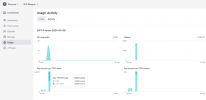
1. We receive an alert at 0200 on 4th August for an excessive and unusual token usage.
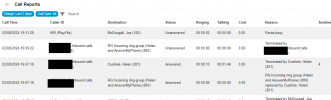
2. However, there are no calls noted at this time (Sunday morning). The last calls were made a few days ago, on the Friday:
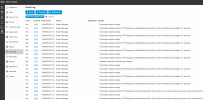
3. Around the same time of the excessive token usage, I saw the transcription service flap:
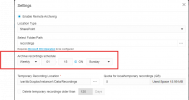
4. Curiously, and I do not know if this is related, but there is a recording archive job at 0115 on Sundays to move all the call recordings to SharePoint.
Now, this is the first week we've been using OpenAI, and also the first week we've been archiving calls to SharePoint. But, the timeline does rather look like SharePoint has somehow caused a problem - and I have no idea how to investigate further. I wonder if something to do with the archiving could be running the call recordings through the transcription service over and over?
Anyway - I would be grateful if someone could help me investigate and suggest a resolution. Perhaps someone else has seen this?
Thanks in anticipation!
First, I'd like to say how impressed I am with the OpenAI integration - the transcript is great, but the summary is a feature I never knew I needed, and cannot now live without. It enables me to quickly see the nature of calls handled without needing to bother people. Idea: send a daily email with the summary and number of every call!
Now, the problem: The charges are as expected, however, I received a larger bill a few nights ago, in the early hours of the morning. This is for hundreds of tokens, in a very short space of time, rather than the dozens of tokens we use over a longer spread throughout the working day.
I can see a few events that look suspicious, so let me talk you through the events.
1. We receive an alert at 0200 on 4th August for an excessive and unusual token usage.
2. However, there are no calls noted at this time (Sunday morning). The last calls were made a few days ago, on the Friday:
3. Around the same time of the excessive token usage, I saw the transcription service flap:
4. Curiously, and I do not know if this is related, but there is a recording archive job at 0115 on Sundays to move all the call recordings to SharePoint.
Now, this is the first week we've been using OpenAI, and also the first week we've been archiving calls to SharePoint. But, the timeline does rather look like SharePoint has somehow caused a problem - and I have no idea how to investigate further. I wonder if something to do with the archiving could be running the call recordings through the transcription service over and over?
Anyway - I would be grateful if someone could help me investigate and suggest a resolution. Perhaps someone else has seen this?
Thanks in anticipation!


