Opening the CRM contact URL does not work if you pick up the call with the smartphone client

Status
Not open for further replies.

david90

Bronze Partner
Advanced Certified
Joined
Nov 2, 2012
Messages
40
Reaction score
9
Hello,

I've noticed a problem with 3CX :
When using a CRM integration, opening the contact URL works fine if you pick up the call with the browser or with a physical handset, but not if you pick up the call with the smartphone client.

I was able to reproduce this bug on two 3CX installations, with different browsers (Chrome and Opera), and the behaviour is strictly the same each time.

Is this deliberate behaviour or a bug?

Thank you in advance for your feedback!

Translated with www.DeepL.com/Translator (free version)
 
The popup of the contact URL is not available for the mobile clients afaik. So this is the expected behavior. In my opinion it makes not much sense to launch a browser tab in your mobile while you're talking, as you have your phone on your ear and you will not be looking at the screen....
 
  • Like
Reactions: Evolute IT
The popup of the contact URL is not available for the mobile clients afaik. So this is the expected behavior. In my opinion it makes not much sense to launch a browser tab in your mobile while you're talking, as you have your phone on your ear and you will not be looking at the screen....
Sorry, I must not have been explicit enough.
The aim is to open the tab on the PC, not on the smartphone!

Let me explain:
I have my webclient open on the PC.
I receive a call:
- If I pick up the call on the browser, the webclient on the PC opens the contact's URL
- If I pick up the call on a physical phone, the webclient on the PC opens the contact's URL
- If I pick up the phone on the smartphone, the webclient on the PC does NOT open the contact's URL.
 
The Windows Softphone does not currently have the auto-popup, only the "CRM" link under the caller ID.

If you talk about the v16 softphone (old one), that one doesn't support the server-side integrations at all.
 
The Windows Softphone does not currently have the auto-popup, only the "CRM" link under the caller ID.

If you talk about the v16 softphone (old one), that one doesn't support the server-side integrations at all.
I never mentioned the PC softphone v16 (which is deprecated), but the webclient (the only client currently officially supported on PCs, with the exception of the microsoft store app, which isn't worth a damn.) ;)
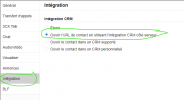
And here's the setting (which works fine if I pick up the call from the webclient or a physical handset):
1726063711448.png
 
Tried that too. No it won't work, as the mobile app doesn't have CTI/uaCSTA. You can only trigger a call from the Webclient to a smartphone, with "Call using: Smartphone".
 
Tried that too. No it won't work, as the mobile app doesn't have CTI/uaCSTA. You can only trigger a call from the Webclient to a smartphone, with "Call using: Smartphone".
I was afraid of this answer, unfortunately... And that's a problem.

The customer in question uses the smartphone app to receive calls, for reasons of practicality (being able to move around the workshop easily, in particular), but they need the contact card on the PC.

And investing in DECT headsets (the only “equivalent” option that would meet the same needs) isn't in their plans, and isn't in phase with 3CX v20's evolution (which is precisely pushing towards the use of apps and the webclient).
 
I was afraid of this answer, unfortunately... And that's a problem.

The customer in question uses the smartphone app to receive calls, for reasons of practicality (being able to move around the workshop easily, in particular), but they need the contact card on the PC.

And investing in DECT headsets (the only “equivalent” option that would meet the same needs) isn't in their plans, and isn't in phase with 3CX v20's evolution (which is precisely pushing towards the use of apps and the webclient).
I would recommend going with Bluetooth Yealink headsets. This way it directly integrates with the Webclient/Softphone and they can answer/end call from the headset.

Depending on the size of the shop, Bluetooth might not work, in which case physical phones with DECT headsets would be my recommendation.
 
I would recommend going with Bluetooth Yealink headsets. This way it directly integrates with the Webclient/Softphone and they can answer/end call from the headset.

Depending on the size of the shop, Bluetooth might not work, in which case physical phones with DECT headsets would be my recommendation.
Thanks for the information (and I can confirm: Yealink is good :) ).

Unfortunately, as I said earlier, buying hardware is not an option for the customer. The customer doesn't understand that it can work by picking up the call from a browser or a physical phone, and not by picking up the call from the smartphone... (And I have to say that I agree with him... It should be a ‘basic’ function...)
 
The customer doesn't understand that it can work by picking up the call from a browser or a physical phone, and not by picking up the call from the smartphone... (And I have to say that I agree with him... It should be a ‘basic’ function...)
As I said, the mobile app doesn't send CTI/uaCSTA commands to the 3CX to tell it that the call was answered. The Webclient knows only because the server tells it it's been answered "elsewhere", so it just does nothing. Same reason you cannot control anything from the Webclient for a smartphone call.
 
Status
Not open for further replies.

Forum statistics

Threads
111,974
Messages
590,081
Members
164,899
Latest member
mazet