


- Joined
- Apr 6, 2022
- Messages
- 17
- Reaction score
- 3
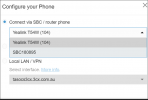
Hi - I am trying to install a phone offsite - I have done this before but when I try add the phone as a router phone I dont get the option. The only option I get is to connect to an already existing sbc or router phone which doesn't help because its onsite.
I have upgraded to latest firmware (T54W) I read the documentation.
https://www.3cx.com/sip-phones/yealink-t5-series/ - This does not contain any relevant info about router phones.
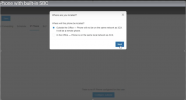
Simply speaking I need this dialogue box but I am not getting it. It just goes through to add phone - no router option.
I have upgraded to latest firmware (T54W) I read the documentation.
https://www.3cx.com/sip-phones/yealink-t5-series/ - This does not contain any relevant info about router phones.
Simply speaking I need this dialogue box but I am not getting it. It just goes through to add phone - no router option.


