Out of office destination for individual user

Status
Not open for further replies.

RobColver

Customer
Basic Certified
Joined
Sep 9, 2022
Messages
81
Reaction score
18
Prior to v20, it was possible to set the destination for Out Of Office calls for every DID in Inbound Rules. In v20 I can see that, for system extensions, this is now done in Call Handling but I can't see where to do it for an individual user extension. Is this still possible or do I need to use status switching?
 
Hi there.
You can assign DID to a specific user too, in the User section, General tab.
And if the call goes to the user, then you have a Call forwarding Tab to adjust the routing for the calls too.
 
Thanks for your response. I appreciate that you can assign a DID to a user and use the Call Forwarding rules (linked to Status) to adjust the routing. You could do all of that in v18. In v18 it was also possible to set Out of Office routing in Inbound Rules for DIDs associated with user extensions and it seems that, for user (as opposed to system) extensions, this is no longer possible in v20. Just looking for confirmation of this - to make sure I haven't missed it somewhere!
 
You are welcome.
In V20 this logic is even simplified, and you don't have inbound rules, so the call routing is now configured on the actual destination end. So if the call is meant to land in the Department, you have multiple settings for the routing settings in there, if Queue there too, or extension advised in the last reply.
In the Dashboard settings, under the System information category, you have the Inbound rules report, and this can show you, the settings you have for Trunk, DIDs and their destination.
 
Thank you again for your response. Just to be absolutely clear, I have a user with their own DID - in other words, the DID routes directly to the user's extension. The user will inherit their out of office hours from the Department they belong to.
In v20, how do I set the destination for calls to that DID during out of office hours? Do I have to use the user's Call Forwarding rules?
 
You are welcome.
You could also adjust your exceptions on the extension, so if the call is directly meant to go to the user, exception time will take over.
 
  • Like
Reactions: Evolute IT
You are welcome.
You could also adjust your exceptions on the extension, so if the call is directly meant to go to the user, exception time will take over.
Hello OlegR_3CX,

Let me chime in for RobCover as I have the same question.
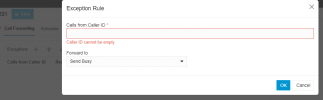
When going to Call Forwarding => Exceptions, whe can add exceptions, that is correct but we cannot add time conditions.
1714376346363.png

It looks cleary setup for this, because when adding the exception we see the option for "Received during"
1714376397883.png
But these options are not available to us.

EDIT: this seems to be adressed in V20U1 (Beta) => https://www.3cx.com/blog/releases/v20-update1/
I'm not comfortable running beta software in production environments, but at this time we will be doing a pilot with one of our customers.

EDIT Again: @RobColver if you can't see the IVR's / Ring groups/ etc. in your exceptions list, go to System => Options and uncheck the following option: 1714377842433.png
 
Last edited:
So the stable version is around the corner and a lot of work in progress, we don't have an exact ETA on the final, however, it should not take long. Keep an eye on the blogpost.
 
Hi @Stijn_DC

I have made sure that "Hide system extensions" is unchecked but I still don't see any option to set Exceptions for IVRs/Ring groups etc. Where should I expect to see this? A screenshot would be great - thanks.

 
Hi @Stijn_DC

I have made sure that "Hide system extensions" is unchecked but I still don't see any option to set Exceptions for IVRs/Ring groups etc. Where should I expect to see this? A screenshot would be great - thanks.

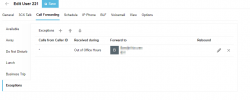
go to Admin > Users > select user > call forwarding > Exceptions
You should see this screen (in V20u1)
1714382225189.png

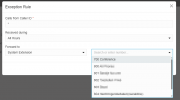
Click on the plus sign and you should see the following window/ options.
Forward to System Extensions should show the propper extensions when "Hide system Extensions" has been unchecked.
1714382295809.png
 
Got it - thanks.
 
  • Like
Reactions: Stijn_DC
@OlegR_3CX
A current v18 customer has over 100 DID rules where the call rings on the end users phone during the day.
Outside of office hours, the calls should route to the voicemail of the specific end user.
In v18 this was a simple inbound rule, whats the solution in v20?

Having to add an exception for over 100 users takes so much time. (And this is just 1 customer)

Also, when updating to v20, what will happen to the current out of office routing on the DID?
Will it still be there? Will it just vanish?
 
Hello,

We have the same problem, in the netherlands its common to have a direct number, but outside office hours they have to go to the company voicemail message. In this way we have to do alot of hand work. In the old v18 we could do an export/import to change that. Is there coming a export/import option for this or maybe a quick way to adjust this option in the future.
 
Same problem. Making an exeption for each user is not a decent solution. this is clearly a V20 backward... I stop upgrading the other customers to avoid everyday complains...
3CX, please provide a decent solution... thanks
 
It seems that problem will be 'solved' with the next update by using scripts. Anyway, it makes V20 powerfull but incredibly difficult to configure for non programmers...
 
With update 3 and multi edit you will be able to select all your users and just change your destination.

Literally 5 clicks to go into the edit and then define either your forwarding rules and/or exceptions
 
thanks but this will not apply the out of office hours rules to the users... as far as I can see. We have to use scripts for that.

When will be the stable version released ? Customer is really angry !!!!
 
thanks but this will not apply the out of office hours rules to the users... as far as I can see. We have to use scripts for that.

When will be the stable version released ? Customer is really angry !!!!
@daspremont it is correct that in V20 there is no OOO handling on the user side at this time.
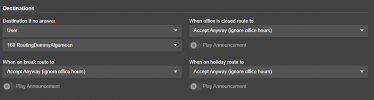
The only sollution that we have currently come up with is to use the Call handling and have calls route through a Ring Group.

This creates the needed flexibility to route calls to the user, have OOO rules applied but also holiday and break routes.
We are looking forward to having this level of granular controle on the user side, but using a ring group is a known good work around.
 

Attachments

  • 1727101674793.png
    1727101674793.png
    13.6 KB · Views: 27
Thanks. I'll try that...
 
Status
Not open for further replies.