- Joined
- Aug 21, 2014
- Messages
- 84
- Reaction score
- 10
I am having the same issue as this post.
Outbound Caller ID filter by Extensions or Department not working v20
I have this working at other locations, just not this one.
Basically I have 2 locations
All outbound calls are currently using the same outbound caller ID listed on the SIP trunk main page under "Main Trunk Number". I need to have a different caller ID for a different office.
I have setup a seperate Department for the one I want a different caller ID for.
The only extensions in the department are the 5 at that location.
The extensions are not listed in any other department. (That I can find)
The calls to the inbound number work and the calls are directed to the ring group assigned to the inbound number. Which is the same number I want for the outbound caller ID.
The department has an Outbound Rule that has only "Calls from this Department" selected and the "Outbound caller ID is set to "+1256XXXXXXX"
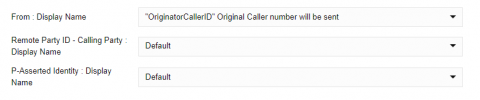
The Telnyx SIP trunk is set for
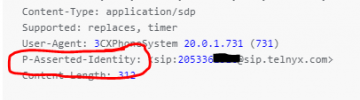
Seems like the 3CX system is not sending the outbound number as "+1256XXXXXXX"
And If it means anything, this installation is a virgin V20 install. Not an upgrade from V18.
Any help would be great.
Thanks
Outbound Caller ID filter by Extensions or Department not working v20
I have this working at other locations, just not this one.
Basically I have 2 locations
All outbound calls are currently using the same outbound caller ID listed on the SIP trunk main page under "Main Trunk Number". I need to have a different caller ID for a different office.
I have setup a seperate Department for the one I want a different caller ID for.
The only extensions in the department are the 5 at that location.
The extensions are not listed in any other department. (That I can find)
The calls to the inbound number work and the calls are directed to the ring group assigned to the inbound number. Which is the same number I want for the outbound caller ID.
The department has an Outbound Rule that has only "Calls from this Department" selected and the "Outbound caller ID is set to "+1256XXXXXXX"
The Telnyx SIP trunk is set for
Inbound +E.164
Outbound E.164 / National (e.g. US - 10 digits)
And for what it is worth, When i try to test the 933 emergency call for this location, the phone number on the automated answering system has the wrong number also.. Even though the correct number is in the Emergency settings for this location.Seems like the 3CX system is not sending the outbound number as "+1256XXXXXXX"
And If it means anything, this installation is a virgin V20 install. Not an upgrade from V18.
Any help would be great.
Thanks