Outbound Caller ID

Status
Not open for further replies.

DIM-L3

Silver Partner
Intermediate Cert.
Joined
Aug 9, 2018
Messages
4
Reaction score
1
My client has one main SIP Truck with Attached 15 DDI with Extensions, I want to show original DDI number for all out bound calls but currently shows main SIP truck number for all outbound calls.


I changed SIP Truck outbound parameters
From : Display Name / From : User " " Outbound caller id taken from Extenstion settings in management console
and
From : Display Name / From : User " " Outbound caller id "Orinial caller Number will be sent"


Voice service provider confirmed they released setting from their end which we can manged from our 3cx

any thoughts ?
 
Have you tried adding the DDI number to the extension - 'Outbound Caller ID' field within User Information
 
Hello @DIM-L3

What do you mean by Original DDI? Does each extension have a unique DID assigned?
Did the provider tell in which SIP field they want this information displayed?
 
Incoming DID numbers are not related to what is sent out as Caller ID. A DID number is used to route a call, internally, to an extension or other destination. Caller ID (sent out) can be taken from a number of places, including the Outbound Caller ID field, mentioned above. Your provider must support this and you must send, in a field, that your provider will use to "extract" it.
 
  • Like
Reactions: craigreilly
I have a similar situation. I have a client that is a seniors residence with 30+ residents, each with a unique DID. I want to set the outbound CLID on a per extension basis. When Dialing mobile phones the pilot number on the DID is displayed, and when dialing my SIP lines at my office the DID is displayed. I called another clients office that is on a Nortel CS1000 and both numbers were displayed in the CLID field. Time for me to break out the wireshark and see what is going on. I'll post back with what I find. It will most likely be something to do with the p-asserted identity though.
 
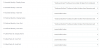
So in my case I have these settings in the Outbound parameters of my SIP trunk
upload_2018-8-9_9-45-4.png

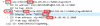
and this is what the header looks like on an outbound call. The Display info has the CLID for the extension, and the From address has the CLID from the main trunk number.

upload_2018-8-9_9-42-44.png
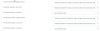
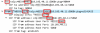
This doesn't look like the from address has the CLID I want, so I change the P-Asserted Identity Display name to take from extension rather than taken from outbound caller id setting in management console ( Which I cannot locate anywhere in the management console by the way) and I still get the same results
upload_2018-8-9_10-7-25.png


upload_2018-8-9_10-10-20.png
So I'm stuck. Anyone have any ideas?
 
Perhaps the main billing number (or the DID) is being passed on, in place of a name by your provider, and each destination is handling the information in a different way. Some display a "name", some don't. The Bellcore standard is 15 numbers, as i recall, so there really isn't room for two full numbers to be sent in the numeric field.
 
Perhaps the main billing number (or the DID) is being passed on, in place of a name by your provider, and each destination is handling the information in a different way. Some display a "name", some don't. The Bellcore standard is 15 numbers, as i recall, so there really isn't room for two full numbers to be sent in the numeric field.
Maybe? from what I can see the name is being set as the DID and the CLID Number is being set as the main number, not the DID. Not sure about DIM-L3 but I suspect we are trying to accomplish the same thing.
 
You may need to work out from where, each field is taken, in the Invite you send. Speaking to your provider may help sort things out.
 
well that was a packet cap directly on the 3cx box. Looks to me like a 3CX setting so not sure if teh provider's NOC will be able to track down that setting. I've been locked out of my partner portal all morning because of some sort of upgrade they appear to be doing. Opening a support ticket as soon as I can get back in.
 
Have you tried adding the DDI number to the extension - 'Outbound Caller ID' field within User Information
Yes. DDI added to each extension
 
Hello @Jesse Amos

The screenshots you are providing are of the P-Asserted-Identity and P-Preffered-Identity but the capture only shows the From Sip field so those are not related.
The first thing you should do is contact your provider and ask them what SIP field they are using to read the caller ID from and if the support clip no screening.
Once they verify the required SIP field change that to "Outbound Caller ID taken from extension settings"
 
Status
Not open for further replies.

Forum statistics

Threads
111,891
Messages
589,591
Members
164,758
Latest member
rmf